


Discord AutoMod and Automatic Moderation
Instead of waiting for moderators to read every message, define your rules once. VeyroBot catches violations instantly and applies the punishment you chose — the action is your decision, not hard-coded.

Multiple filters
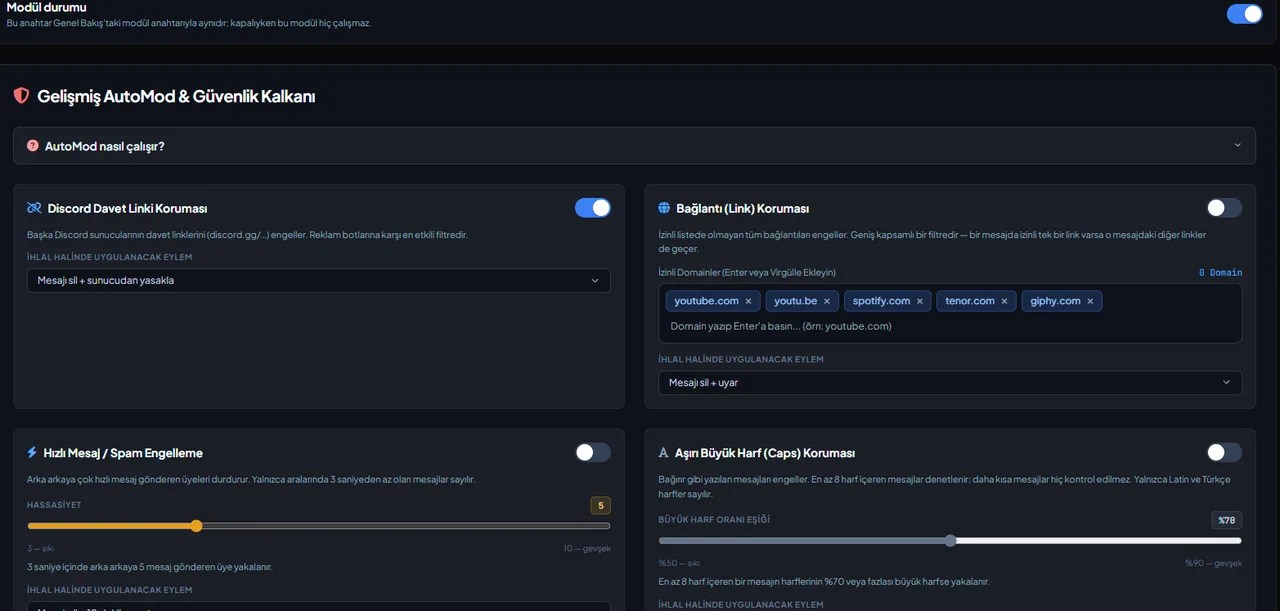
The blocked word, regex, invite link, link and mass mention filters run in Discord's own AutoMod, as "VeyroBot · …" rules that VeyroBot creates and keeps in sync with the dashboard: the message is blocked before it is sent. The caps, emoji, line, repeated message and spam filters are applied by VeyroBot. Each filter is switched on individually.
Tiered punishments
Two tiers that kick in as violations add up: first a warning or mute, then a heavier action on repeat.
Raid protection is a separate module
AutoMod looks at what a message contains; the join threshold, the automatic lockdown and the captcha gate belong to the Anti-Raid module and have their own page.
Unified case history
Bans, kicks, mutes, warnings and automatic moderation records are collected in one user history.
Adjustable thresholds
The fast message filter triggers on 3–10 messages that each arrive less than 3 seconds after the previous one; the repeat filter triggers on 2–10 identical messages sent at most 60 seconds apart, ignoring case and spacing. The caps filter checks messages with at least 8 letters against a ratio of 50–90%. The emoji (3–50), line (5–50) and mention (3–10) filters catch a message that goes over the limit you set.
Who it’s for
Servers whose moderators cannot read every message and want to decide the penalty themselves; teams that want every decision recorded in a log channel.
Who it’s not for
If you want a human to make every decision — AutoMod applies automatically and always deletes the matching message; there is no log-only watch mode. The lightest action is delete and warn.
Setup in 3 steps
-
1
Add the bot to your server
Open the invite link above, pick your server and approve the permissions. The bot comes online within seconds.
-
2
Pick your filters in the Advanced AutoMod tab
Dashboard → your server → Advanced AutoMod: choose which filters to turn on, their thresholds and the penalty for each, then save. The blocked word, regex, invite, link and mention filters are set up in Discord's AutoMod, so the bot needs the Manage Server permission.
-
3
Connect a log channel
Use /setlog to pick a channel so every warning, timeout and ban is recorded. One /case-history call shows a member's full history.
Related commands
For the full list of commands, see the commands page.
Step-by-step usage in the docs: AutoMod & Anti-Raid Shield
Sourced, dated comparisons with other bots: MEE6 and VeyroBot comparedDyno and VeyroBot comparedCarl-bot and VeyroBot comparedTatsu and VeyroBot comparedBetterAntispam and VeyroBot comparedMEE6, Dyno and Carl-bot compared
Frequently asked questions
What if AutoMod punishes someone by mistake?
Every action is written to the case history; staff can review it, clear warnings and correct the case reason with /reason or from the dashboard.
Can I choose which punishment is applied?
Yes. The action for each filter is chosen separately in the web dashboard.
Can I allow invite links in a promotion channel?
Yes. The invite link and link filters each have their own "allowed channels"; for example, invites can be allowed only in a promotion channel and links only in a sharing channel. If no channel is selected, the filter applies everywhere.
Can specific roles or channels be exempt from AutoMod?
Yes. Messages in the channels you pick in the Exemptions card and members with the roles you pick are not caught by any filter; anyone with Manage Messages or Administrator is already exempt.
Can I use regex or wildcard words?
Yes. A blocked word matches at the start of a word by default ("idiot" also catches "idiots"); put * in front ("*spam") and it is also found inside words. Discord doesn't support a wildcard in the middle of a word, so entries like "sp*m" aren't saved. For advanced rules, write one regex pattern per line, up to 10 patterns; they run case-insensitively in Discord's AutoMod, and a pattern Discord rejects is shown as an error in the dashboard.
How does it work with Discord's own AutoMod?
For the blocked word, regex, invite, link and mass mention filters you turn on, VeyroBot creates rules named "VeyroBot · …" under Server Settings > AutoMod and updates them every time you save in the dashboard. A message that hits a rule is blocked before it is sent; the punishment you chose (warn, timeout, kick, ban), the case record and the warning tiers are still applied by VeyroBot. If you delete these rules in Discord, the bot doesn't recreate them on its own; they come back when you save again in the dashboard. The bot needs the Manage Server permission for this.
How does the link allow-list work?
Every link in a message has to be allowed on its own; one allowed link doesn't let an unallowed link next to it through. When you enter youtube.com, the http, https and www. forms are added automatically; subdomains (for example music.youtube.com) must be listed separately. Only addresses that start with http:// or https:// count as links. Discord accepts up to 100 allow-list entries in the link rule and each domain uses 8 of them; domains that don't fit are listed in the dashboard when you save, and links to them are caught by the filter.
Which violations are caught?
Blocked words, regex patterns, server invites, links, mass mentions, caps ratio, emoji count, line count, repeated messages and fast messages (spam). Each filter is switched on separately and you choose what happens: the matching message is always deleted or blocked before it is sent, followed by a warning, a 5-minute, 10-minute, 1-hour or 1-day timeout, a kick or a ban. A ban also deletes the member's messages from the last hour.
What if an innocent message gets removed?
Lower that filter's sensitivity, raise a threshold such as the caps ratio, exempt the channel or role concerned, or turn that filter off. With a log channel every decision is recorded, so you can look back.
Do AutoMod violations count as warnings?
Yes. Every violation opens a numbered AutoMod case and adds one warning to the member's count. When a member reaches a threshold you set under Progressive Punishment System in the Advanced AutoMod tab, the tier penalty is applied on top of the filter's own penalty. If the filter's penalty already removed the member from the server, the tier is skipped.
Can an automatic penalty shorten an existing timeout?
No. If the member is already timed out for longer, AutoMod and the warning tiers don't apply a new timeout, and the case record says so. A duration a moderator sets with /timeout isn't subject to this rule.
I already have my own Discord AutoMod rules. Will they clash?
VeyroBot only updates or deletes the "VeyroBot · …" rules it created itself and leaves your rules alone. When you turn a filter off in the dashboard, its Discord rule is deleted too. Discord allows at most 6 keyword rules per server and VeyroBot uses up to 4 of them (blocked words, regex, invites, links); if there's no room left, the rule can't be created and the dashboard shows a warning when you save.
Related articles
Discord Server Security Audit: 12 Checks
The security of a Discord server depends on a few settings. From @everyone permissions to staff account protection, here are 12 checks and where to find them in Discord.
Protecting Your Discord Server from Raids: An End-to-End Setup Guide
Raids come from the outside, nukes from the inside—they require different defenses. This guide walks you through configuring Discord's native settings, followed by the VeyroBot Anti-Raid lock and captcha gate, explaining threshold selection and false positive management along the way.
Discord Bot Permissions: Should I Grant Administrator?
What does granting Administrator permission to a bot actually mean, which feature requires which permission, and what is the real risk factor? A table and a five-step approach to help you make a concrete decision.
How to Set Up Discord AutoMod: Filters, Punishments, and Tiers
AutoMod runs the moment a message is sent with ten filters: invite, link, spam, caps, mass mention, duplicate message, emoji, line spam, blocked word, and regex. Setup steps, default values, tiered punishments, and common mistakes.
Discord Server for Software Developer Community: Channel Layout, Roles, and Moderation
A developer community is a Q&A archive rather than just a chat. Help organization with forum channels, language and interest roles, question-asking rules, and protection against spam and malicious links.
Best Discord Moderation Bots 2026: Criteria First, Bots Second
There is no single answer to "the best moderation bot"; five criteria (detection type, punishment automation, log depth, raid protection, dashboard) shift in weight depending on your server. This guide covers the criteria first, then compares six bots using dated statements from their own pages without ranking them.
How to Block Profanity on Discord? Banned Words and Regex
Stop profanity before the message hits the channel: learn about word-start matching in the banned word list and the * wildcard, regex patterns that catch spelling tricks, working with Discord's native AutoMod rules, exemptions, and choosing the right punishment.
Adding it is all it takes to try
Add VeyroBot to your server and turn on the modules you want in the web dashboard. You can switch off anything you don't use.
Add to Server for Free