


Discord Kick Stream Notifications
VeyroBot checks Kick channels every 60 seconds. When a stream goes live, a notification with the title, category, viewer count and a preview image lands in the Discord channel you chose and, if you like, mentions a role. You don't need to enter an API key or connect a Kick account.

Kick support
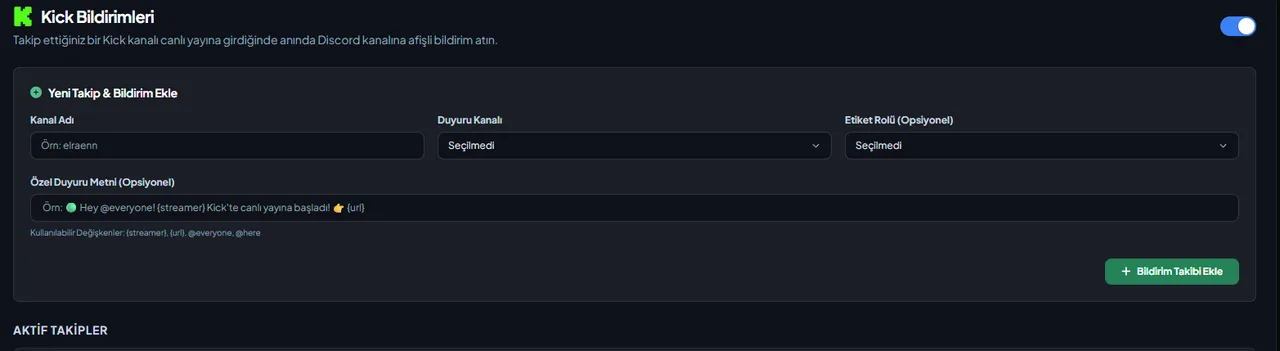
Enter the Kick channel name (2–25 characters; letters, digits, underscores and hyphens). The notification goes out automatically when the stream starts, and no second one is sent while the same stream is running.
Seven platforms
Kick, Twitch, YouTube, RSS, podcasts, Reddit and Bluesky are managed with the same command.
Role mentions
Choose which role gets mentioned; you reach the people who care without pinging everyone.
Custom message
Write your own notification text of up to 1000 characters; {streamer}, {url}, {title}, {category} and {viewers} are filled with the streamer name, stream link, title, category and viewer count.
A card that updates during the stream
When the title or category changes, the card is edited at most once a minute; the viewer count is only updated if 5 minutes have passed since the last edit and it changed by at least 50 people or 25%. When the stream ends, the card turns into a closing card with the duration, peak viewers and end time.
Card appearance
In the Kick Notifications tab, a follow's Edit window lets you choose the Rich (with buttons) or Plain card layout, the preview image and a button label of up to 80 characters. You also decide there whether the card is updated with the closing summary, left as is or deleted when the stream ends.
Who it’s for
Discord communities of streamers who go live on Kick; servers that follow several streamers and want a separate announcement text and ping role for each.
Who it’s not for
For Twitch or YouTube streams this is not the module — the dashboard has separate Twitch and YouTube alert tabs.
Setup in 3 steps
-
1
Add the bot to your server
Open the invite link above, pick your server and approve the permissions. The bot comes online within seconds.
-
2
Register the streamer with /streamalert add
Choose the Kick channel to watch and the Discord channel for the alert; /streamalert list shows what is registered and /streamalert delete removes one.
-
3
Shape the alert in the dashboard
Dashboard → your server → Kick Notifications: you can add the follow here too; the announcement channel, mention role and custom text are kept separately for each follow. Use the follow's Edit window to choose the card layout and what happens when the stream ends. When the stream goes live the alert is sent on its own.
Related commands
For the full list of commands, see the commands page.
Step-by-step usage in the docs: Streamer & Content Alerts (7 Platforms)
Sourced, dated comparisons with other bots: MEE6 and VeyroBot comparedDyno and VeyroBot comparedCarl-bot and VeyroBot comparedTatsu and VeyroBot comparedBetterAntispam and VeyroBot comparedMEE6, Dyno and Carl-bot compared
Frequently asked questions
How many streamers can I add?
Up to 25 Kick follows per server. The same Kick channel can't be added twice to the same Discord channel, but it can be added to different Discord channels.
If the stream drops briefly and comes back, is a new notification sent?
A stream missing from a single check isn't treated as ended; it ends only after two checks in a row don't find it, and then the card becomes a closing card. No second notification is sent for the same stream. If Kick opens the stream again as a new stream after the drop, a new notification goes out.
Why doesn't the mention role get a ping?
In the role's Discord settings, anyone must be allowed to mention the role. Otherwise the role shows up in the notification text, but Discord doesn't notify its members. The only exception is a follow whose custom text contains @everyone and was saved with that permission. Bot integration roles can't be chosen as the mention role.
Can I put @everyone in the notification text?
Only if you have the Mention Everyone permission in Discord. Without it, text containing @everyone or @here isn't saved; dashboard access alone isn't enough. The permission is checked when you save the text.
Adding it is all it takes to try
Add VeyroBot to your server and turn on the modules you want in the web dashboard. You can switch off anything you don't use.
Add to Server for Free