


Discord Leveling System and Rank Cards
Members earn XP as they chat, level up and automatically receive the roles you set. Members can choose their own rank card background and color.

Visual rank cards
Each member designs their card in the dashboard: a background from the gallery or their own image, theme color, avatar shape and ring, XP bar, font, top-right stat and frame. On the Veyro background they can pick Veyro’s pose, color and particle density, and add a short title above their name. The card belongs to the member and looks the same on every server.
Level reward roles
Members who reach the level you set get the role automatically.
Voice channel XP
If you turn it on, every minute spent in a voice channel with at least one other member also earns XP. No XP while alone, deafened or in the AFK channel.
Leaderboard
An in-server leaderboard command and, if you want, a public web leaderboard page.
Achievements
Besides leveling, there is a separate achievement/badge system.
How XP adds up
Each message earns 15–25 XP, and a member gets XP at most once every 60 seconds, so rapid-fire messages don't speed it up. With voice XP on, every minute in voice earns 5–10 XP. Both are multiplied by the XP Gain Rate in the dashboard.
Members resetting their own level
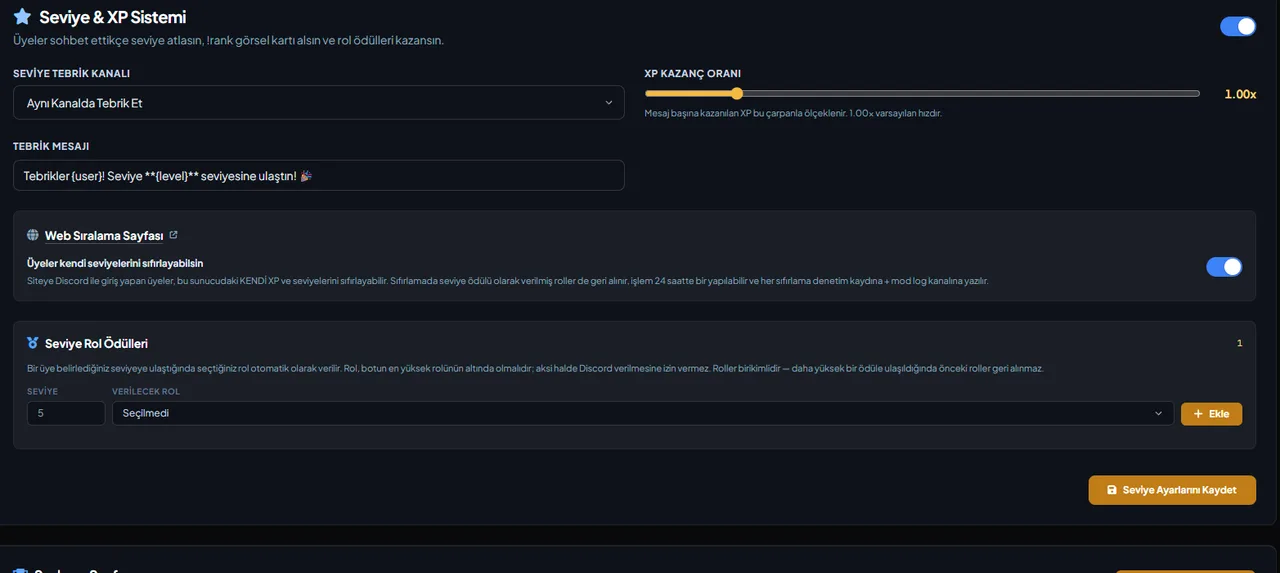
If you allow it, a member who logs in to the website with Discord can reset their own XP and level on this server. It can be done once every 24 hours, roles granted as level rewards are removed too, and every reset is posted to the mod log channel.
Unbranded cards
The small "Powered by VeyroBot" signature in the corner of the cards can be removed depending on your plan; the Premium page shows which plan.
Who it’s for
Communities that want to reward active chat, grant roles by level and let members see their own card.
Who it’s not for
If XP has to come over from another bot exactly: levels are moved only from members' level reward roles, and members without a reward role start from zero.
Setup in 3 steps
-
1
Add the bot to your server
Open the invite link above, pick your server and approve the permissions. The bot comes online within seconds.
-
2
Set XP and rewards in the Leveling & Rankings tab
Dashboard → Leveling & Rankings: set the XP rate, the congratulation channel and message, which role is granted at which level, the no-XP channels and roles, and whether members may reset their own level.
-
3
Track it with /rank and /leaderboard
A member sees their own card with /rank; /leaderboard shows the server ranking and /achievement-leaderboard the achievement ranking.
Related commands
For the full list of commands, see the commands page.
Step-by-step usage in the docs: Leveling & Ranking System
Sourced, dated comparisons with other bots: MEE6 and VeyroBot comparedDyno and VeyroBot comparedCarl-bot and VeyroBot comparedTatsu and VeyroBot comparedBetterAntispam and VeyroBot comparedMEE6, Dyno and Carl-bot compared
Frequently asked questions
Can I change the XP rate?
Yes. The XP Gain Rate in the Leveling & Rankings tab goes from 0.25x to 5x, with 1.00x as the default. It applies to both message and voice XP.
Can I stop XP in some channels or for some roles?
Yes. In the dashboard you can pick no-XP channels (text or voice) and roles; members earn no XP there or while they have those roles, and existing XP is kept.
Can I make the leaderboard public?
Yes, optionally your server's leaderboard can be published on the web.
Can the VeyroBot signature on cards be removed?
Yes. The small "Powered by VeyroBot" signature in the corner of rank, welcome and achievement cards is removed automatically depending on your plan, with no extra setting. The Premium page shows which plan.
How many messages does a level take?
At the default rate, level 1 takes 100 XP, about 5 messages on average (each at least 60 seconds apart). Level 10 is reached at a total of 4,675 XP. Going from level L to the next one takes 5L² + 50L + 100 XP, so every level needs more XP than the one before.
Are level roles handed out by hand?
No. You define once which role belongs to which level, and the role is granted automatically when a member reaches it. Up to 50 rewards can be set, one role per level. Rewards stack, so earlier roles stay when a member reaches a higher one. If several levels are crossed at once, the rewards for the levels in between are granted as well.
If I add a reward later, do members past that level get the role?
No. A reward role is granted at the moment a member reaches that level; if you add the reward later, give the role by hand to members who are already past it. If the reward role was deleted, isn't below the bot's highest role, or the bot lacks Manage Roles, the role can't be given, and this shows up in the Server Health card on the Overview.
Where does the level-up message go?
If you picked a Level-Up Announcement Channel, it goes there. Otherwise it goes to the channel the member just wrote in; if the member leveled up from voice XP, it goes to the voice channel's chat when the bot can post there. The message can use {user}, {level} and {xp} and can be up to 2,000 characters. Only the member who leveled up is mentioned; @everyone and roles are not.
What happens to a member's XP if they leave and come back?
XP is not deleted when a member leaves, so they pick up at the same level when they return. Discord removes a leaving member's roles, and level reward roles are not given back automatically on return; the member gets a reward role again when they reach a new reward level. As an admin you can reset one member or the whole server on the web leaderboard page, and the reset also removes level reward roles.
Related articles
How to Set Up a Discord Leveling System? XP, Role Rewards, and Leaderboard
Choosing the XP rate for your server's pace, arranging reward roles correctly, and excluding spam channels: set up the leveling system step-by-step from the dashboard, and learn common mistakes before you start.
How to Set Up a Discord Server for a Study and Education Community
Discord layout for study, exam prep, and education communities: subject channels, Forum for Q&A, silent study rooms, subject roles, cautious moderation, and a study schedule.
Adding it is all it takes to try
Add VeyroBot to your server and turn on the modules you want in the web dashboard. You can switch off anything you don't use.
Add to Server for Free