


Discord RSS Notifications
If your blog, news site or any source you follow publishes an RSS/Atom feed, sharing every new post by hand wastes time. VeyroBot reads the feed URL you give it every minute; when a new item appears, it posts to the Discord channel you chose with title, summary and image if available, and can mention a role. No API key and no linked account are needed — any public RSS/Atom address works.

Any RSS/Atom address
A standard RSS 2.0 or Atom feed URL is enough — blog, news site, forum or your own CMS's feed all work. The address must resolve to a public site; internal network addresses are rejected for security.
Checked every minute, posted in order
The feed is read every 60 seconds. If several new items appear in the same check, they're posted oldest to newest (up to 3 per round); the rest follow in the same order on the next round, none are skipped.
Role mention or your own text
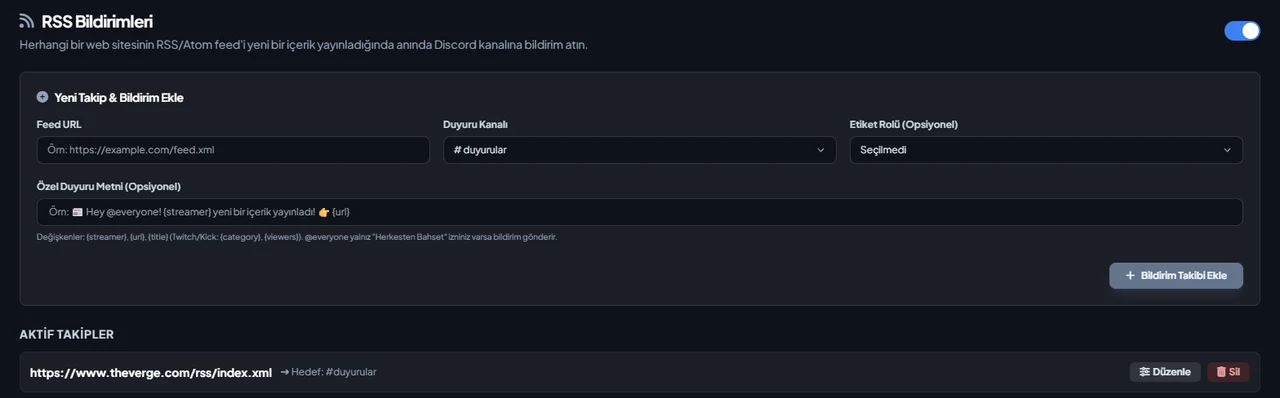
The default notification can mention a role. If you write your own text (up to 1,000 characters), it replaces the default; {streamer} becomes the feed title, {url} the item link and {title} the item title.
A new follow starts silently
When a feed is first added, the items already in it aren't announced — they're just marked as seen. Notifications start only with new items published AFTER the follow was added, so an old post never shows up as a surprise.
Who it’s for
Communities following a blog, news site or any source that publishes an RSS/Atom feed, tired of sharing every new post by hand.
Who it’s not for
Not for following a social media account (Twitter/X, Instagram and the like) — VeyroBot can only read sources that publish an RSS/Atom feed, and most social networks don't offer a public one.
Setup in 3 steps
-
1
Add the bot to your server
Open the invite link above, pick your server and approve the permissions. The bot comes online within seconds.
-
2
Add the feed address
Dashboard → your server → RSS Notifications: enter the RSS/Atom feed address you want to follow, pick the announcement channel and an optional role, then press Add Notification Follow. The /streamalert add command does the same and requires Manage Server.
-
3
Check the permission and wait
The bot needs permission to send messages in the announcement channel. The first check runs within a minute; if your source is active, a notification lands when a new item is published (existing items aren't shared when you first add it).
Related commands
For the full list of commands, see the commands page.
Step-by-step usage in the docs: Streamer & Content Alerts (7 Platforms)
Sourced, dated comparisons with other bots: MEE6 and VeyroBot comparedDyno and VeyroBot comparedCarl-bot and VeyroBot comparedMEE6, Dyno and Carl-bot compared
Frequently asked questions
What's the difference between RSS and Podcast Notifications?
They use the same feed engine; RSS pulls general content (title, summary, image), while Podcast Notifications also add the episode duration to the card; if an episode has no page of its own, the title links straight to the audio file (the audio file itself is not attached to the card). A podcast feed can be added to either follow type, but Podcast Notifications shows episode details more fully.
Is an old post shared when I add the feed?
No. When a new follow is added, the items already in the feed are only marked as seen, none are announced. Only items that appear in the feed after the follow was added reach Discord.
How many RSS feeds can I follow?
Up to 25 RSS follows per server. The same feed can't be added twice to the same Discord channel, but it can be added to a different one.
Are adult items posted too?
If the publisher marks an item, or the whole feed, as 'adult' with the Media RSS media:rating tag, those items are only posted to age-restricted channels; in a channel without age restriction they're skipped and shown on the Server Health card. Items without this marker are posted as usual.
Related articles
Adding it is all it takes to try
Add VeyroBot to your server and turn on the modules you want in the web dashboard. You can switch off anything you don't use.
Add to Server for Free