


Discord Anti-Nuke Bot
A nuke comes from inside: a staff account gets compromised and channels, roles and members are gone within minutes. Staff Protection watches the Discord audit log, removes that person’s roles with dangerous permissions once your limit is exceeded, and writes what happened to your mod-log channel. Deleted channels and roles are recorded and can be rebuilt from the dashboard with their permissions and category.

You set the limit
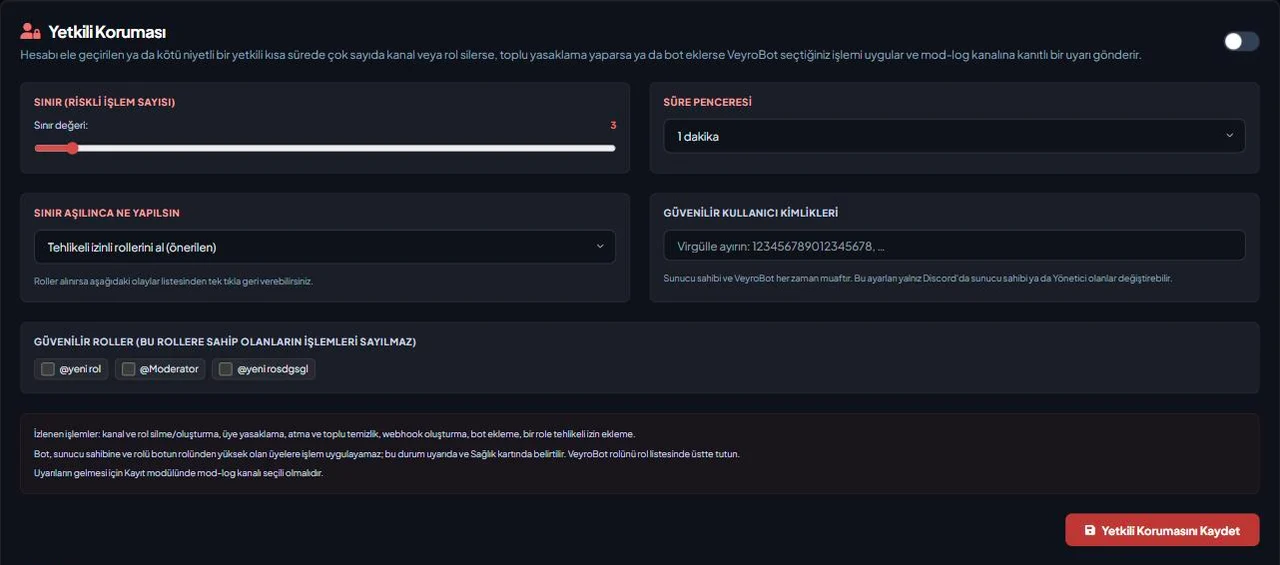
Pick the limit (2–20 actions) and the time window (10 seconds–10 minutes) in the dashboard. Tracked actions: deleting/creating channels and roles, banning, kicking and pruning members, creating webhooks, adding bots, adding a dangerous permission to a role.
The action you choose
The recommended action removes roles with dangerous permissions; quarantine (all roles removed, a quarantine role and a 28-day timeout), alert only, kick or ban can be chosen instead. If someone gives the roles back and the person keeps going, the roles are removed again right away and the alert names who gave them back.
Rebuild what was deleted
Deleted channels, categories and roles are stored in the incident record; one click in the dashboard rebuilds them with their permissions, category and position, gives roles back to their members and moves VeyroBot settings to the new channel.
One click for a false alarm
If it was a false alarm, the removed roles are given back with one click, and a quarantined member is released with one click too. The same actions are available as buttons under the mod-log alert in Discord. The server owner, VeyroBot and the users and roles you mark as trusted are never counted.
Who it’s for
Servers with several staff members that could lose channels and roles if one staff account is compromised; growing teams that can’t be sure every staff account is secure.
Who it’s not for
Servers run by a single admin — the owner is exempt, so there is no staff account to protect against. If you want a backup tool that brings deleted messages back, this is not it.
Setup in 3 steps
-
1
Add the bot to your server
Open the invite link above, pick your server and approve the permissions. The bot comes online within seconds.
-
2
Turn on Staff Protection in the Anti-Raid tab
Dashboard → your server → Anti-Raid Shield → Staff Protection: pick the limit, the time window and the action to take when the limit is exceeded, then save; mark trusted users and roles here too.
-
3
Check the mod-log channel and the bot role’s position
The alert goes to the moderation log: pick the Moderation Log Channel in the Audit Logs tab and, in Server Settings → Roles, move the VeyroBot role above your staff roles; the bot can only remove roles below its own.
Related commands
For the full list of commands, see the commands page.
Step-by-step usage in the docs: Staff Protection (Anti-Nuke)
Sourced, dated comparisons with other bots: MEE6 and VeyroBot comparedDyno and VeyroBot comparedCarl-bot and VeyroBot comparedTatsu and VeyroBot comparedBetterAntispam and VeyroBot comparedMEE6, Dyno and Carl-bot compared
Frequently asked questions
How is it different from Anti-Raid?
Anti-Raid answers mass joins from outside and locks channels. Staff Protection answers destructive actions from inside, done by a staff account. Both sit in the same dashboard tab and can be turned on together.
What can’t Staff Protection stop?
The bot cannot act on the server owner or on members whose role is above the bot’s role; this is noted in the alert and on the Health card. Actions up to the limit have already happened. Keep the VeyroBot role above your staff roles.
Do the messages of deleted channels come back?
No. Discord does not keep deleted messages. The channel’s name, type, category, position, topic and permissions are rebuilt; the channel ID changes and messages and pins don’t come back.
Who can change the settings?
Only the server owner or members with Administrator on Discord. Someone with dashboard access through a role cannot add themselves to the trusted list; giving removed roles back needs the same permission.
Related articles
Discord Server Security Audit: 12 Checks
The security of a Discord server depends on a few settings. From @everyone permissions to staff account protection, here are 12 checks and where to find them in Discord.
Protecting Your Discord Server from Raids: An End-to-End Setup Guide
Raids come from the outside, nukes from the inside—they require different defenses. This guide walks you through configuring Discord's native settings, followed by the VeyroBot Anti-Raid lock and captcha gate, explaining threshold selection and false positive management along the way.
My Discord Server Was Nuked: What to Do in the First 30 Minutes
If channels and roles are being deleted, revoke permissions first, then find the culprit in the Audit Log, and rebuild last. Step-by-step order and common mistakes.
Discord Bot Permissions: Should I Grant Administrator?
What does granting Administrator permission to a bot actually mean, which feature requires which permission, and what is the real risk factor? A table and a five-step approach to help you make a concrete decision.
How to Back Up a Discord Server? Guide Including Restoration
Taking a backup takes one click, but restoring requires knowing what gets added and what gets skipped. Prerequisites, excluded data, preview, daily automatic backups, and permissions you must check after restoration.
How to Set Up a Discord Server for Esports Teams and Clans: Channels, Roles & Recruitment
A clan or esports team server is built differently from a general gaming community: the internal section is private to the roster, and the structure depends on schedules. Channel categories, roles, application workflow, practice reminders, and moderation.
Adding it is all it takes to try
Add VeyroBot to your server and turn on the modules you want in the web dashboard. You can switch off anything you don't use.
Add to Server for Free