


Discord Moderation Bot
When several moderators punish members with different tools, nobody can see what was already done to whom. In VeyroBot, bans, kicks, timeouts, warnings and notes share one case sequence, and whether an action comes from a command or the dashboard it lands in the same mod-log channel. Channel actions like /clear, /slowmode and /lock are logged too, while message, voice, member and server events go to the channels you pick for each.

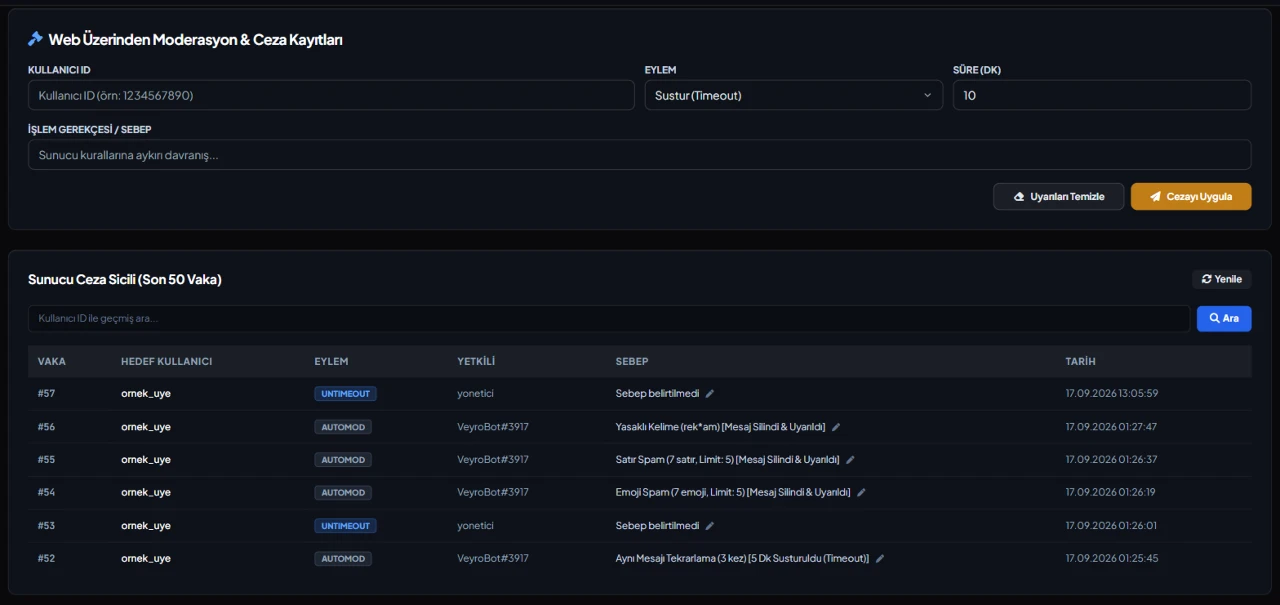
Punish from a command or the dashboard
/ban takes an optional duration (30m, 12h, 7d, 2w; from 1 minute to 365 days) and can delete the last 1 hour, 1 day or 7 days of messages; /timeout runs from 5 seconds to 28 days. The Web Moderation tab does the same by user ID, and it checks the moderator's Discord permission and role position just like the commands.
Numbered cases and mod notes
Every action opens a numbered case for your server. /case-history pages through a member's full history, /note adds a note that isn't a punishment (up to 500 characters), and /reason corrects a case reason while logging the old one. The dashboard lists the last 50 cases with a filter.
Warning tiers
In the Advanced AutoMod tab you set two warning thresholds and an action for each: warn only, 1-hour or 1-day timeout, kick or ban. Manual warnings from /warn and the dashboard also trigger the tiers, even with the AutoMod module turned off. Each tier is applied to a member once.
Each log type in its own channel
Moderation, messages (deleted, edited, bulk deleted), voice, member joins and leaves, server changes (channels, roles, emojis, invites, bans) and member updates (nickname, roles, timeout) each go to their own channel. A log type with no channel is off. You can exclude channels and roles from message logs.
Permission and role order checks
Before any punishment two things are checked: the moderator's highest role must be above the target's highest role (the server owner is exempt), and VeyroBot's role must be above the target too. With /ban, /kick and /timeout, if the bot lacks the Discord permission it needs, the reply names the missing permission. Nobody can punish themselves or VeyroBot, and /warn can't be used on bots.
Channel tools
/clear looks at the last 1–100 messages at a time, /slowmode sets a slowmode between 0 and 21600 seconds (6 hours) where 0 turns it off, and /lock stops @everyone from sending messages in the chosen channel. All three are written to the mod-log channel.
Who it’s for
Communities where several moderators hand out punishments and people often ask what was already done to a member; servers that want punishments and server changes logged channel by channel.
Who it’s not for
For small servers run by one person that rarely punish anyone, Discord's built-in tools are usually enough. Punishments given from Discord's own menus get no case number, so if your team doesn't use VeyroBot for every action, the case history will have gaps.
Setup in 3 steps
-
1
Add the bot to your server
Open the invite link above, pick your server and approve the permissions. The bot comes online within seconds.
-
2
Pick your log channels
Dashboard → your server → Audit Logs: make sure the module is on, then choose the Moderation Log Channel and any other log channels and save. For the moderation channel alone, the /setlog command is enough. Without a channel, punishments still apply but nothing is logged.
-
3
Set warning tiers and the bot role
In Advanced AutoMod → Progressive Punishment System, choose the two thresholds and their actions. In Server Settings → Roles, move the VeyroBot role above the roles of members it should act on; the bot can't act on members whose top role is equal to or above its own.
Related commands
/ban /unban /kick /timeout /untimeout /warn /warnings /note /reason /case-history /clear /slowmode /lock /unlock /setlogFor the full list of commands, see the commands page.
Step-by-step usage in the docs: Moderation & Case Desk · Multi-channel Audit Logging
Sourced, dated comparisons with other bots: MEE6 and VeyroBot comparedDyno and VeyroBot comparedCarl-bot and VeyroBot comparedTatsu and VeyroBot comparedBetterAntispam and VeyroBot comparedMEE6, Dyno and Carl-bot compared
Frequently asked questions
What if a temporary ban expires while the bot is restarting?
The end time is stored in the database. The bot checks for expired bans every minute, lifts the ban, opens an unban case and posts it to the mod-log. If someone lifted the ban by hand in the meantime, the record is simply removed.
Does /clear delete messages older than 14 days?
No. Discord doesn't allow bulk deleting messages older than 14 days, so those are skipped. The command looks at the last 1–100 messages; if you pick a member, it deletes only their messages among them.
Does a ban made from Discord's own menu open a case?
No. If a server log channel is set, the ban shows up there, but numbered cases are only opened for actions taken with VeyroBot commands, the dashboard or an automatic tier. Punishments from before VeyroBot joined aren't in the case history either.
Which Discord permission do moderators need?
Ban Members for /ban and /unban; Kick, Approve, and Reject Members for /kick; Timeout Members for /timeout, /untimeout and /case-history; Manage Messages for /warn, /warnings, /note, /reason and /clear; Manage Channels for /lock, /unlock and /slowmode. The Web Moderation tab checks the same permission on the Discord account of whoever takes the action; access to the dashboard alone doesn't let anyone punish members.
If I clear warnings, do the tiers apply again?
Yes. Running /warnings with the option to clear all warnings, or the Clear Warnings button in the Web Moderation tab, deletes all of the member's warnings and removes the marks of tiers already applied; if the member reaches a threshold again, the tier is applied again. The clearing opens its own case, and ban, kick and timeout cases are not deleted.
Can I ban someone who isn't in the server?
Yes. /ban takes a user ID and bans an account that has left the server or never joined; the Web Moderation tab doesn't require membership for a ban either. If the person is already banned, /ban doesn't open a new case. Kicks and timeouts only work on members who are in the server.
What do /lock and /unlock change in a single channel?
/lock turns off sending messages for @everyone in the chosen channel, or the channel where you run it if none is chosen; reactions are left alone. Roles with their own send permission in that channel, and administrators, can still write. /unlock sets that permission back to neutral, so the channel follows its category and server roles again. If an Anti-Raid lockdown is active, /unlock lifts the whole lockdown first.
Related articles
Discord Temporary Ban and Timeout: Which and When?
Muting a member for a few hours, or banning them from the server for a few days? Learn the difference between timeout and temporary ban, how to format durations, limits, and revoking penalties early step-by-step with VeyroBot commands.
How to Set Up a FiveM Roleplay Discord Server? Channel Layout & Role Template
Discord layout for FiveM roleplay communities: channel categories, role hierarchy, form whitelist applications, rules, punishment tiers, announcement channels, and week-one checklist.
Best Discord Moderation Bots 2026: Criteria First, Bots Second
There is no single answer to "the best moderation bot"; five criteria (detection type, punishment automation, log depth, raid protection, dashboard) shift in weight depending on your server. This guide covers the criteria first, then compares six bots using dated statements from their own pages without ranking them.
Adding it is all it takes to try
Add VeyroBot to your server and turn on the modules you want in the web dashboard. You can switch off anything you don't use.
Add to Server for Free