


Discord Music Bot
No complicated setup to play music in a voice channel. VeyroBot joins the channel, manages the queue and puts the controls on buttons right under the message.

Button-controlled panel
The panel opened with /queue has previous, pause/resume, skip, stop, shuffle and repeat buttons and lists the queue 10 tracks per page. While it is open, it updates itself as tracks change.
Queue management
Add to the queue, view it, move tracks or clear the queue.
Song names, YouTube and Spotify
/play with a song name plays the first YouTube result; it also accepts YouTube video and playlist links and Spotify track, album and playlist links. Links from other sites are rejected. A YouTube link that carries a video ID queues only that video.
Per-server settings
Default volume and music behavior are configured in the web dashboard; change the volume while playing with /volume or the dashboard slider.
Can be switched off
If you don't use music, turn the module off completely — its commands stop working and reply that the module is off.
Live control from the dashboard
The Live Music Player in the Music & DJ Studio tab shows the current track, its progress and the upcoming songs. From there you can pause, skip, stop, shuffle, change the repeat mode, set the live volume and toggle the Bassboost, 3D, Nightcore and Vaporwave filters.
Who it’s for
Communities that listen to music together in a voice channel and want the controls on buttons under the message; servers that want to limit control to a DJ role.
Who it’s not for
If you will use no other module and only want music, a lean bot that does only music may stay simpler for you.
Setup in 3 steps
-
1
Add the bot to your server
Open the invite link above, pick your server and approve the permissions. The bot comes online within seconds.
-
2
Open the music settings in the dashboard
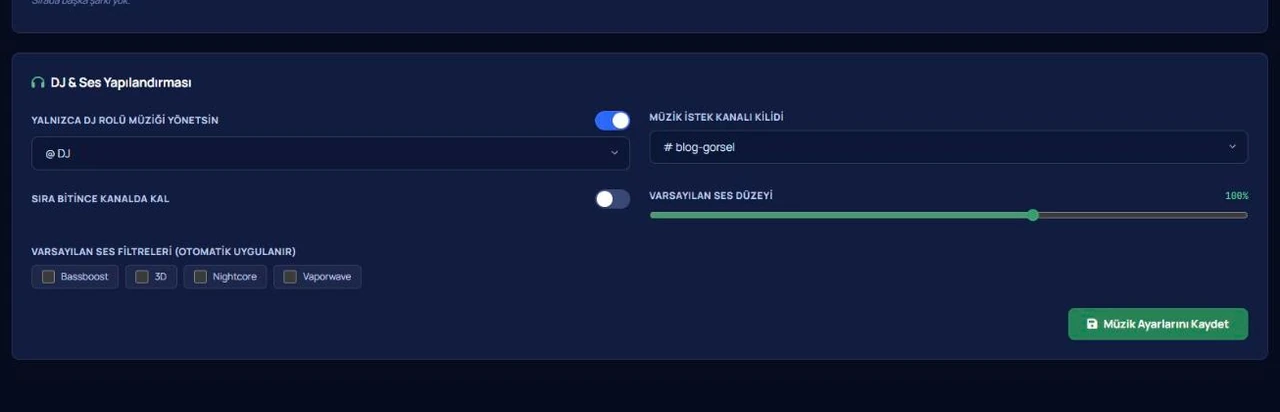
Dashboard → your server → Music & DJ Studio: set whether a DJ role is required, lock music requests to one channel, choose whether the bot stays when the queue ends, pick the default volume and the automatic sound filters, then press Save Music Settings.
-
3
Join a voice channel and type /play
Give a song name or a YouTube / Spotify link; the track joins the queue and starts playing. Type /queue to open the queue panel with buttons.
Related commands
/play /queue /pause /resume /skip /stop /leave /nowplaying /loop /move /remove /seek /filter /clearqueue /volumeFor the full list of commands, see the commands page.
Step-by-step usage in the docs: Music & Audio Engine
Sourced, dated comparisons with other bots: MEE6 and VeyroBot comparedDyno and VeyroBot comparedCarl-bot and VeyroBot comparedTatsu and VeyroBot comparedBetterAntispam and VeyroBot comparedMEE6, Dyno and Carl-bot compared
Frequently asked questions
How do I use the music panel?
When a track starts, the bot posts a short message with the track name and length. You open the button panel with /queue; while it is open, a new track updates that panel instead of posting a separate message. The buttons work for 6 hours after the last track change and close when the music session ends.
What does the bot do if everyone leaves the voice channel?
If only bots are left in the channel, VeyroBot waits 60 seconds. If nobody comes back in that time, it stops the queue, leaves the channel and says so in the text channel. The Stay in Channel When Queue Ends setting doesn't change this; it only decides whether the bot stays when the queue runs out.
What volume range can I set?
/volume, the live volume slider in the dashboard and Default Volume all take values from 10 to 150. The default volume and default filters are applied once, on the first track of each music session; changes you make while playing only affect that session.
What happens if I type /play while the bot is playing in another voice channel?
The bot keeps the queue in that channel and tells you it is playing in another voice channel. To add songs or control the music, join the voice channel the bot is in.
Can everyone control the music?
That is your call. Turn on “only the DJ role manages music” in the dashboard and pick a DJ role, and the commands and buttons work only for that role and for members with Manage Server; members without the DJ role can't start songs either. Leave it off and anyone in the bot's voice channel can use them.
Can I keep requests in one channel?
Yes. With the music request channel lock, music commands only work in the channel you pick, so your other chats stay free of command noise.
Related articles
Adding it is all it takes to try
Add VeyroBot to your server and turn on the modules you want in the web dashboard. You can switch off anything you don't use.
Add to Server for Free