


Discord Twitch Live Notifications
Telling the community a stream has started usually stays a manual job for whoever goes live. VeyroBot checks the Twitch channels you follow every minute through the official Twitch API; when a stream starts, it posts a notification in the Discord channel you chose and can mention a role.

Follow by Twitch username
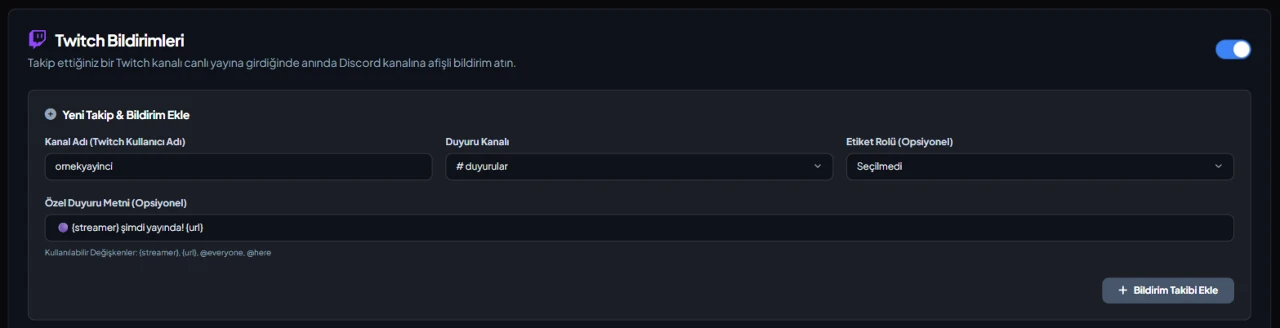
Enter the streamer's Twitch username (4–25 characters; letters, digits and underscores). Live status is read from the official Twitch API every 60 seconds.
One notification per stream
Each stream is announced once; no new message arrives while the same stream is running. When it ends and a new one starts, a new notification goes out.
Stream details in the embed
The notification shows the stream title, category, current viewer count and the stream preview image; the title links straight to the stream.
Role mention or your own text
The default notification can mention a role, or you can write your own text of up to 1,000 characters with {streamer}, {url}, {title}, {category} and {viewers}. A notification that couldn't be delivered is retried on the next check.
Who it’s for
Communities of Twitch streamers, and team, clan or crew servers that follow several streamers in one place.
Who it’s not for
Anyone who wants to announce clips or VODs: VeyroBot only reports the stream itself; its end shows up not as a separate message but as the same card turning into a closing card.
Setup in 3 steps
-
1
Add the bot to your server
Open the invite link above, pick your server and approve the permissions. The bot comes online within seconds.
-
2
Add the streamer
Dashboard → your server → Twitch Notifications: enter the Twitch username, pick the announcement channel and an optional role, then press Add Notification Follow. The /streamalert add command in Discord does the same and requires Manage Server.
-
3
Check the channel permission
The bot needs permission to send messages in the announcement channel. When the streamer goes live, the notification arrives within about a minute; to test right away, add a channel that is live now.
Related commands
For the full list of commands, see the commands page.
Step-by-step usage in the docs: Streamer & Content Alerts (7 Platforms)
Sourced, dated comparisons with other bots: MEE6 and VeyroBot comparedDyno and VeyroBot comparedCarl-bot and VeyroBot comparedTatsu and VeyroBot comparedBetterAntispam and VeyroBot comparedMEE6, Dyno and Carl-bot compared
Frequently asked questions
If the streamer is already live when I add them, do I get a notification?
Yes. The first check announces the running stream once; the next notification comes with their next stream.
Is the message updated or deleted when the stream ends?
By default it is updated, not deleted. While the stream runs, the card is edited when the title, category or viewer count changes noticeably; once two checks in a row don't find the stream, the same message turns into a closing card with the duration, peak viewers and end time. In the follow's Edit window you can turn off live updates and use When the stream ends to leave the message as is or delete it. No separate end message, clip or VOD notification is sent.
How many Twitch streamers can I add?
Up to 25 Twitch follows per server. The same streamer can't be added twice to the same Discord channel, but can be added to different channels.
Which language is the notification sent in?
The card's field names, the default notification line and the button label follow the Bot Language setting in the dashboard. If you wrote your own text or button label, those are sent as written.
Can I try the setup without waiting for a stream?
Yes. In the Twitch Notifications tab, the Send a test notification button in a follow's Edit window posts the card with sample data to the announcement channel; the follow's stream state doesn't change. Each person can send one test per minute, and a server at most 3 tests every 5 minutes.
Related articles
Adding it is all it takes to try
Add VeyroBot to your server and turn on the modules you want in the web dashboard. You can switch off anything you don't use.
Add to Server for Free