


Discord Support Ticket System
Instead of waiting for members to reach out by DM, put a support panel with a button in your server. When a ticket opens, a channel is created that only the member and your staff can see.

One-button opening
The member presses the button and a ticket channel is created automatically; nobody has to send a DM.
Staff role
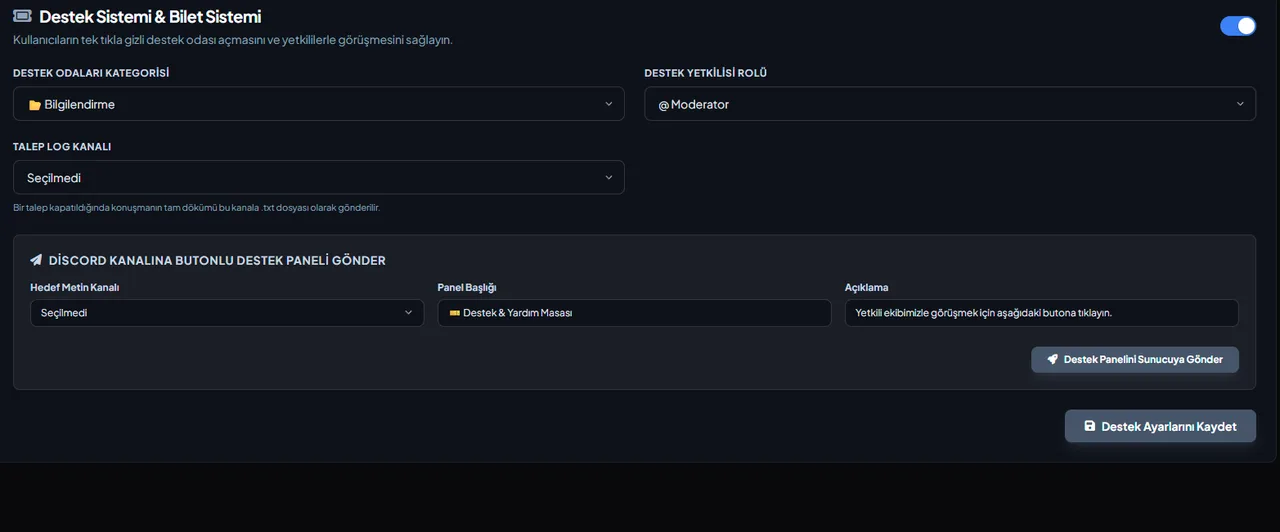
You decide which role can see the tickets.
Category layout
All tickets are collected under the category you choose, so your channel list stays tidy.
Log channel
Closed tickets are sent to the log channel you choose.
Ticket types
Define up to 5 types (e.g. Support, Report, Partnership); the panel comes with a select menu and each type goes to its own category and staff role.
Claiming and closing with a reason
Staff take a ticket with the Claim button; a reason can be entered on close, and .txt and .html transcripts go to the log channel and, if you want, to the opener by DM.
One open ticket per member
A member who already has an open ticket and presses again gets a link to that ticket, and no second channel is created. In the ticket channel the member can write messages and attach files and screenshots.
Who it’s for
Servers that do not want members reaching out by DM and want support requests kept tidy under a staff role and a category.
Who it’s not for
If your support already runs outside Discord (email, forms), a ticket system becomes one more channel to watch.
Setup in 3 steps
-
1
Add the bot to your server
Open the invite link above, pick your server and approve the permissions. The bot comes online within seconds.
-
2
Configure the Ticket Support tab
Dashboard → Ticket Support: set the category support rooms open in, the support-staff role, the ticket log channel and the panel's title and description. The bot creates the ticket channels, so it needs the Manage Channels permission.
-
3
Place the panel with /ticket-panel
Run /ticket-panel with the Manage Channels permission, or pick a channel in the panel sending section of the tab and send it. A member presses the button and gets a private channel; when it is closed the transcript lands in the ticket log channel.
Related commands
For the full list of commands, see the commands page.
Step-by-step usage in the docs: Support & Ticket Desk
Sourced, dated comparisons with other bots: MEE6 and VeyroBot comparedDyno and VeyroBot comparedCarl-bot and VeyroBot comparedTatsu and VeyroBot comparedBetterAntispam and VeyroBot comparedMEE6, Dyno and Carl-bot compared
Frequently asked questions
Who can see ticket channels?
The member who opened the ticket, the general staff role you set and, if the ticket was opened with a type, that type's staff role. Members added with /ticket-add can see it too. Anyone with the Administrator permission sees every channel, because that is how Discord permissions work.
Can I have separate ticket types for different topics?
Yes. Define up to 5 types in the dashboard; each can have its own name, emoji, category and staff role.
Can another member be added to a ticket?
Yes. In the ticket channel the support team adds a member with /ticket-add and removes one with /ticket-remove.
Who can claim and close tickets?
The support team claims tickets, adds and removes members and closes them. The support team is the server owner, anyone with Manage Channels, the general support staff role and the staff role tied to the ticket's type. The member who opened a ticket can also close it. Only one staff member can claim a ticket, and their name then shows on the button; a reason of up to 500 characters can be entered when closing.
Are conversations recorded?
If you set a ticket log channel, each closed ticket posts its opener, type, the staff member who claimed it, the close reason and the transcript there — nobody has to argue later about what was said.
What does the transcript include?
The last 1,000 messages of the ticket channel, oldest first. Files that members attached appear in the transcript as a name and a link; the files themselves are not copied. If no ticket log channel is set and the DM to the opener is turned off, the transcript is not sent anywhere, and since the ticket channel is deleted 5 seconds after closing, the conversation is lost.
I added a ticket type, why isn't it on the panel?
The panel message is built with the types that exist when it is sent. After adding, changing or deleting a type, send the panel again with /ticket-panel or from the panel sending section in the tab. A member who picks a deleted type on an old panel sees a notice asking an admin to send the panel again.
Related articles
How to Set Up a Discord Ticket System: Buttons, Private Channels, and Transcripts
Stop support requests from getting lost in DMs: a private channel opened with a button, visible only to the user and support role, with a .txt transcript sent to the log channel upon closing. Learn how to set it up from the dashboard in five minutes, choose staff roles, and manage closing permissions.
How to Set Up a FiveM Roleplay Discord Server? Channel Layout & Role Template
Discord layout for FiveM roleplay communities: channel categories, role hierarchy, form whitelist applications, rules, punishment tiers, announcement channels, and week-one checklist.
How to Set Up a Minecraft Discord Server? Channels, Roles, and Whitelist Setup
Minecraft Discord server setup for survival, SMP, and mini-game communities: channel categories, roles, whitelist applications, rules, events, giveaways, ticket support, and moderation.
How to Create a Discord Staff Application Form? Step-by-Step
Setting up application forms via the panel, question types and 5-page limits, sending the "Apply" message to a channel, decision-making with Accept/Reject, cooldown settings, sample question sets, and common mistakes.
Adding it is all it takes to try
Add VeyroBot to your server and turn on the modules you want in the web dashboard. You can switch off anything you don't use.
Add to Server for Free