


Discord Events
Instead of juggling three separate tools for announcing an event, tracking RSVPs and sending a reminder, set it all up from the dashboard in one go. VeyroBot both opens a real event in your server's Discord Events tab and posts a three-button RSVP card to the channel you choose; the RSVP list is kept in its own database, and a reminder goes out however long before the start you pick.

Set up from the dashboard, no command needed
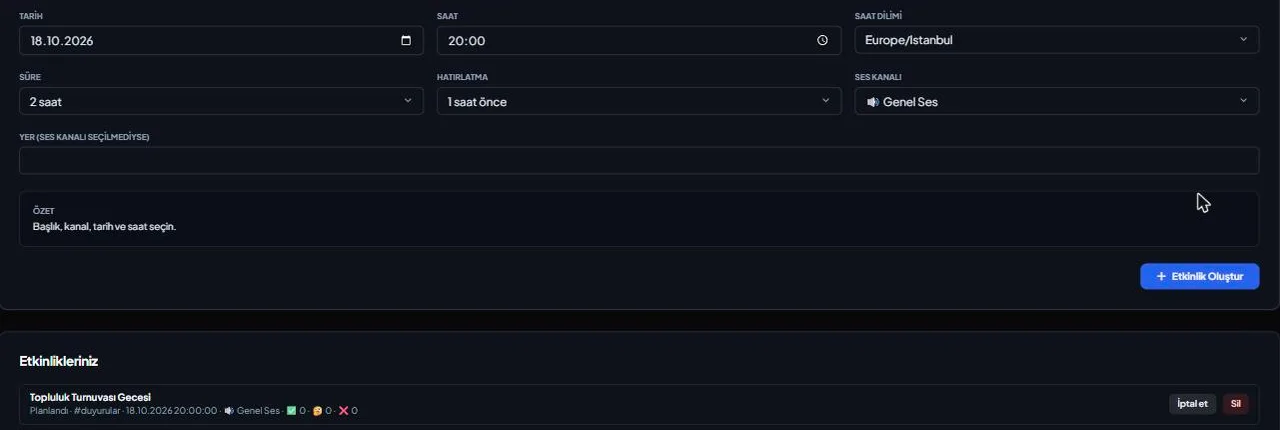
Create an event from the dashboard's Events tab with a title, description, date/time/timezone, duration, and a voice channel or location — there's no slash command.
Works alongside Discord's own event
If the bot has the Manage Events permission, a real scheduled event also opens in your server's Discord Events tab; without it, that step is skipped silently but the RSVP card is still posted.
Its own RSVP system, separate from Discord's
Responses to the card's Going/Maybe/Not Going buttons are stored in VeyroBot's own database — this runs completely independently of Discord's own "Interested" list.
Automatic reminder before it starts
Based on the time you pick (from 10 minutes to 24 hours, or off), a reminder is posted to the card's channel before the event starts, tagging everyone who answered Going.
Who it’s for
Server admins who want to announce a one-time event — a tournament, a stream night, a community meetup — and collect RSVPs.
Who it’s not for
Not for setting up a recurring schedule like a weekly class or daily meetup — this first version only supports one-time events.
Setup in 3 steps
-
1
Add the bot to your server
Open the invite link above, pick your server and approve the permissions. The bot comes online within seconds.
-
2
Enter the event details
In the dashboard's Events tab, fill in the title, description, date/time/timezone, duration, reminder time, and a voice channel or location, then press Add Event.
-
3
The card and (if possible) the Discord event go out automatically
The Going/Maybe/Not Going card is posted to your chosen channel right away; if the bot has permission, a real event also opens at the same time in your server's Discord Events tab.
Related commands
For the full list of commands, see the commands page.
Step-by-step usage in the docs: Events
Sourced, dated comparisons with other bots: MEE6 and VeyroBot comparedDyno and VeyroBot comparedCarl-bot and VeyroBot comparedMEE6, Dyno and Carl-bot compared
Frequently asked questions
Is Discord's own "Interested" list the same as VeyroBot's RSVP card?
No, they run separately. Discord's interest list on its Events tab is its own mechanism; the Going/Maybe/Not Going responses on the card are kept separately in VeyroBot's own database.
What happens if the bot doesn't have Manage Events permission?
No entry opens in Discord's own Events tab, but the RSVP card is still posted to your chosen channel and works normally; the dashboard warns you about this.
Can I set up a recurring event, like weekly?
No, this first version only supports one-time events; there's no recurrence or calendar sync.
Related articles
Adding it is all it takes to try
Add VeyroBot to your server and turn on the modules you want in the web dashboard. You can switch off anything you don't use.
Add to Server for Free