


Discord Suggestion System
Ideas typed into chat vanish a few messages later, and nobody can track who asked for what or what was decided. VeyroBot posts every suggestion as a numbered card in the channel you choose, members vote with 👍/👎, and staff decide with the buttons on the card or from the dashboard. The decision is written on the card with the staff member's name and reason.

A numbered suggestion in one command
A member writes their idea, up to 1,000 characters, with the /suggest command. The bot posts a card in the suggestions channel showing the number, the author and a "Pending" status, and adds 👍 and 👎 reactions below it. The card text follows the server's bot language.
Anonymous suggestions if you allow them
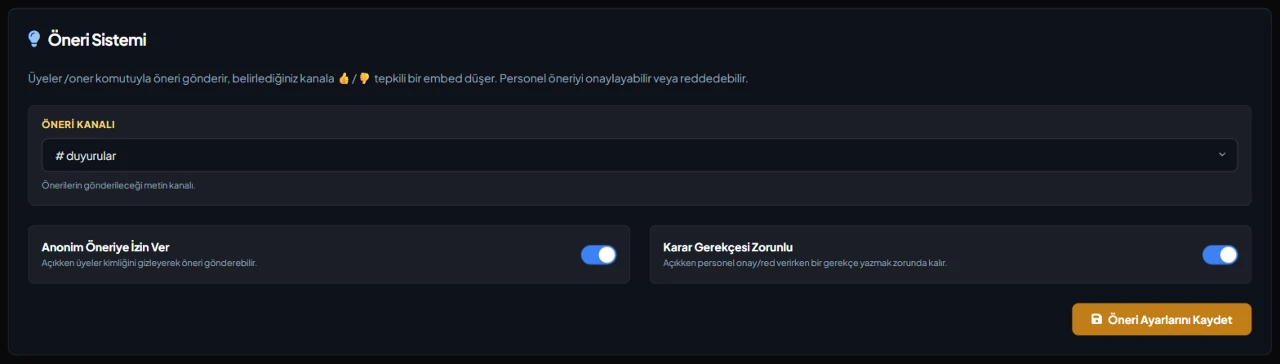
With "Allow Anonymous Suggestions" on (the default), a member ticks the anonymous option in /suggest, and the card and the dashboard list show "Anonymous" instead of their name. With it off, anonymous suggestions are refused.
Approve or reject right on the card
Only staff with the Manage Server permission can use the Approve and Reject buttons. Once decided, the card turns green or red, the decision maker and any reason are added, and the buttons are removed.
Required reasons and dashboard decisions
With "Require Decision Reason" on, staff who press a button get a form for a reason of up to 500 characters. The dashboard's Pending Suggestions list shows the latest 20 pending suggestions with their 👍/👎 counts; decisions made there update the card in Discord and follow the same reason rule.
Who it’s for
Game servers gathering ideas from players, creator communities and staff teams that want their decisions to be visible.
Who it’s not for
Teams wanting auto-approval at a vote count, a discussion thread per suggestion or a multi-stage review. Here a decision is a single step and can't be undone.
Setup in 3 steps
-
1
Add the bot to your server
Open the invite link above, pick your server and approve the permissions. The bot comes online within seconds.
-
2
Pick the suggestions channel and rules
Dashboard → your server → Suggestions: choose the suggestions channel, set the "Allow Anonymous Suggestions" and "Require Decision Reason" switches, then save. You can do the same with the /setsuggestions command.
-
3
Send a suggestion and decide on it
Send a test suggestion with /suggest, check that the card appears with 👍/👎 reactions, and decide on it with an account that has Manage Server. The bot needs Send Messages, Embed Links and Add Reactions in that channel.
Related commands
For the full list of commands, see the commands page.
Step-by-step usage in the docs: Suggestions
Sourced, dated comparisons with other bots: MEE6 and VeyroBot comparedDyno and VeyroBot comparedCarl-bot and VeyroBot comparedTatsu and VeyroBot comparedBetterAntispam and VeyroBot comparedMEE6, Dyno and Carl-bot compared
Frequently asked questions
Can a decision be changed later?
No. An approved or rejected suggestion can't be decided again; both the Discord buttons and the dashboard reply that it has already been decided. Leave a suggestion pending if you're not sure yet.
Is a suggestion approved automatically after enough votes?
No. 👍/👎 reactions are only counted and shown in the dashboard; a staff member always makes the decision. The bot's own starting reactions on the card aren't counted.
Can staff see who sent an anonymous suggestion?
Not on the card or in the dashboard list. The sender's account ID is still stored in the bot's records; anonymity applies toward other members and anyone reading the card.
What happens if the suggestions channel is deleted or the bot cannot write there?
The member is told the suggestion could not be sent. A suggestion that does not reach the channel is not kept, so it does not stay in the dashboard as a pending one. If no suggestions channel was ever selected or it was deleted, the command says so in a separate message.
Can everyone see a member's /suggest reply?
No. The command's reply is visible only to the member who used it and contains the suggestion number. The suggestion card is posted separately in the suggestions channel.
Related articles
Adding it is all it takes to try
Add VeyroBot to your server and turn on the modules you want in the web dashboard. You can switch off anything you don't use.
Add to Server for Free