


Discord Scheduled Messages and Reminders
Reposting the rules, the vote link or the weekly event by hand depends on someone remembering. VeyroBot gives you two tools for it: Timed Messages post at a pace tied to elapsed time or to how many messages the channel gets, while Reminders follow the calendar and post on set days at a set time. Both can send plain text or an embed and fill in the {server}, {memberCount} and {channel} variables.

Two tools, two questions
Timed Messages answer "how often?": time since the last post or the number of messages written since. Reminders answer "when?": which days of the week, at what time. Use the first for recurring promos and the second for announcements at a fixed hour.
Paced by time or by chat
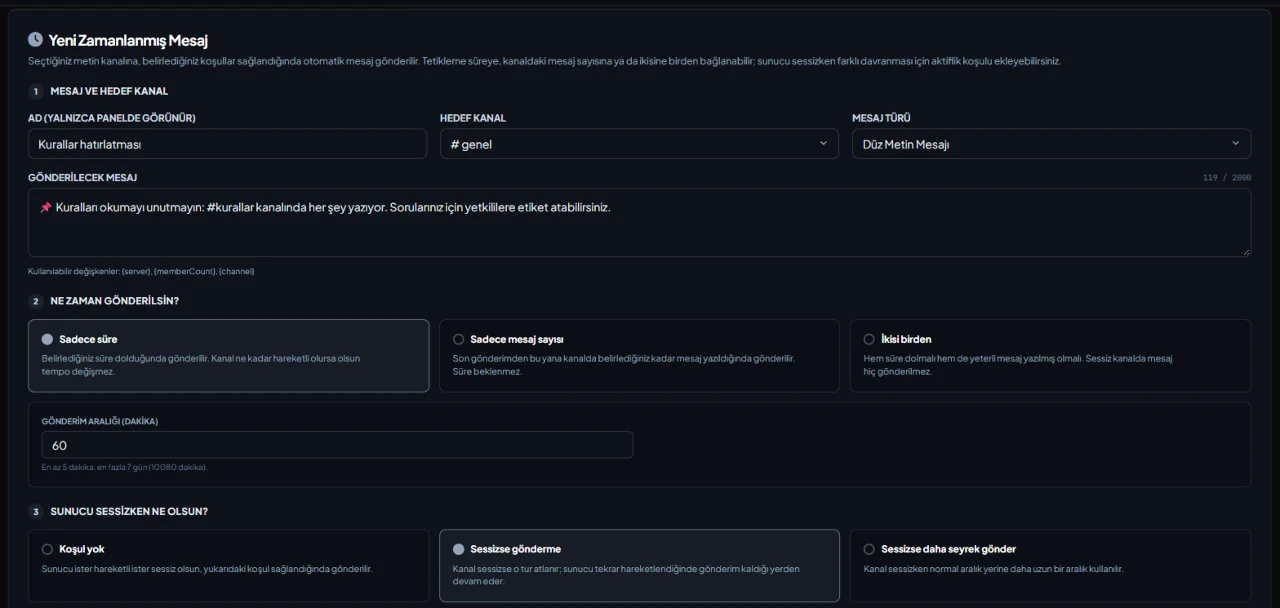
A timed message fires on "Time only" (5 minutes to 7 days), "Message count only" (1 to 10,000 messages) or "Both". Bot messages aren't counted; counts are processed at most every 60 seconds, so a post can arrive up to a minute late.
Holds back when the server is quiet
If the channel gets too few messages within the window you set (5 to 1,440 minutes), it counts as quiet. "Skip while quiet" skips that round; "Send less often while quiet" uses a longer interval instead. Bot messages don't pile up in an empty channel.
Reminders: day, time and time zone
"Single (once a day)" posts once at the set time on the chosen days. "Multiple (at intervals)" posts every 5 to 1,440 minutes on the chosen days, optionally only within a time window that may cross midnight. Leave the time zone empty to use the server's; the embed can have an author, images, a footer and up to 5 extra fields.
Who it’s for
Communities that regularly repost rules, vote or donation links, and announce weekly events at a fixed time.
Who it’s not for
Anyone looking for one-off, date-based announcements or personal reminders members set for themselves. Both tools repeat and are set up by staff in the dashboard only.
Setup in 3 steps
-
1
Add the bot to your server
Open the invite link above, pick your server and approve the permissions. The bot comes online within seconds.
-
2
Pick the right tool and write the message
Dashboard → your server → Timed Messages (paced by time or chat) or Reminders (set days and times): enter a name shown only in the dashboard, the target text channel, the message type and the content. Text can be up to 2,000 characters, an embed description up to 4,096.
-
3
Set the schedule and check it
Choose the trigger and quiet-server behavior, or the time, days and time zone, read the Summary under the form and save. You can try a reminder right away with the test button in the list; the bot needs Send Messages in the channel.
Related commands
For the full list of commands, see the commands page.
Step-by-step usage in the docs: Timed Messages · Reminders
Sourced, dated comparisons with other bots: MEE6 and VeyroBot comparedDyno and VeyroBot comparedCarl-bot and VeyroBot comparedTatsu and VeyroBot comparedBetterAntispam and VeyroBot comparedMEE6, Dyno and Carl-bot compared
Frequently asked questions
Can I schedule a one-off announcement for a specific date?
No. Both tools repeat: a timed message posts whenever its condition is met, and a reminder posts every week on the chosen days. There is no date picker; for a one-off post, pause or delete the reminder after it goes out.
If the bot is offline at reminder time, is the post sent later?
No. A "Single" reminder only posts in its set minute, and a missed post is not made up. A timed message's condition stays met, so it sends one message when the bot is back; the quiet-window count starts over.
How many timed messages and reminders can I set up?
The entry limit depends on the server's plan; the current limits are listed in the table on the /premium page. Entries can be paused without deleting them, even if their target channel was deleted.
Related articles
How to Set Up a Discord Server for Esports Teams and Clans: Channels, Roles & Recruitment
A clan or esports team server is built differently from a general gaming community: the internal section is private to the roster, and the structure depends on schedules. Channel categories, roles, application workflow, practice reminders, and moderation.
How to Set Up a Discord Server for a Study and Education Community
Discord layout for study, exam prep, and education communities: subject channels, Forum for Q&A, silent study rooms, subject roles, cautious moderation, and a study schedule.
How to Set Up Scheduled Messages on Discord (Including Reminders)
Should rule reminders be sent at set intervals, as chat picks up, or every Friday at 8 PM? A guide on choosing the right tool, step-by-step setup, quiet channel settings, time zones, and troubleshooting unsent messages.
Adding it is all it takes to try
Add VeyroBot to your server and turn on the modules you want in the web dashboard. You can switch off anything you don't use.
Add to Server for Free