


Discord Achievement System
On most servers, noticing active members depends on a moderator happening to see them. VeyroBot ties it to countable activity: you pick a trigger such as messages, voice minutes, invites or level and set the thresholds; when a member passes one, the achievement unlocks, gets announced and hands out the role or XP you attached. Ready-made packs get you started in a few clicks.

17 triggers
Messages, voice minutes, reactions given and received, boosts, invites, level reached, days on the server, active days, command use, creating and joining threads, support tickets, giveaway entries, saving a birthday, temporary rooms and manually granted awards. Some need the related module turned on.
One threshold or four tiers
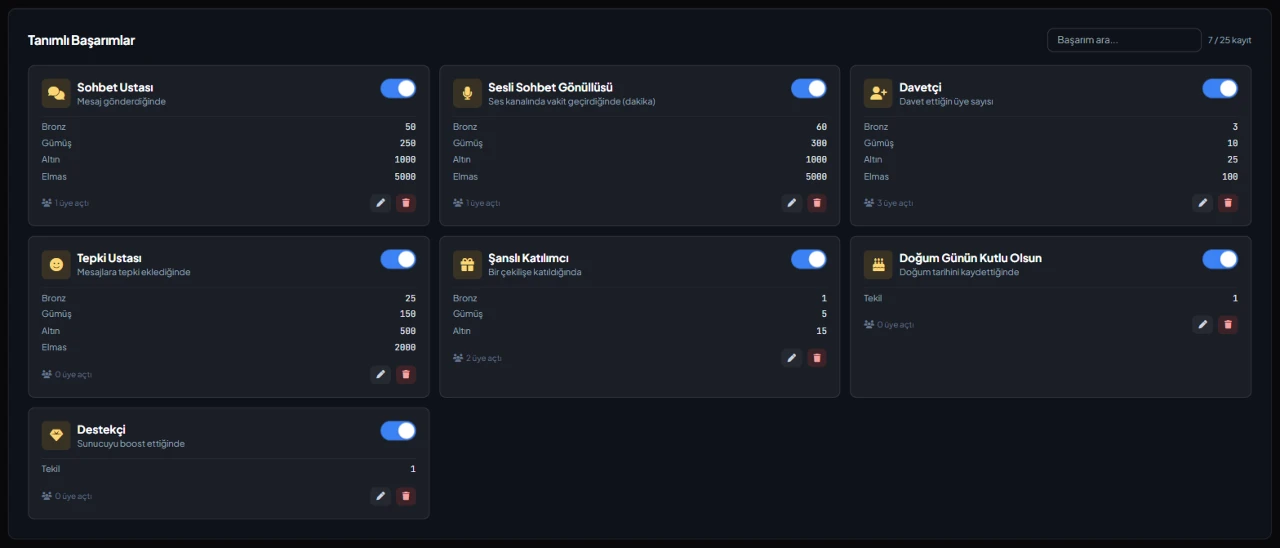
An achievement can have a single threshold or progress through Bronze, Silver, Gold and Diamond tiers. Each tier can carry a permanent role reward and, when leveling is on, an XP reward.
Announcement channel with DM fallback
An unlock is posted as an embed in the achievement's own channel or the general notification channel; if that fails, the member can get a DM instead. The message supports {user}, {achievement} and {tier} and shows how many members unlocked that tier before.
Events and a public showcase
For achievements with a start or end date, progress counts from that point; a hidden achievement's name stays secret until unlocked. /give-achievement grants manual awards, and the public achievements page and /achievement-leaderboard show the ranking.
Who it’s for
Communities that want to reward active members visibly, and servers that hand out seasonal event, contest or member-of-the-month awards.
Who it’s not for
Anyone hoping to reward things that can't be counted, like content quality or helpfulness, automatically: automatic triggers only measure countable activity, the rest is granted by hand.
Setup in 3 steps
-
1
Add the bot to your server
Open the invite link above, pick your server and approve the permissions. The bot comes online within seconds.
-
2
Pick a pack or add an achievement
Dashboard → your server → Achievements: apply one of the Quick Start Packs, or in Add New Achievement choose the trigger, tier type, thresholds and optionally a reward role. The reward role must sit below the bot's highest role.
-
3
Set up announcements
In the Settings tab, choose the notification channel, turn on Fallback Announcement for announcements that can't reach the channel, and edit the default message. The announcement preview shows what will land in Discord.
Related commands
For the full list of commands, see the commands page.
Step-by-step usage in the docs: Achievements
Sourced, dated comparisons with other bots: MEE6 and VeyroBot comparedDyno and VeyroBot comparedCarl-bot and VeyroBot comparedTatsu and VeyroBot comparedBetterAntispam and VeyroBot comparedMEE6, Dyno and Carl-bot compared
Frequently asked questions
Do existing members unlock a new achievement right away?
Yes, if no dates are set. Message, voice and reaction counters run even before any achievement exists, and level, invites and days on the server are calculated from existing data. If you don't want that, set a start date and progress counts from then.
Can I create several achievements with the same trigger?
No. Each trigger has one achievement per server, with its tiers defined inside it. Manual awards are the exception and you can create several. Automatic achievements can't be granted with /give-achievement.
Are reward roles removed when progress is reset?
No. Achievement roles are permanent; /reset-achievements or the reset in the dashboard only clears progress and unlock records. If you want the role gone, remove it by hand.
Related articles
Adding it is all it takes to try
Add VeyroBot to your server and turn on the modules you want in the web dashboard. You can switch off anything you don't use.
Add to Server for Free