


Custom Bot Profile
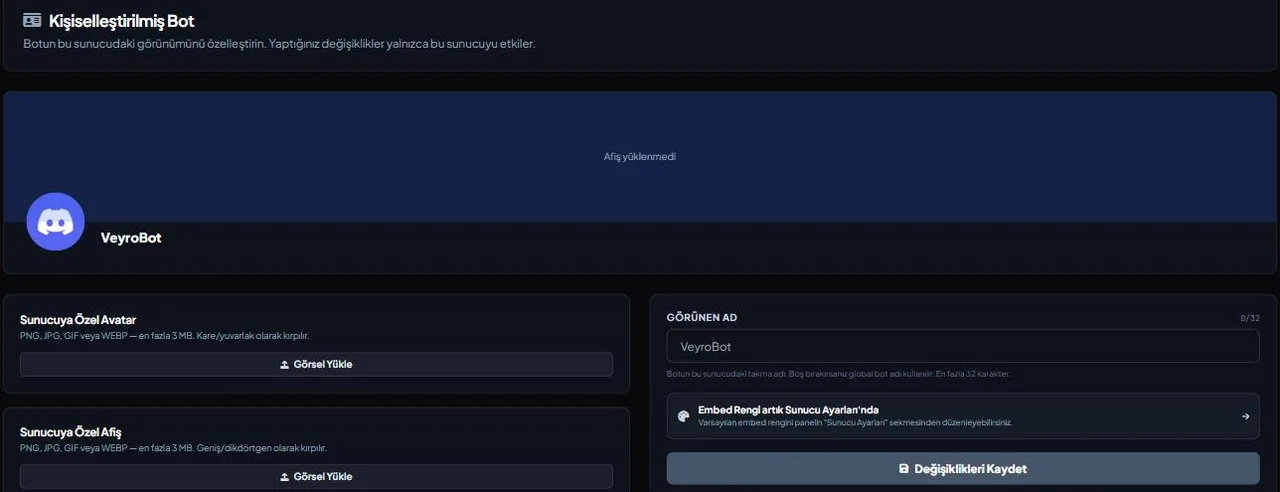
Most bots look identical everywhere. With VeyroBot you can set an avatar, banner and nickname just for this server; the change applies to Discord instantly and only affects this server — the bot's look elsewhere doesn't change.

Per-server, not global
The avatar, banner and name you set are visible only on this server, using Discord's per-server member profile feature. The bot's global name and default avatar stay the same, and its look on your other servers isn't touched.
PNG/JPEG/GIF/WEBP, up to 3 MB
The avatar and banner are uploaded separately, each up to 3 MB. The display name is up to 32 characters; leave it blank and the bot's global name is used.
Removal works one at a time
You can remove the avatar or the banner on its own, and the other stays. Whichever you remove reverts to the bot's default.
Plan changes, but nothing is deleted
If the server's plan no longer includes this feature, the bot reverts to its default look on this server, but the avatar, banner and name you saved aren't deleted; they come back automatically once the feature is available again. The table on the /premium page shows which plan includes it.
Who it’s for
Server owners who want the bot to match their brand or server theme, and anyone running several servers who wants a different look on each.
Who it’s not for
Small or casual servers that don't mind Discord's default bot look, or have no interest in changing it at all.
Setup in 3 steps
-
1
Add the bot to your server
Open the invite link above, pick your server and approve the permissions. The bot comes online within seconds.
-
2
Open the Custom Bot tab
Pick your server in the dashboard and click Custom Bot in the left menu. It's one of the dashboard's own tabs, not a separate address.
-
3
Upload the images and set the name
Upload an avatar and a banner (PNG/JPEG/GIF/WEBP, up to 3 MB each), optionally type a display name (up to 32 characters) and save. The change is applied to Discord immediately.
Related commands
For the full list of commands, see the commands page.
Step-by-step usage in the docs: Personalized Bot Profile
Sourced, dated comparisons with other bots: MEE6 and VeyroBot comparedDyno and VeyroBot comparedCarl-bot and VeyroBot comparedMEE6, Dyno and Carl-bot compared
Frequently asked questions
When does the change show up?
Instantly. Whatever you save in the dashboard is applied through Discord's member profile API right away — no bot restart involved.
Does this change the profile every member on the server sees?
Yes — Discord's per-server member profile changes the bot's visible identity on this server; everyone sees the same customized avatar and name, and the bot's global account is untouched.
If my plan no longer includes this feature, do I lose my settings?
No. The saved avatar, banner and name stay in the database; the bot just shows its default look in the meantime. Once the feature is available again, the profile comes back automatically — nothing to re-upload.
Related articles
Adding it is all it takes to try
Add VeyroBot to your server and turn on the modules you want in the web dashboard. You can switch off anything you don't use.
Add to Server for Free