


Discord AI Bot
Mention the bot or reply to its message; it answers while remembering the context of the conversation. You can define your server's own character and decide how the bot talks.

Multi-turn memory
It remembers earlier messages, so you don't have to ask every question from scratch.
Server-specific persona
Define the bot's identity and tone for your own community.
Three ways to use it
Talk to it with a command, by mentioning the bot or by replying to its message.
Long answers are split
Answers over Discord's character limit are split into several messages without losing content.
Who it’s for
Communities that want the bot to speak in the server's own character; servers that want to cap reply length and, if they like, keep the chat in one channel.
Who it’s not for
If you want to run a different model with your own API key — the assistant runs on Gemini and the dashboard offers no model selection.
Setup in 3 steps
-
1
Add the bot to your server
Open the invite link above, pick your server and approve the permissions. The bot comes online within seconds.
-
2
Set the personality in the AI Studio tab
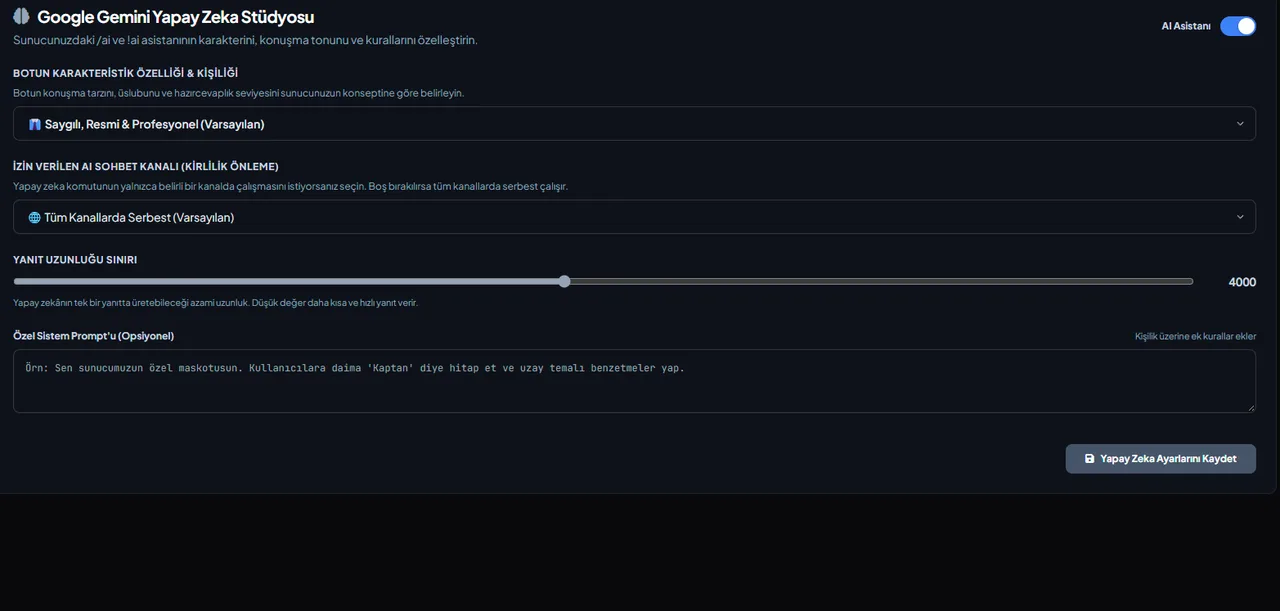
Dashboard → AI Studio: set the bot's personality and the reply-length limit; optionally restrict replies to one channel and write your own system prompt.
-
3
Ask with /ai
Answers follow your server's language and remember earlier conversations within this server (the memory carries across channels, never to other servers). If you picked a channel in AI Studio, it only answers there.
Related commands
For the full list of commands, see the commands page.
Step-by-step usage in the docs: Google Gemini AI
Sourced, dated comparisons with other bots: MEE6 and VeyroBot comparedDyno and VeyroBot comparedCarl-bot and VeyroBot comparedTatsu and VeyroBot comparedBetterAntispam and VeyroBot comparedMEE6, Dyno and Carl-bot compared
Frequently asked questions
Which AI model is used?
Current models from the Google Gemini family; if one model can't answer, the bot switches to another automatically.
Can I change the bot's personality?
Yes, you can set a server-specific persona and system prompt in the web dashboard.
Does the bot answer in every channel?
By default, yes — it answers in any channel where you mention it or use /ai. If you pick an “allowed AI chat channel” in the dashboard, it only works there and the rest of your channels stay free of AI traffic.
Can I change how it speaks?
Yes. In the personality field you pick one of four presets (formal, blunt, gamer, philosopher); to describe your own tone in free text, write it in the system prompt field. You can also cap the reply length.
Adding it is all it takes to try
Add VeyroBot to your server and turn on the modules you want in the web dashboard. You can switch off anything you don't use.
Add to Server for Free