Protecting Your Discord Server from Raids: An End-to-End Setup Guide
Raids come from the outside, nukes from the inside—they require different defenses. This guide walks you through configuring Discord's native settings, followed by the VeyroBot Anti-Raid lock and captcha gate, explaining threshold selection and false positive management along the way.
This article was translated automatically from the Turkish original. Read the Turkish original
In this article
In short
Protecting a Discord server against raids is a three-layer process. First come Discord's own native settings: the verification level, @everyone permissions, and 2FA for moderators. Next is a bot that detects mass joins and locks the server, and finally, a gate that verifies new members before they receive any roles. In VeyroBot, the second and third layers live under the Anti-Raid tab. If you receive a specified number of joins within 10 seconds, writing for @everyone is disabled across all text channels, and an alert is sent to the moderation log channel. If captcha is enabled, new members will not be automatically assigned roles until they solve the visual code. This guide walks you through setting up all three layers step by step.
Raid or nuke?
These two types of attacks are often confused, but they require different defenses. A raid comes from the outside: numerous accounts join in a short period, flood channels with spam, and mass mention users. A nuke comes from the inside: a staff account or a bot with administrator permissions is compromised, and channels and roles are deleted. VeyroBot's Anti-Raid is designed for the first type; against the second type, the Staff Protection feature in the same tab strips dangerous roles from staff members who exceed limits and allows you to restore deleted channels and roles. Discord's native settings serve as the primary defense for both types and are measured in the dashboard's Health Score card.
This topic in VeyroBot:Discord Anti-Raid Bot →
Layer 1: Discord's native settings
| Setting | Recommended | Why |
|---|---|---|
| Verification level | At least "Medium": accounts must be registered for 5 minutes and have a verified email to send messages | Most raid accounts are created minutes prior; this single setting renders the vast majority of spam bots unable to type. |
| @everyone permissions | "Administrator", "Manage Server", "Manage Roles", "Manage Webhooks", "Ban/Kick Members", "Manage Channels", and "Mention Everyone" turned off | A single dangerous permission left on @everyone turns any new member into a potential attacker. |
| 2FA for moderation | Enabled (can only be changed by the server owner) | If a moderator's account is compromised, the attacker can directly execute bans and channel deletions; 2FA stops this. |
| Administrator bots | Remove bots you don't use, narrow down the permissions of the remaining ones | If a bot's token is leaked, Administrator permissions affect the entire server. |
The status of these four items appears as a Health Score in the Overview tab of the VeyroBot dashboard. One-click fixes are available for the verification level and @everyone permissions, which can be reverted within 24 hours. The fix is applied using your actual permissions on Discord; dashboard access alone is not enough.
Layer 2: VeyroBot Anti-Raid lock
You can find the following settings under the Dashboard → Anti-Raid Shield tab:
- Raid detection threshold and counting duration. Threshold between 3 and 30 (default 10); the duration in seconds over which joins are counted between 5 and 60 seconds (default 10). When the threshold is exceeded, the server is locked: message sending and reaction adding for @everyone are disabled across all text channels, and the number of joins and threshold are written to the moderation log channel. The lock is a one-time event; it will not trigger again until lifted.
- Automatically lift the lock. Disabled (default) or a duration between 5 minutes and 24 hours. Once the time expires, channels revert to their pre-lock permissions, and an information message is sent to the log channel.
- Panic mode. Two separate toggles: kicking new members who join while the lock is active (excluding bots) and pausing invites. Invites are re-enabled once the lock is lifted; if they were already disabled, they are left untouched.
- Action for new accounts below the account age limit. "Do nothing (lock only on threshold breach)", "Kick from server", or "Ban". This selection determines the penalty applied to accounts below the age limit, independent of the raid lock: if Kick or Ban is selected, such an account is removed from the server as soon as it joins, even if there is no raid.
- Minimum account age (days). Between 0 and 30, default 3. If you enter 0, no age check is performed.
- Visual captcha gate. Covered in Layer 3; for this to be enabled, a member role must be selected in the Auto Roles tab or a verified role must be selected in this tab to be given after verification.
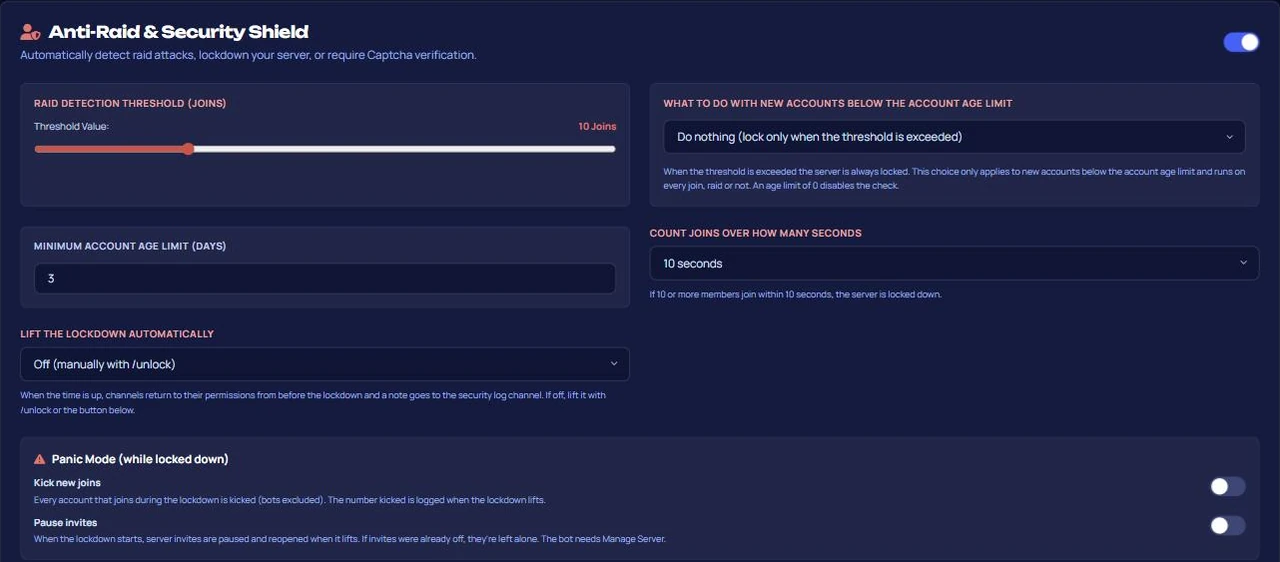
Use the /unlock command to lift the lock: while the lock is active, the command restores all locked channels to their pre-lock permissions (channels with explicit allows remain allowed, explicitly denied ones remain denied) and resets the flag so the next wave can be detected again.
Layer 3: Captcha gate
When captcha is enabled, a six-character visual code is sent to new members via direct message. Members enter the code through a button; no automatic roles are granted until verified, meaning they cannot write anything if they cannot see un-role-accessible channels. Nobody is kicked: there is no time limit, and members can verify whenever they want. A new code is generated after three failed attempts. If direct messages are disabled, a button accessible only by that member is left in the welcome channel (or the system channel if posting there fails). The code visual is displayed only to them when they click the button; the message remains until the member verifies or leaves the server. If the bot cannot write to any channel, the role remains pending and appears as a live error on the Health card. For the gate to work, either a member role must be selected in the Auto Roles module or a verified role must be selected in the Anti-Raid Shield; the verified role is granted after verification even if the auto role module is turned off. If neither role exists (e.g., if deleted later), the gate is silently disabled; the Health Score displays this under the "Captcha gate" check.

How to choose a threshold?
- Small community (a few hundred members): on a normal day, you won't even get 2–3 joins in 10 seconds; a threshold of 5–6 is safe.
- Mid-scale: the default of 10 is the right starting point for most servers.
- Servers with active live streams: when a streamer shares a link, you might get 15–20 real joins in 10 seconds; increase the threshold to 20–25 and monitor the logs on those days, otherwise you will lock out real crowds.
False positive management
If the lock triggers falsely, the cost is low: /unlock or the "Lift Lock Now" button in the dashboard returns all channels to their old permissions; if panic mode is off, no one has been kicked. In panic mode, the cost of a false trigger is higher: genuine members who arrive during the lock period are also kicked. If you selected "Kick/Ban" for account age, the cost is high: newly created genuine accounts will also be removed. Therefore, our recommendation is to leave this setting as "Do nothing" for the first week and start with captcha, only enabling account age penalties after experiencing a raid and setting it to a low number of days (1–3).
Does an invite-only server need captcha?
Suitable for:
- Gaming or streaming-focused servers with public invite links floating around.
- Communities that want new members to verify they are human before getting roles.
Not suitable for:
- Private servers joined strictly via invitation; there, captchas only add friction, and Discord's "Medium" verification level is enough.
- Those looking solely for protection against internal deletion (nukes); the lock in this guide targets incoming joins from the outside, for which you should enable Staff Protection.
Frequently asked questions
Does joining the server also stop when locked?
No. The lock disables writing and reaction permissions for @everyone in text channels; joins continue, but newcomers cannot type. To completely stop joins, temporarily pause your invite link.
What happens to a member who fails the captcha?
They remain in the server and do not receive automatic roles. No one is kicked; they can try again via the button whenever they want, and a new code is issued after three failures.
Does the lock affect staff members?
The lock disables the @everyone permission at the channel level. Users with Administrator permissions are not affected; roles that have explicit "send message" permissions defined specifically for them in that channel can also continue writing. Only moderators who rely solely on server-level write permissions will be unable to type during the lock.
Is Anti-Raid enabled on every server?
The module is enabled and configured from the dashboard; check plan details on the premium page. If disabled, the Health Score shows this under the "Anti-Raid shield" check.
What to do after a raid?
Check the join list in the logs, clean up using /ban if necessary, restore channels to their old permissions using /unlock, and readjust the threshold and account age according to that wave.
Last updated: September 26, 2026. The behaviors described apply to VeyroBot's version at that date. For a module summary, setup steps, and dashboard preview, visit the Anti-Raid page; for message content filters, visit the AutoMod page.
For these topics in VeyroBot
Discord Anti-Raid Bot
VeyroBot locks text channels when joins pass your threshold within the window you set (5–60 s), alerts your mod log, and /unlock restores the old permissions.
Discord Anti-Nuke Bot
If staff delete many channels or roles fast, VeyroBot removes their dangerous roles and alerts you with evidence; you rebuild deleted items in the dashboard.
Discord AutoMod and Automatic Moderation
Profanity, spam, advertising and mass-mention filters; tiered punishments and one shared case history. Protect your server automatically with VeyroBot.