


Discord Starboard Bot
A funny message or a great drawing scrolls out of sight within hours. VeyroBot copies messages your members mark with the emoji you choose into a separate highlights channel once they pass the threshold. Members' reactions decide what gets featured, not staff; set it up in the dashboard or with the /setstarboard command.

Your threshold, your emoji
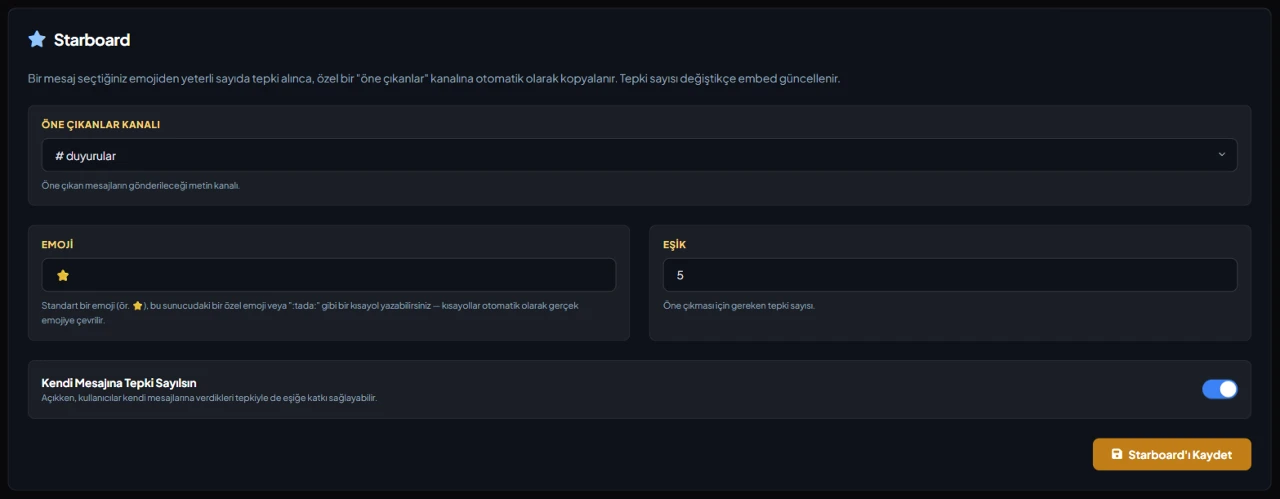
The threshold goes from 1 to 50 and defaults to 3. The emoji defaults to ⭐; you can enter a standard emoji, a custom emoji from this server or a shortcode like ":tada:". Shortcodes are converted to the real emoji, and a custom emoji copied from another server is rejected.
Recounted on every reaction
Whenever a reaction is added or removed, the count is calculated from scratch; bot reactions never count. The author's own reaction doesn't count by default, and you can turn it on with "Count Self-Reactions". The number on the card follows along.
A card linked to its source
The card shows the author, the message text (up to 4000 characters), the first image in the message, a link to the original, the channel name and the date. Bot messages and messages in the highlights channel itself are never copied.
NSFW content stays put
A message from an NSFW channel (or a channel in an NSFW category) is not copied unless the highlights channel is NSFW too, so age-restricted content never lands in a public channel.
Who it’s for
Communities with a fast-moving chat where memes, art, clips or screenshots get shared a lot.
Who it’s not for
Small servers with little chatter, or teams that want staff to pick what gets featured. Starboard has no approval step; members' reactions decide.
Setup in 3 steps
-
1
Add the bot to your server
Open the invite link above, pick your server and approve the permissions. The bot comes online within seconds.
-
2
Pick the highlights channel and emoji
Dashboard → your server → Starboard: choose the highlights channel, the emoji and the threshold, decide whether self-reactions count, then save. You can do the same with the /setstarboard command.
-
3
Test it with a message
React to another member's message until it reaches the threshold and check that the card appears in the highlights channel. The bot needs Send Messages and Embed Links in that channel.
Related commands
For the full list of commands, see the commands page.
Step-by-step usage in the docs: Starboard
Sourced, dated comparisons with other bots: MEE6 and VeyroBot comparedDyno and VeyroBot comparedCarl-bot and VeyroBot comparedTatsu and VeyroBot comparedBetterAntispam and VeyroBot comparedMEE6, Dyno and Carl-bot compared
Frequently asked questions
Is a message removed from the highlights if reactions drop?
No. Once a message has passed the threshold its card stays; only the reaction count on it is updated to the current number.
Does the card change if the original is edited or deleted?
No. The card keeps the text and image as they were when the message was copied. Deleting the original doesn't remove the card automatically; you can delete it from the highlights channel yourself.
Can I use more than one emoji or more than one highlights channel?
No. Each server has one highlights channel and one emoji; reactions with other emojis are not counted.
What happens if I delete a card in the starboard channel by hand?
The record is dropped. If the original message is still above the threshold, the count is recalculated when a reaction is added to or removed from the message, and the card is posted to the starboard channel again. The card does not come back by itself unless a new reaction arrives.
Do mentions in a starred message notify anyone?
No. The card is sent and updated so that it does not ping anyone; even if the copied text contains @everyone, a role or a user mention, nobody gets a notification.
Related articles
Adding it is all it takes to try
Add VeyroBot to your server and turn on the modules you want in the web dashboard. You can switch off anything you don't use.
Add to Server for Free