


Discord Live Stat Channels
Showing off your server's size with a channel name you update by hand is a waste of time. VeyroBot opens a voice channel that writes your chosen stat — members, humans, bots or boosts — right into its name, creates it for you, and refreshes it automatically every 15 minutes.

The bot creates the channel for you
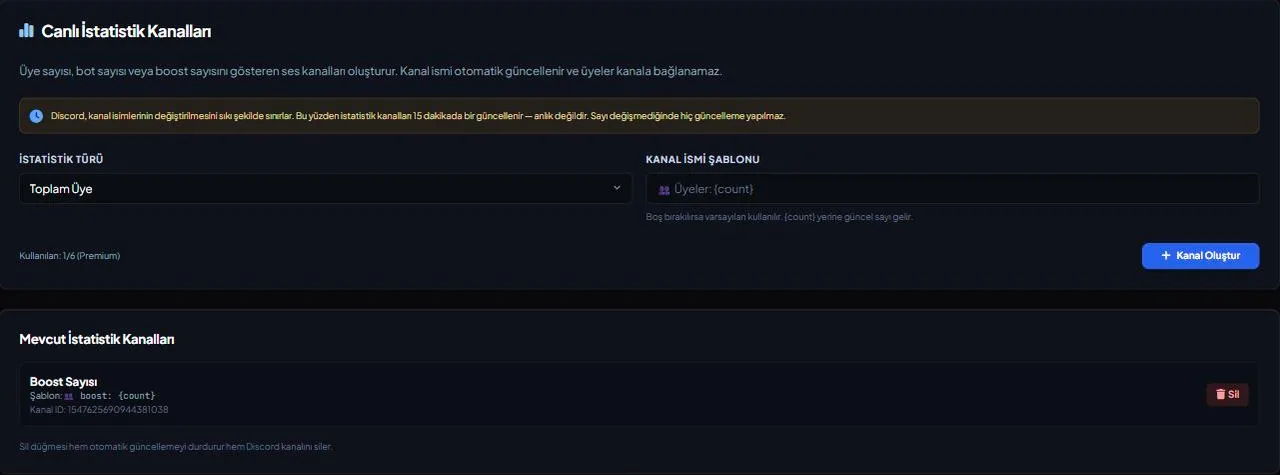
The /statschannel add <stat> command and the dashboard's Stats Channels tab don't make you open an empty voice channel first — the bot creates it itself and denies @everyone the Connect permission, giving it that classic "unclickable" look.
Pick one of 4 metrics
Total member count, human-only count, bot-only count, or server boost count — each can be added as its own channel.
Format the channel name yourself
The optional template field lets you write your own text (up to 80 characters); the only rule is it must contain the {count} placeholder. Leave it blank and the default "<Stat Name>: {count}" is used.
Opens with the right number instantly
The channel is created with the current real value, so you don't wait for the engine's first 15-minute tick; every update after that arrives every 15 minutes.
Who it’s for
Server admins who want their server's size or boost support visible to visitors without manually updating a channel name.
Who it’s not for
Not for anyone who wants a second-by-second live counter — updates arrive every 15 minutes, this isn't a real-time ticker.
Setup in 3 steps
-
1
Add the bot to your server
Open the invite link above, pick your server and approve the permissions. The bot comes online within seconds.
-
2
Pick the stat type
In the dashboard's Stats Channels tab or with /statschannel add, choose member, human, bot or boost count; optionally write your own channel name template.
-
3
The channel opens and updates itself
The bot creates a voice channel with your chosen metric and refreshes its name automatically every 15 minutes — you never edit anything by hand.
Related commands
For the full list of commands, see the commands page.
Step-by-step usage in the docs: Live Stat Channels
Sourced, dated comparisons with other bots: MEE6 and VeyroBot comparedDyno and VeyroBot comparedCarl-bot and VeyroBot comparedMEE6, Dyno and Carl-bot compared
Frequently asked questions
How often does a stat channel update?
Every 15 minutes. It opens with the current real value the moment it's created, and every update after that follows the 15-minute cycle.
How many stat channels can I add?
There's a per-server limit that depends on your plan; the exact number is on the Premium page. Once you hit it, adding another is rejected — delete an existing one to add a new one.
Can I write the channel name however I want?
Yes, any text up to 80 characters that contains the {count} placeholder, emoji included. The template is rejected if the placeholder is missing.
Related articles
Adding it is all it takes to try
Add VeyroBot to your server and turn on the modules you want in the web dashboard. You can switch off anything you don't use.
Add to Server for Free