


Discord Server Backup
When a category gets deleted by mistake or a role disappears, rebuilding the server by hand from memory takes hours. VeyroBot backs up your server's structure and bot settings with one click in the dashboard. Before restoring it shows what will be added, then creates only the missing roles and channels; no channel, role or permission currently on the server is changed or deleted.

Structure and settings in one backup
Roles (color, permissions, order), categories, text, voice, announcement, stage and forum channels, channel permission overwrites and VeyroBot dashboard settings (modules such as welcome, log channels, AutoMod, leveling, tickets and anti-raid) are saved together. Integration roles and the @everyone role are not included.
Restore only adds what's missing
Roles and channels that are in the backup but no longer on the server are recreated with their permissions and categories. An item is skipped if one with the same name already exists (for channels, same type and category) or if the role sits above the bot's role. In VeyroBot settings only fields that are currently empty get filled.
Preview first, then confirm
The Preview button lists the roles and channels to add, the empty settings to fill and the items that will be skipped. VeyroBot settings pointing at a deleted channel or role are moved to the newly created one during the restore.
Manual or automatic every day
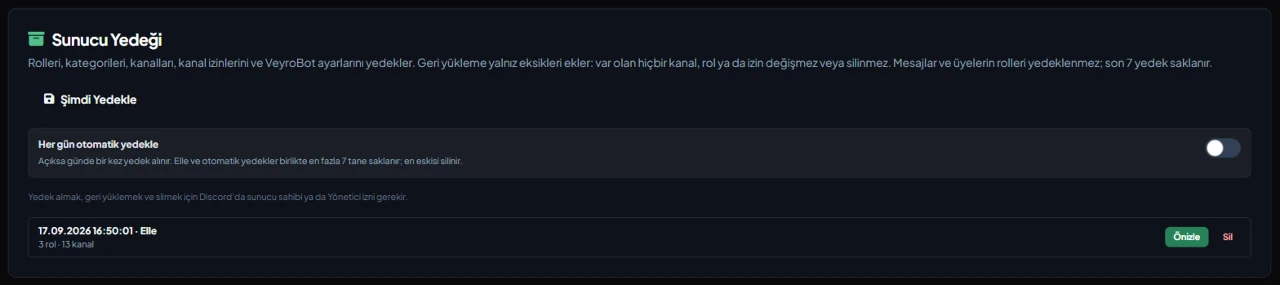
Take a backup any time with Back Up Now, or turn on the daily automatic backup. Manual and automatic backups share a limit of 7, and the oldest is removed. Taking, restoring and deleting backups requires being the server owner or having Administrator in Discord.
Who it’s for
Servers with a growing staff team and a channel and role layout that took real work to build; admins who want to recover the structure quickly after a deletion mistake or an attack.
Who it’s not for
Not for keeping message history or members' roles: those aren't backed up. It also can't copy one server's layout to another server.
Setup in 3 steps
-
1
Add the bot to your server
Open the invite link above, pick your server and approve the permissions. The bot comes online within seconds.
-
2
Take the first backup
Dashboard → your server → Server Settings → Server Backup card: press Back Up Now, and optionally turn on Back up automatically every day. You need to be the server owner or have Administrator in Discord.
-
3
Preview and restore when needed
Use Preview on a backup in the list to see what will be added, then press Restore Missing Items. The bot needs Manage Channels and Manage Roles, and roles above the bot's role can't be created.
Related commands
For the full list of commands, see the commands page.
Step-by-step usage in the docs: Server Backup
Sourced, dated comparisons with other bots: MEE6 and VeyroBot comparedDyno and VeyroBot comparedCarl-bot and VeyroBot comparedTatsu and VeyroBot comparedBetterAntispam and VeyroBot comparedMEE6, Dyno and Carl-bot compared
Frequently asked questions
Do deleted messages come back too?
No. Messages and which roles members had are not backed up. A recreated channel opens empty with a new channel ID, and a recreated role has to be given to members again by hand.
Does it revert a channel or setting I changed to the backup version?
No. Restoring deliberately only adds what's missing: the name or permissions of an existing channel, or a VeyroBot setting that already has a value, are not reset to the backup. That way an old backup can't overwrite the changes you made since.
Can I move a backup to another server?
No. A backup can only be restored on the server it was taken from; there is no way to apply it to another server or download it as a file.
Related articles
My Discord Server Was Nuked: What to Do in the First 30 Minutes
If channels and roles are being deleted, revoke permissions first, then find the culprit in the Audit Log, and rebuild last. Step-by-step order and common mistakes.
How to Back Up a Discord Server? Guide Including Restoration
Taking a backup takes one click, but restoring requires knowing what gets added and what gets skipped. Prerequisites, excluded data, preview, daily automatic backups, and permissions you must check after restoration.
Adding it is all it takes to try
Add VeyroBot to your server and turn on the modules you want in the web dashboard. You can switch off anything you don't use.
Add to Server for Free