


Discord Application Form
When you recruit staff, applications often get lost between external form links, DMs and scattered messages. VeyroBot keeps the whole process inside Discord: a member presses the Apply button in a channel and answers the questions in a Discord pop-up. The application lands in the review channel you chose with Accept and Reject buttons; once it's decided the member gets a DM, and a role if you set one.

Up to 15 questions, three types
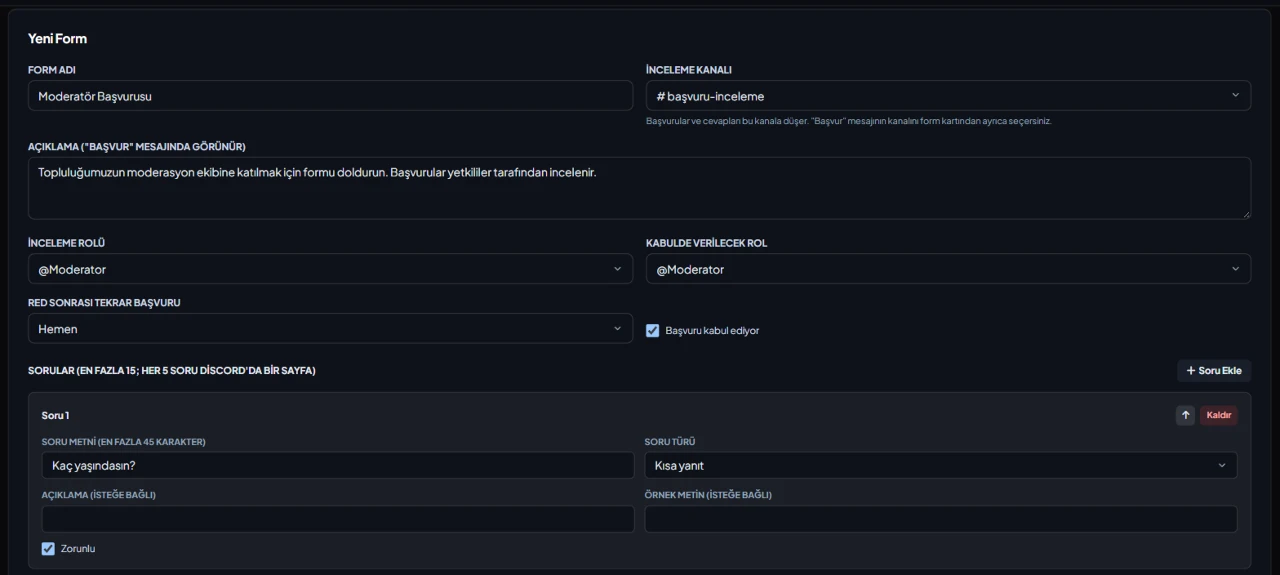
Short answer (200 characters), long answer (1000 characters) or a dropdown with 2–25 options. Each question can be required or optional and can have a description and placeholder text. A server can have up to 25 forms.
Pages of 5 and a Continue button
A Discord pop-up holds at most 5 fields, so questions are split into pages of 5. After submitting a page the member moves on with the Continue button; a half-finished application is kept for 30 minutes, and if it expires or the form changes in the meantime they start over.
Decisions in the review channel
The application arrives in the review channel with its answers. The server owner, members with Manage Server or the form's reviewer role decide it; if two people press at once, the first decision counts. Writing a reason when rejecting is optional.
DM, accept role and reapply rule
The result goes to the member by DM, including the rejection reason if one was written. On accept, the role you picked is given. A member can have only one pending application per form; reapplying after a rejection can be allowed right away, after 1, 7 or 30 days, or never.
Who it’s for
Communities recruiting staff, moderators, event teams or partners that want to review applications in one channel instead of scattered DMs.
Who it’s not for
Not for roles members should take themselves without waiting: every application is decided one by one by a staff member. It also isn't a survey tool with file uploads or scoring; only text and multiple-choice questions exist.
Setup in 3 steps
-
1
Add the bot to your server
Open the invite link above, pick your server and approve the permissions. The bot comes online within seconds.
-
2
Create the form
Dashboard → your server → Application Forms → New Form: enter the form name, review channel and questions, optionally pick a reviewer role, a role given on accept and the reapply period, then save. Make the review channel one that only staff can see.
-
3
Send the Apply message to a channel
On the form's card, choose a channel and press Send to Channel; members apply with the Apply button on that message. The bot must be able to post in the review channel, and its role must sit above the accept role to give it.
Related commands
For the full list of commands, see the commands page.
Step-by-step usage in the docs: Application Forms
Sourced, dated comparisons with other bots: MEE6 and VeyroBot comparedDyno and VeyroBot comparedCarl-bot and VeyroBot comparedTatsu and VeyroBot comparedBetterAntispam and VeyroBot comparedMEE6, Dyno and Carl-bot compared
Frequently asked questions
Can I accept or reject applications from the dashboard?
No. In the dashboard you build forms, send the Apply message to a channel and see the last 50 applications with their answers and status; decisions are made with the buttons on the review message in Discord.
What happens if the member's DMs are closed?
The decision is still saved and the review message is updated. If the DM can't be sent, the person who decided is told, and the dashboard shows that the result couldn't be delivered for that application.
What if long answers don't fit in the review message?
Discord limits how much text one message can hold. If the answers don't fit, the longest ones are shortened first and the full answers are attached to the message as a file.
Related articles
How to Set Up a Discord Ticket System: Buttons, Private Channels, and Transcripts
Stop support requests from getting lost in DMs: a private channel opened with a button, visible only to the user and support role, with a .txt transcript sent to the log channel upon closing. Learn how to set it up from the dashboard in five minutes, choose staff roles, and manage closing permissions.
How to Set Up a FiveM Roleplay Discord Server? Channel Layout & Role Template
Discord layout for FiveM roleplay communities: channel categories, role hierarchy, form whitelist applications, rules, punishment tiers, announcement channels, and week-one checklist.
How to Set Up a Minecraft Discord Server? Channels, Roles, and Whitelist Setup
Minecraft Discord server setup for survival, SMP, and mini-game communities: channel categories, roles, whitelist applications, rules, events, giveaways, ticket support, and moderation.
How to Set Up a Discord Server for Esports Teams and Clans: Channels, Roles & Recruitment
A clan or esports team server is built differently from a general gaming community: the internal section is private to the roster, and the structure depends on schedules. Channel categories, roles, application workflow, practice reminders, and moderation.
How to Create a Discord Staff Application Form? Step-by-Step
Setting up application forms via the panel, question types and 5-page limits, sending the "Apply" message to a channel, decision-making with Accept/Reject, cooldown settings, sample question sets, and common mistakes.
Adding it is all it takes to try
Add VeyroBot to your server and turn on the modules you want in the web dashboard. You can switch off anything you don't use.
Add to Server for Free