Best Discord Moderation Bots 2026: Criteria First, Bots Second
There is no single answer to "the best moderation bot"; five criteria (detection type, punishment automation, log depth, raid protection, dashboard) shift in weight depending on your server. This guide covers the criteria first, then compares six bots using dated statements from their own pages without ranking them.
This article was translated automatically from the Turkish original. Read the Turkish original

In this article
Short answer
There is no single answer to the question of the "best moderation bot" for Discord; the right question is "which moderation tasks do I want to automate." Five criteria dictate the decision: what it detects, how it escalates punishments, how deep the logs are, whether it distinguishes between a raid and a nuke, and whether settings are managed via a dashboard or commands. Below, these criteria are presented first, followed by a comparison of six bots using statements from their own pages. No ranking has been made; putting a security-focused bot and a multipurpose bot in the same ranking would be unfair to both.
This topic in VeyroBot:Discord AutoMod and Automatic Moderation →
Five selection criteria
| Criterion | What to look for | Why it matters |
|---|---|---|
| Detection type | Which filters exist (invite links, links, mass mentions, caps, banned words, spam); whether thresholds are adjustable | The breadth of filters determines the false positive rate: a "link" filter is broad, an "invite link" filter is narrow. |
| Punishment automation | Can actions be selected per violation; is the warning counter tied to tiered punishments | Having a human make every decision is feasible for a small server, but not a large one; however, automation must be reversible. |
| Log depth | Is a case record generated for every violation; can you see who, why, and what action was taken | An AutoMod without logs operates silently; no one can see what was deleted or why. |
| Raid / nuke distinction | What it does during mass joins; what it does when a staff account is compromised | A raid comes from the outside, a nuke comes from the inside; these are two different protections, and most bots only do one. |
| Dashboard | Are settings managed via a web dashboard or commands; can the moderator team view them in their own language | With a dashboardless bot, settings changes depend on a single person; as the team grows, this becomes a bottleneck. |
Six bots, in their own words
The statements in each row were taken from that bot's official page on September 12, 2026. We did not write down anything we could not verify: if a feature did not appear on a bot's page, we did not say "it doesn't exist," we said "not seen."
| Bot | Own statement regarding moderation | Who it is for | Limit / not seen |
|---|---|---|---|
| Wick | “Discord moderation and security that is always one step ahead”; features "Raids Stopped" and "Nukes Stopped" counters on the homepage. | Large servers where raid and nuke risks are high and security is the top priority. | Filter list, thresholds, and pricing were not seen on the homepage; verify from their own documentation. |
| YAGPDB | “YAGPDB has a very configurable automoderator”; “for each rule you can set automoderator to mute, kick or ban”; “Modlog with kicks, bans, mutes and warnings”; “Timed mutes and bans”; open source: “you can host it yourself”. | Technical teams that want actions per rule and may choose to self-host the bot. | Raid protection and verification gate were not seen on the homepage. |
| Sapphire | “Setup 10+ modules”; “Punish users based on conditions”; “Add additional actions for Discord's AutoMod”; “Make use of 80+ log types”; “Ignore users, roles or channels”. | Servers looking to fine-tune log types and conditional punishments, and expand Discord's built-in AutoMod. | Raid protection and verification were not seen on the homepage. |
| MEE6 | Addon categories on the premium page: “Moderation & Server Management · Utilities · Social Alerts · Games & Fun · Bot Personalizer · MEE6 AI”. | Single-server communities wanting a broad set of addons alongside moderation. | Filter and punishment details are not listed on the premium page; scope is “A subscription is valid for a single Discord server.” |
| Dyno | Three plans on the premium page; scope statement “Standard Premium for one server of your choice.” | Moderation-heavy servers with an established setup for years. | Its homepage was inaccessible (403) while preparing this article; check their own docs for moderation details. |
| Carl-bot | Limits on the premium page: “Reaction roles per server 250 / 1,000 · YouTube channel alerts 5 / 20 · Twitch stream alerts 2 / 5 · Weblog entries 100 / 500”. | Reaction role and log-focused servers. | Moderation filters are not listed on the premium page; pricing is not on the page (sales via Patreon/Discord). |
| VeyroBot | Six filters (invite link, link, mass mention, caps, banned word, spam), separate action per filter, tiered punishment tied to warning counter, case record and log for every violation; plus Anti-Raid lock, captcha gate, and Staff Protection (stripping dangerous roles from staff exceeding thresholds, reinstating deleted channels and roles); settings via a seven-language dashboard. | Servers looking to set up moderation from a single dashboard and measure setup accuracy; multilingual moderator teams. | Staff Protection (anti-nuke) was added in September 2026, little field data exists yet; deleted messages cannot be recovered. |
Sources: Wick wickbot.com, YAGPDB yagpdb.xyz, Sapphire sapph.xyz, MEE6 mee6.xyz/en/premium, Dyno dyno.gg/premium, Carl-bot carl.gg/get-premium; all as of September 12, 2026. Price and scope quotes are on the triple comparison page.
For those considering switching from Dyno, we covered the VeyroBot equivalents of moderation tasks separately in the Dyno alternative guide.
What happens during a violation in VeyroBot?
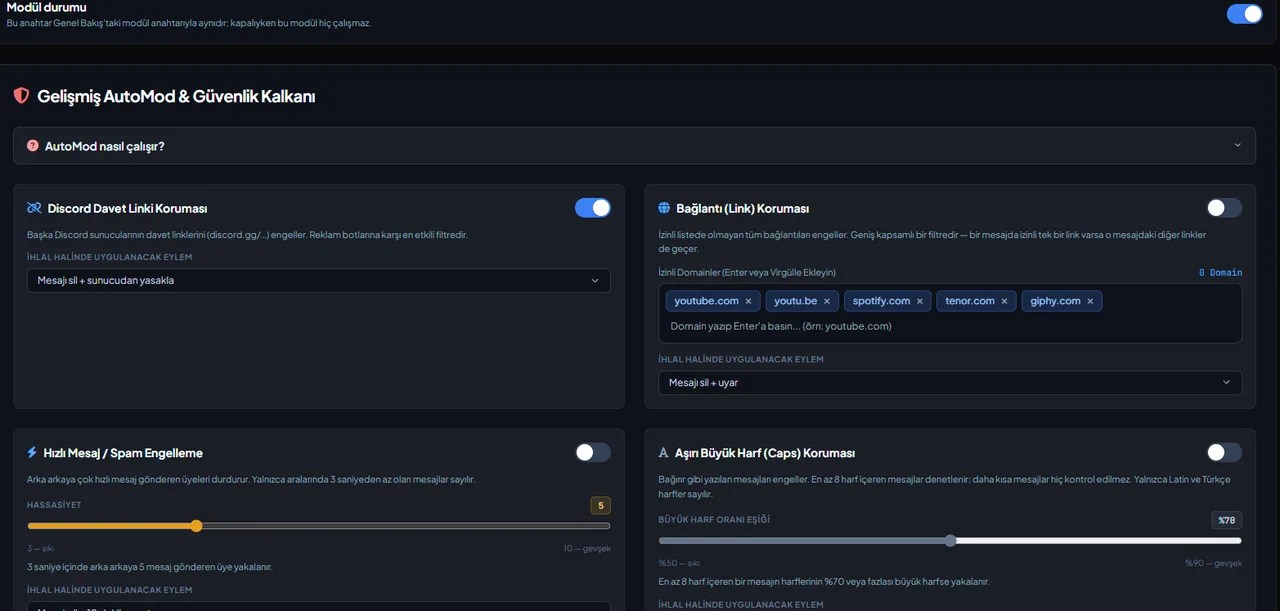
Let's apply the criteria to our own bot; this section is identical to what is written in the dashboard. When a filter is triggered, in order: the message is deleted, a warning lasting five seconds drops into the channel, a moderation case is opened, the warning counter increases by one, and a record is logged to the log channel. Finally, the action you selected for the filter is executed: delete message and warn; mute for 5 minutes, 10 minutes, 1 hour, or 1 day; kick; ban. Three rules should be known:
- First matching filter wins. Order: invite link → link → mass mention → caps → banned word → spam. Only the action of the first matching filter is executed for a message.
- Staff are exempt. Anyone with the "Manage Messages" or "Administrator" permission will never be caught by a filter; nothing happens if you test the setting with your own account.
- Warning counter feeds tiered punishment. Default thresholds are a 1-hour mute at 3 warnings and a kick at 5 warnings; both are customizable.
Who is it for, who is it not for?
A single moderation bot is enough:
- Communities with a few hundred members; two or three filters, a log channel, and mild punishment thresholds.
- Those running separate bots for levels, tickets, or notifications alongside moderation and wanting to gather them in a single dashboard.
Consider a separate security-focused bot:
- Large servers where the risk of a nuke (internal channel/role deletion) is real; most multipurpose bots do not prevent this; VeyroBot's Staff Protection is threshold-based and can be evaluated alongside a specialized security bot on very large servers.
- Communities that require human judgment for every message; leaving automation as "None / warn only" and keeping logs exclusively is more appropriate there.
Frequently asked questions
Is a bot necessary when Discord has a built-in AutoMod?
Discord's own AutoMod covers word and mention rules. Bots add layers that Discord doesn't handle, such as warning counters, tiered punishments, case logging, and raid locks. Some bots, like Sapphire, claim to attach extra actions to Discord AutoMod; VeyroBot runs its own filter chain.
How do I reduce false positives?
Do not use "kick/ban" on broad filters (links); use them on narrow filters (invite links, banned words). Leaving the action as "warn only" and monitoring logs for the first week is the safest start.
Can two moderation bots run at the same time?
They can, but both bots will punish the same message. Make sure a single bot is doing the job; double punishment is the most common mistake.
Is warning history transferred between bots?
No. Warning counters and case history reside in each bot's own database; switching starts from scratch.
How up-to-date is this list?
All statements were taken from the bots' official pages on September 12, 2026; they may have changed, so check the source page before making a decision.
Last updated: September 14, 2026. Statements belonging to rival bots were taken from their respective pages on that date; they may have changed. Plan breakdowns for VeyroBot are on the premium page.
For these topics in VeyroBot
Discord AutoMod and Automatic Moderation
Profanity, spam, advertising and mass-mention filters; tiered punishments and one shared case history. Protect your server automatically with VeyroBot.
Discord Moderation Bot
Ban, kick, time out and warn: every action is saved as a numbered case and posted to your mod-log. Warning tiers and six separate log channels.
Discord Anti-Raid Bot
VeyroBot locks text channels when joins pass your threshold within the window you set (5–60 s), alerts your mod log, and /unlock restores the old permissions.