


Discord YouTube Notifications
If your community gathers around a YouTube channel, sharing every new video by hand gets forgotten or arrives late. VeyroBot reads the channel's public video feed every 5–10 minutes; when a new video appears, it posts an embed in the Discord channel you chose and can mention a role. No API key and no linked YouTube account are needed.
Channel ID or @handle
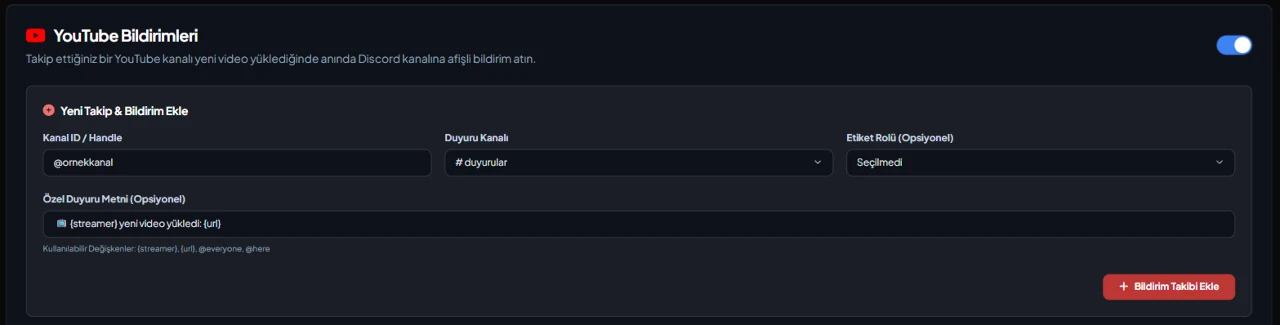
Enter the 24-character channel ID starting with UC, or a handle like @channelname. A handle is resolved to the real channel ID once, on the first check, and stored that way.
Regular checks, posted once
Each follow's feed is read every 5 minutes; with many YouTube follows the interval stretches to at most 10 minutes. A new video is posted with its title, thumbnail and link; the last 25 notified videos and their publish times are kept, so the same video is never posted twice.
Role mention or your own text
The default notification can mention a role. If you write your own text (up to 1,000 characters), it is sent instead of the default; {streamer} becomes the channel name, {url} the video link and {title} the video title.
Failed notifications aren't lost
If the announcement channel was deleted or the bot can't send messages there, the video isn't marked as sent and is retried on the next check. The problem also shows up on the dashboard's Server Health card.
Who it’s for
Communities built around one or a few YouTube channels, and creators tired of sharing every new video on Discord by hand.
Who it’s not for
Anyone who wants to announce the moment a YouTube live stream starts or Community posts: VeyroBot only reports new items in the channel's video feed.
Setup in 3 steps
-
1
Add the bot to your server
Open the invite link above, pick your server and approve the permissions. The bot comes online within seconds.
-
2
Add the follow
Dashboard → your server → YouTube Notifications: enter the channel ID or @handle, pick the announcement channel and an optional role, then press Add Notification Follow. The /streamalert add command does the same and requires Manage Server.
-
3
Check the permission and wait
The bot needs permission to send messages in the announcement channel. When the follow is added, videos already in the feed are marked as seen and none are posted; notifications come only for videos uploaded afterwards. To test the setup right away, use the test notification button in the dashboard.
Related commands
For the full list of commands, see the commands page.
Step-by-step usage in the docs: Streamer & Content Alerts (7 Platforms)
Sourced, dated comparisons with other bots: MEE6 and VeyroBot comparedDyno and VeyroBot comparedCarl-bot and VeyroBot comparedTatsu and VeyroBot comparedBetterAntispam and VeyroBot comparedMEE6, Dyno and Carl-bot compared
Frequently asked questions
Are YouTube live streams notified too?
There is no separate live check. VeyroBot announces new items that appear in the channel's YouTube video feed; the moment a stream starts isn't tracked. Twitch and Kick are the platforms that report a stream going live.
Is an old video posted when I add the channel?
No. When a new follow is added, the videos already in the feed are only marked as seen, none are announced. Only videos uploaded after the follow was added are posted.
How many YouTube channels can I follow?
Up to 25 YouTube follows per server. The same channel can't be added twice to the same Discord channel, but it can be added to a different one.
If the channel uploads several videos in a short time, are all of them posted?
Yes. When a check finds more than one new video, they are sent from oldest to newest. Each check sends at most 3 videos; the rest come with the next check. If a send fails, the later videos aren't counted as sent and are retried in the same order.
I added a channel by @handle but no notifications arrive. Why?
On the first check, the handle is turned into the real channel ID from the channel page. If that fails, no notification can be sent; once the problem lasts at least 30 minutes and has been seen three times, it shows up as a source issue on the Server Health card. In that case, delete the follow and add it again with the channel ID that starts with UC.
What if YouTube's video feed doesn't respond?
VeyroBot reads the channel's public video feed first. If the feed returns an error, it reads the channel's upload list another way in the same check. If both fail, no notification is sent and the next check tries again. If the problem continues, it shows up on the Server Health card.
Related articles
Adding it is all it takes to try
Add VeyroBot to your server and turn on the modules you want in the web dashboard. You can switch off anything you don't use.
Add to Server for Free