


Discord Custom Commands & Auto-Responder
Typing out the same answer to a common question every time gets old fast. With VeyroBot's Custom Commands & Auto-Responder you define a trigger word; when a member mentions the bot followed by that word (@VeyroBot rules), the reply — plain text or an embed — comes back instantly. You choose whether the text must match exactly, contain the word, or start with it. No slash command, no code.

Triggered by a bot mention, three ways to match
The message must start with a mention of the bot; the reply fires when the text after the mention is an exact match for the trigger, contains it, or starts with it. Case doesn't matter, and a leading mark such as ! in the trigger is ignored, so an old !rules trigger works as @VeyroBot rules. Messages without the mention don't trigger custom commands.
Text or embed, with live variables
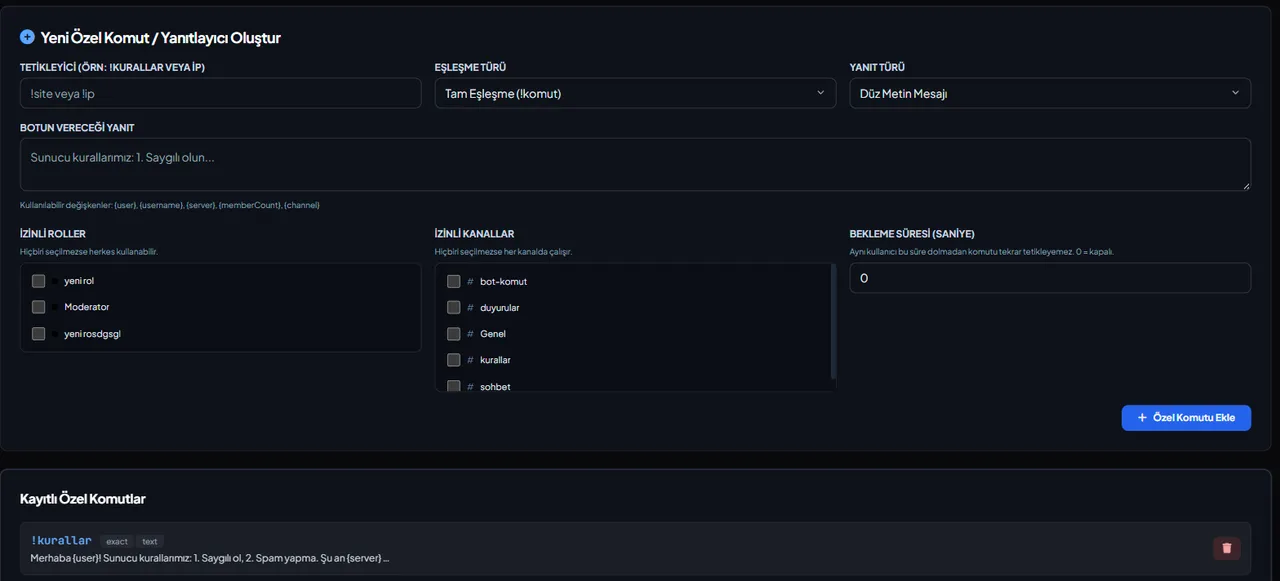
The reply is sent as plain text or as an embed. With an embed, the trigger word becomes the title, your reply text becomes the description and the color is the server's default embed color; there are no separate title, image or color fields. Typing {user}, {username}, {server}, {memberCount} or {channel} swaps in the real mention, name or count — no need to write it by hand each time.
Channel, role and cooldown limits
Optionally restrict a command to certain channels, require a specific role to trigger it, or set a per-user cooldown in seconds so the same person can't fire it again before it expires.
@everyone can't be triggered
Replies only resolve user mentions; even if the reply text contains @everyone or a role mention, Discord posts it as plain text and pings nobody — a misused auto-reply can't turn into a mass ping.
Who it’s for
Servers that want quick, personal replies to common questions or repeated requests, and anyone building simple automation without writing a slash command.
Who it’s not for
Anyone needing complex logic (conditional branches, external API calls, database lookups): this feature only maps a fixed trigger to a fixed reply.
Setup in 3 steps
-
1
Add the bot to your server
Open the invite link above, pick your server and approve the permissions. The bot comes online within seconds.
-
2
Open the Custom Commands tab
Pick your server in the dashboard, click Custom Commands in the left menu and press Add New Command.
-
3
Set the trigger and reply, then try it
Choose the match type (exact/contains/starts with), write a plain-text or embed reply, optionally add a channel/role/cooldown, and save. Mention the bot followed by the trigger in Discord (@VeyroBot rules) to try it right away.
Related commands
For the full list of commands, see the commands page.
Step-by-step usage in the docs: Custom Command Engine
Sourced, dated comparisons with other bots: MEE6 and VeyroBot comparedDyno and VeyroBot comparedCarl-bot and VeyroBot comparedMEE6, Dyno and Carl-bot compared
Frequently asked questions
What happens if two custom commands share a trigger?
The list is checked in order and the FIRST match wins; the rest are never tried. Defining the same trigger twice just causes confusion — use distinct triggers.
What if the embed can't be sent?
If the bot lacks Embed Links permission in that channel, or the embed data is malformed, the reply silently falls back to plain text — the command doesn't appear to fail.
Can this work as a slash command?
No — custom commands react to messages that mention the bot (@VeyroBot rules); they don't create a slash command, and there are no prefix (!) text commands. If you want to add your own slash command, this isn't the feature for that.
Related articles
Adding it is all it takes to try
Add VeyroBot to your server and turn on the modules you want in the web dashboard. You can switch off anything you don't use.
Add to Server for Free