


Discord Anti-Raid Bot
A raid happens in seconds, and the time it takes to lock the server by hand is exactly the time the spam needs to spread. VeyroBot watches how fast members join, closes writing once your threshold is passed and records what it did in the log channel. The lock is not permanent: each channel’s previous permission is saved and /unlock puts all of them back.

Adjustable join threshold
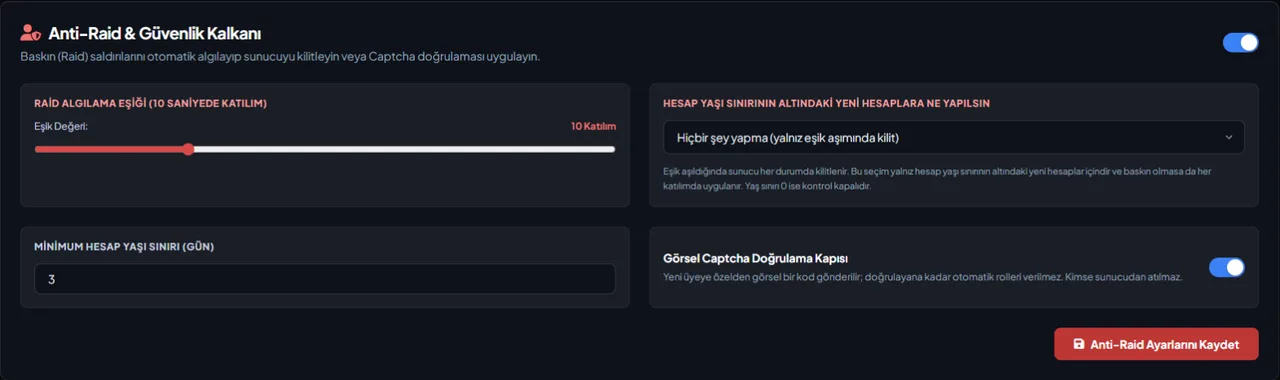
You pick the threshold (3–30 joins) and the window joins are counted over (5–60 seconds, 10 by default). Once it is passed, Send Messages and Add Reactions are switched off for @everyone in text channels, and your moderation log shows how many joins passed which threshold.
Automatic unlock and panic mode
If you want, the lockdown lifts itself after a time between 5 minutes and 24 hours. In panic mode, new joins are kicked and invites are paused during the lockdown; invites reopen when it lifts.
A lock you can undo
Every channel’s @everyone permission is saved before the lock; /unlock puts all of them back. The record lives in the database, so it survives a restart.
Account age limit
For accounts newer than the number of days you set, choose “kick from the server”, “ban” or “do nothing”. Set the limit to 0 days and the age check never runs.
Visual captcha gate
A new member does not get their automatic role until they solve the code sent by DM. Nobody is removed from the server and there is no time limit. Servers that do not use auto-roles can pick a “verified role” that is granted after verification.
Lockdown status in the dashboard
While a lockdown is active, the Anti-Raid Shield tab shows how many channels are locked, when the lockdown started, when it lifts automatically, whether invites are paused and how many accounts panic mode has kicked. The Lift Lockdown Now button does the same as /unlock and requires the Manage Channels permission in Discord.
Who it’s for
Servers with a public invite going around, growing fast around a game or a stream; communities that want a new member verified as human before they get a role.
Who it’s not for
Closed, invite-only servers — there the lock and the captcha are mostly extra friction. The lock answers joins coming from outside; against a compromised staff account deleting channels (a nuke), use Staff Protection in the same tab.
Setup in 3 steps
-
1
Add the bot to your server
Open the invite link above, pick your server and approve the permissions. The bot comes online within seconds.
-
2
Set the threshold in the Anti-Raid Shield tab
Dashboard → your server → Anti-Raid Shield: pick the join threshold (3–30), the window joins are counted over (5–60 seconds, 10 by default), the minimum account age (0–30 days) and what happens to accounts below that limit.
-
3
Connect a log channel, open the captcha gate if you want one
Use /setlog to pick the moderation log channel; the raid alert lands there. To switch the captcha gate on, either a member role must be selected in the Auto Roles tab or a “verified role” to grant after verification must be picked in this tab.
Related commands
For the full list of commands, see the commands page.
Step-by-step usage in the docs: AutoMod & Anti-Raid Shield
Sourced, dated comparisons with other bots: MEE6 and VeyroBot comparedDyno and VeyroBot comparedCarl-bot and VeyroBot comparedTatsu and VeyroBot comparedBetterAntispam and VeyroBot comparedMEE6, Dyno and Carl-bot compared
Frequently asked questions
What happens when the lock kicks in?
Send Messages and Add Reactions are switched off for @everyone in text channels and an alert goes to the moderation log channel. Joining does not stop; newcomers simply cannot write. If you turned on panic mode, new joins are kicked and invites are paused during the lockdown.
How do I lift the lock?
While a lock is active, /unlock puts every locked channel back to the permissions it had before: what was explicitly allowed stays allowed, what was denied stays denied. The command needs the Manage Channels permission.
Are threads locked as well?
No. The lock closes the @everyone permission on text channels that carry their own permission overwrites; writing in a thread is governed by a separate permission that is left untouched. Conversation can continue in an open thread, so lock the thread yourself if you need to.
What if the lock triggers by mistake?
The lock can be undone and nobody is removed from the server. On servers that get 15–20 real joins in 10 seconds after a stream announcement, raising the threshold reduces false alarms.
Is a member who fails the captcha removed?
No. They stay in the server and simply do not get the automatic role; there is no time limit. After three wrong attempts a new code is generated. If their DMs are closed, a verification button that mentions only them is posted in the welcome channel; the code image is shown only to that member when they press it. The message stays until they verify or leave the server.
How does the Pause invites option work?
When the lockdown starts, VeyroBot uses Discord's own feature for pausing server invites. The pause lasts until the automatic unlock time and is removed when the lockdown lifts; if automatic unlock is off, it ends by itself after 24 hours, the longest Discord allows. If you had already paused invites yourself, the bot leaves them alone and doesn't reopen them later. The bot needs the Manage Server permission for this.
Is the captcha code case-sensitive?
No. The code is 6 characters of letters and digits; I, O, 0 and 1 are left out because they are easy to confuse, and you can type it in upper or lower case. Bots added to the server skip verification.
Does the welcome channel fill up during a raid?
No. While a lockdown is active, welcome cards and messages aren't sent one by one, and even without a lockdown the cards stop once more than 10 members join within 60 seconds. A minute later a single summary that pings nobody is sent instead.
What should I check if the account age penalty isn't applied?
The bot needs the Kick, Approve, and Reject Members or the Ban Members permission for the action you picked. If Ban is selected and the bot can't ban but can kick, it kicks the member. If the penalty can't be applied at all, this shows up on the dashboard's Server Health card.
Related articles
Discord Server Security Audit: 12 Checks
The security of a Discord server depends on a few settings. From @everyone permissions to staff account protection, here are 12 checks and where to find them in Discord.
Protecting Your Discord Server from Raids: An End-to-End Setup Guide
Raids come from the outside, nukes from the inside—they require different defenses. This guide walks you through configuring Discord's native settings, followed by the VeyroBot Anti-Raid lock and captcha gate, explaining threshold selection and false positive management along the way.
My Discord Server Was Nuked: What to Do in the First 30 Minutes
If channels and roles are being deleted, revoke permissions first, then find the culprit in the Audit Log, and rebuild last. Step-by-step order and common mistakes.
Discord Bot Permissions: Should I Grant Administrator?
What does granting Administrator permission to a bot actually mean, which feature requires which permission, and what is the real risk factor? A table and a five-step approach to help you make a concrete decision.
How to Set Up Discord Captcha Verification? Step-by-Step Guide
Hold the new member's role until they enter the code in the image: select the role to be held, open the captcha gate from the Anti-Raid Shield tab, learn what members with direct messages closed see and the errors that silently disable the gate.
Best Discord Moderation Bots 2026: Criteria First, Bots Second
There is no single answer to "the best moderation bot"; five criteria (detection type, punishment automation, log depth, raid protection, dashboard) shift in weight depending on your server. This guide covers the criteria first, then compares six bots using dated statements from their own pages without ranking them.
Adding it is all it takes to try
Add VeyroBot to your server and turn on the modules you want in the web dashboard. You can switch off anything you don't use.
Add to Server for Free