


Discord Sticky Messages
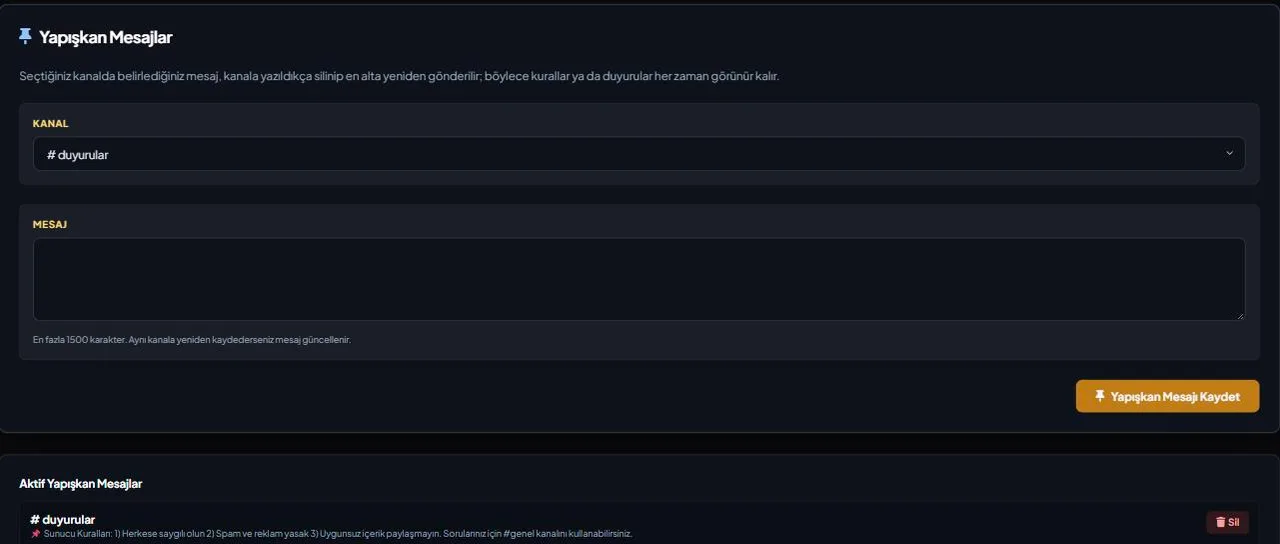
If you want a message like rules, an announcement or an FAQ to always stay at the bottom of a channel, you shouldn't have to repost it by hand. Set up a sticky message with VeyroBot once; every time a new message lands in the channel, the bot deletes its own previous copy and reposts the same text at the bottom.

Set it up from the dashboard or a command
Set a sticky message in any text channel from the dashboard's Sticky Messages tab or with /sticky set <channel> <message>; it's posted as an embed and can be up to 1,500 characters.
Doesn't interrupt chat or spam
The bot doesn't repost on every message — it waits until the channel has been quiet for at least 4 seconds, and leaves at least 10 seconds between consecutive reposts in the same channel, so it never floods a busy conversation.
Removing it really removes it
/sticky remove <channel> deletes both the record and the bot's last copy in the channel — it never leaves an old message behind.
One message per channel
/sticky list lists every sticky message. Setting a new one in the same channel replaces the old text there.
Who it’s for
Server admins who want a message like rules, an announcement or an FAQ to always show at the bottom of a channel.
Who it’s not for
Not for showing frequently changing live data — a sticky message is fixed text; for a live number like member, bot or boost count, see Live Stat Channels.
Setup in 3 steps
-
1
Add the bot to your server
Open the invite link above, pick your server and approve the permissions. The bot comes online within seconds.
-
2
Set it up from the dashboard or a command
Pick the channel and write the text in the dashboard's Sticky Messages tab, or run /sticky set <channel> <message>; the message is posted to that channel as an embed right away.
-
3
It refreshes on its own as chat continues
As new messages arrive in the channel, the bot automatically moves the sticky message to the bottom — you never repost anything by hand.
Related commands
For the full list of commands, see the commands page.
Step-by-step usage in the docs: Sticky Messages
Sourced, dated comparisons with other bots: MEE6 and VeyroBot comparedDyno and VeyroBot comparedCarl-bot and VeyroBot comparedMEE6, Dyno and Carl-bot compared
Frequently asked questions
Does the sticky message repost instantly on every new message?
No. The bot waits until the channel has been quiet for at least 4 seconds, and leaves at least 10 seconds between consecutive reposts in the same channel — this keeps it from flooding a busy conversation.
What permissions does the bot need?
View Channel, Send Messages, Embed Links and Read Message History — the last one so it can find and delete its previous copy. If any of these is missing, the repost fails.
Can a channel have more than one sticky message?
No, there's only one per channel. Setting it again in the same channel replaces the previous text.
Related articles
Adding it is all it takes to try
Add VeyroBot to your server and turn on the modules you want in the web dashboard. You can switch off anything you don't use.
Add to Server for Free