


Discord Birthday Bot
Keeping birthdays in a calendar and remembering each one doesn't scale on a growing server. With VeyroBot every member saves their own date; on the day, at the hour you picked in the server's time zone, the birthday role is given, a message lands in the celebration channel and the role is removed again when the day ends.

Members save it themselves
With /birthday-set a member enters a date like 21.02 or 1996-02-21; the year is optional. The record only applies on that server; the member can remove it any time with /birthday-delete, and admins can delete it in the dashboard.
Role and announcement at your hour
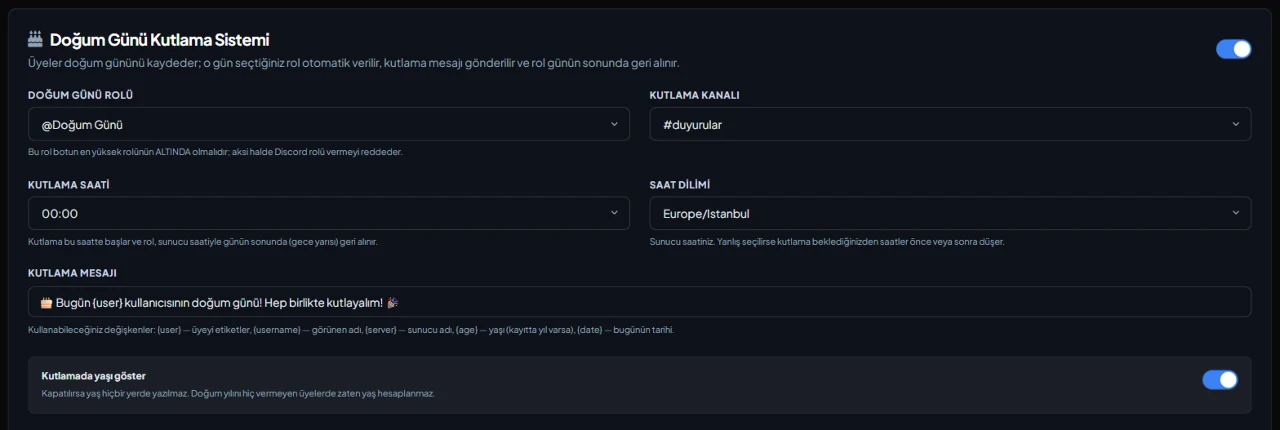
The celebration starts at the hour you choose between 0 and 23: the role is given and a message is sent to the celebration channel. If the bot was offline at that hour, it still celebrates once it's back that day, and never twice on the same day. You can also use only the role or only the announcement.
Time zone and 29 February
Choose a time zone for birthdays or use the server-wide one; the role is removed when the day ends in that time zone. Members born on 29 February are celebrated on 28 February in non-leap years.
Message, age and extra options
The celebration text can be up to 1,000 characters and supports {user}, {username}, {server}, {age} and {date}. Age is only shown if the record has a year and the option is on. A DM celebration and up to 10 extra roles depend on the server's plan.
Who it’s for
Friend communities, gaming clans and chat servers where members know each other, and admins who want birthdays celebrated without anyone tracking them by hand.
Who it’s not for
Anyone wanting to bulk-import birthdays from a list: members enter their own records, and there is no bulk or manual adding in the dashboard.
Setup in 3 steps
-
1
Add the bot to your server
Open the invite link above, pick your server and approve the permissions. The bot comes online within seconds.
-
2
Set up the celebration
Dashboard → your server → Birthday: choose the birthday role, the celebration channel, the hour and the time zone, edit the message, then press Save Birthday Settings. The role must sit below the bot's highest role.
-
3
Ask members for their dates
Ask members to enter their date with /birthday-set. /birthday shows a member's record and the days left, and /birthdays lists the upcoming birthdays.
Related commands
For the full list of commands, see the commands page.
Step-by-step usage in the docs: Birthday Celebration System
Sourced, dated comparisons with other bots: MEE6 and VeyroBot comparedDyno and VeyroBot comparedCarl-bot and VeyroBot comparedTatsu and VeyroBot comparedBetterAntispam and VeyroBot comparedMEE6, Dyno and Carl-bot compared
Frequently asked questions
Can an admin enter a member's birthday for them?
No. A date of birth is personal data, so only the member can add it with their own command. Admins can see and delete saved birthdays in the dashboard, but can't add or change them.
When exactly is the birthday role removed?
On the first check after the day ends in the selected time zone. Checks run every 10 minutes, so the role may be removed a few minutes after midnight; if the bot is offline then, it's removed when it comes back.
Does a date I saved on another server apply here?
No. Records are per server, so you save it separately on each one. /birthdays lists the upcoming birthdays on that server.
Adding it is all it takes to try
Add VeyroBot to your server and turn on the modules you want in the web dashboard. You can switch off anything you don't use.
Add to Server for Free