How to Set Up a Discord Leveling System? XP, Role Rewards, and Leaderboard
Choosing the XP rate for your server's pace, arranging reward roles correctly, and excluding spam channels: set up the leveling system step-by-step from the dashboard, and learn common mistakes before you start.
This article was translated automatically from the Turkish original. Read the Turkish original

In this article
In short
In VeyroBot, the leveling system is set up from the Leveling & Leaderboard tab on the dashboard: you enable the system, select the announcement channel and message, adjust the XP gain rate, define which role is given at which level, and save. No commands are needed for setup; members see the results using /rank and /leaderboard.
The real task is choosing the right settings. If the XP rate does not match your server's pace, reward roles will either be distributed in a few days or become unreachable for everyone.
Three conditions for XP and reward roles
- The system must be enabled and saved. Even if the module looks active in Overview, nobody earns XP until you turn on the Level & XP System switch in the tab and save; this setting starts turned off on newly added servers. When the module is off,
/rankand/leaderboardwill not work either. - Reward roles must be below the bot's role. This is checked during setup: a role equal to or higher than the bot's highest role cannot be made a reward. If you are not the server owner, the reward role must also be below your own highest role. The bot must have the Manage Roles permission.
- The bot must be able to write in the announcement channel. If the bot lacks permission to send messages in your chosen channel, levels will still be gained, but the announcement will not appear.
If you are unsure about role order, check the troubleshooting steps in the Discord bot permission errors article.
This topic in VeyroBot:Discord Leveling System and Rank Cards →
Step-by-step setup
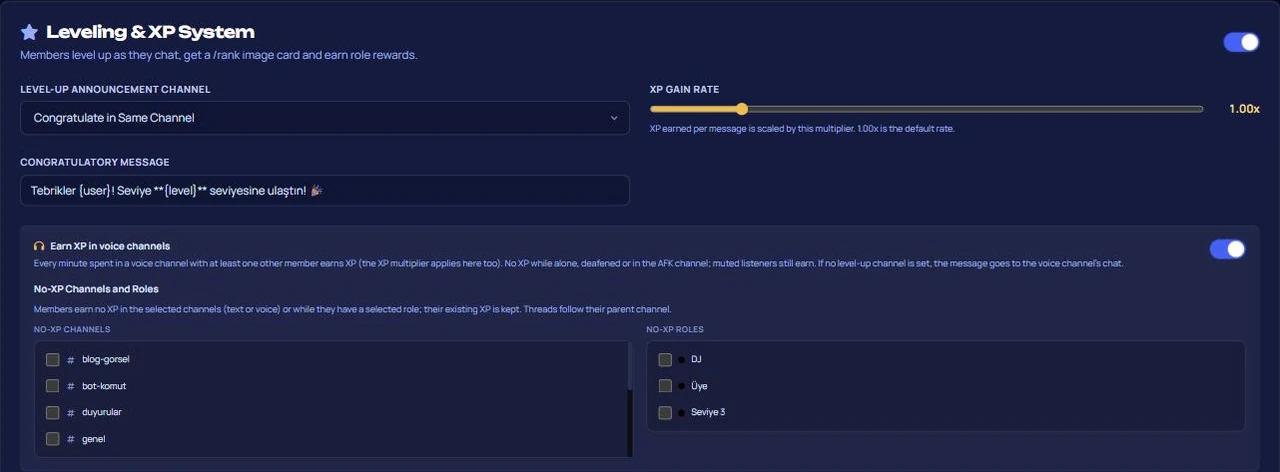
- Open the Dashboard → your server → Leveling & Leaderboard tab and turn on the Level & XP System switch.
- Select the Level Announcement Channel. With the Announce in the Same Channel option, the congratulatory message drops into the channel where the member wrote.
- Set the XP Gain Rate between 0.25x and 5x. 1.00x is the default speed.
- Write the Announcement Message.
{user}mentions the member,{level}writes the new level, and{xp}writes the total XP. The message can be up to 2000 characters; even if it contains @everyone or a role mention, no notification is sent, only the member is mentioned. - If you want, turn on the Earn XP in voice channels switch and fill in the Channels and Roles Excluded from XP list.
- In Level Role Rewards, select the level (1–999) and the role to be given, then click Add. You can define up to 50 rewards, and the same level cannot have two rewards.
- Click Save Level Settings.
How does XP accumulate?
| Message | 15–25 XP per message, at most once per minute per member. Ten messages written back-to-back count as a single message. Messages from bots and those caught by AutoMod do not grant XP. |
| Voice | 5–10 XP per minute. There must be at least one other member in the channel besides themselves; XP is not granted when alone, deafened, or in an AFK channel. Listeners with muted microphones still earn XP. |
| Multiplier | The XP Gain Rate applies to both sources. Changing the rate does not change existing XP, it only affects future earnings. |
Level thresholds are determined by total XP: 100 XP for level 1, 1,150 XP for level 5, 4,675 XP for level 10, 23,850 XP for level 20, and 268,375 XP for level 50. Every time you level up, reaching the next one takes slightly longer.
How should you choose the XP rate?
At 1.00x, a member typing a message every minute accumulates about 1,200 XP per hour; they reach level 10 with four hours of active chat. Since members don't actually type every minute in reality, the duration is longer. Make your choice based on how fast you want rewards to be distributed:
- Small or quiet server: 1.5x–2x. If the first reward doesn't arrive in the first week, the system gets forgotten.
- Medium-scale server with daily chat: Start at 1.00x, check the leaderboard after two weeks, and decide.
- Crowded and fast-paced server: 0.5x–1x. A high rate causes higher levels to lose their meaning quickly.
If you set the rate too high, multiple levels can be skipped in a single message. This is not a bug: reward roles for the skipped levels are also granted, but the announcement is written only once.
Designing reward roles
Rewards are cumulative: when a member gets the level 20 role, they keep the level 10 role on top of it. Take this into account if you use roles for colors. Do not put permissions that grant authority into reward roles. Levels are earned purely through chat and rewards are automatically assigned; permissions like message deletion or channel management would amount to unauthorized privilege distribution.

Leaderboard, card, and reset
/rankdisplays the member's visual card, their progress within their current level, and their rank. Members choose the card background image themselves by logging into the website via Discord; details are in the rank card documentation./leaderboardshows the rankings in pages of ten people, up to the top 100 members.- The Open Leaderboard Page button in the tab opens the server's web leaderboard. As an administrator, you can reset the level of a single member or the entire server on that page; each reset is recorded as an incident and falls into the moderation log channel.
- If Allow members to reset their own levels is enabled, a member can reset their own XP from the leaderboard page once every 24 hours. In this case, the roles they received as level rewards are also revoked.

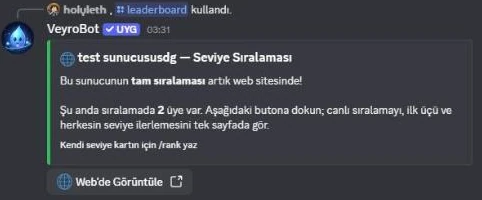
Note: Admin resets leave reward roles on the members. If you want to take back the roles as well, you need to do it manually.
If rewards are not given or the leaderboard is inflated
- Moving the bot role down afterwards. The check passed at the time of setup becomes invalid when the role order changes, and rewards are not given. The Health card in the dashboard's Overview separately displays unassignable reward roles.
- Not excluding spam and command channels. Counting games or bot command channels inflate the leaderboard. Add these channels to the Channels and Roles Excluded from XP list; subchannels inherit the setting of their parent channel.
- Directing announcements to the general chat. In a crowded server, announcements interrupt the chat; choose a separate channel.
- Counting sitting alone in voice XP. To prevent hoarding XP in empty channels, single-person voice channels do not grant XP; this is an intentional rule.
On which servers does a level system reward noise?
Suitable for: Communities with regular chat that want to make active members visible and reward long-time participants; voice-heavy gaming servers.tsx
Not suitable for: Servers with low member counts and sparse chat where the leaderboard always shows the same three people; support and announcement servers where message count rewards noise rather than quality. If you want to measure contribution differently than message count, setting up a achievement system might be a better starting point.
Frequently asked questions
Will members' levels drop if I lower the XP rate?
No. Accumulated XP and levels remain as they are; only XP earned from then on changes.
Is the XP of a member added to an XP-excluded role deleted?
No. As long as the member stays in that role, they won't earn new XP, but their existing XP is preserved.
Will data be lost if I toggle the leveling system off and on?
No. Turning it off pauses XP acquisition and level commands; when you turn it back on, the leaderboard picks up right where it left off. Turning it off also disables the option for members to reset their own levels.
What happens to a member's XP if they leave the server and return?
XP records are tied to the server and the member, and are not deleted upon leaving; when the member returns, they continue from the level they left off at. Discord removes reward roles upon leaving, and the bot assigns them only when a new level is reached.
The announcement message never shows up, what should I check?
In order: Are both switches on? Does the selected channel still exist? Can the bot send messages in that channel? Undelivered announcements appear in the Health card's live errors list.
For a general overview of the feature, check the Discord leveling system page, for a list of all settings the leveling system documentation, and for command details the rank and leaderboard command cards.
Last updated: September 17, 2026. The XP amounts, level thresholds, limits, and reset behaviors in this article have been verified against VeyroBot's current version leveling engine and panel validation.
For these topics in VeyroBot
Discord Leveling System and Rank Cards
XP from messages and voice channels, customizable rank cards, level reward roles and a public leaderboard page. Keep your community active with VeyroBot.
Discord Achievement System
Build achievements on messages, voice, invites, levels and 13 more triggers. Role and XP rewards per tier, announcements, hidden and time-limited achievements.