Is Your Discord Server Set Up Correctly? What the Server Health Score Measures
A bot might look "online," but if the log channel was deleted, its role is below other roles, or it has no filters configured, it won't do anything at all. The Server Health Score calculates these silent failures from your actual settings, shows you the reasons, and lets you fix some of them with a single click, completely undoable.
This article was translated automatically from the Turkish original. Read the Turkish original

In this article
At a glance
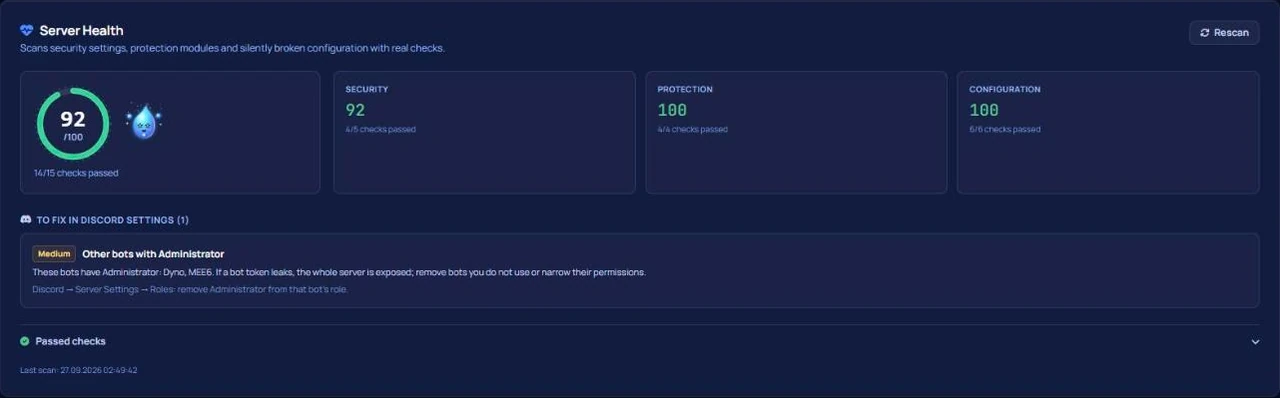
Whether a Discord server is set up correctly isn't answered by the question "is the bot online?"; it's answered by "will this bot actually work during this event?" The Server Health Score is a card located in the Overview tab of the VeyroBot dashboard, calculated directly from your server's live settings. Across three categories (security, protection, configuration), every check either passes or fails. Every failed check deducts points based on its severity and explains why. There are no guesses, AI, or rigid checklists; the specific checks performed depend entirely on which modules you have enabled.
What is a silent failure?
Most setup errors don't trigger error messages; they just silently do nothing. Three real-world examples:
- The log channel was deleted. Moderation logs were tied to a specific channel, but that channel was deleted during a cleanup. The module appears enabled, but ban and mute actions are written nowhere.
- The bot role is positioned too low. Auto-role is configured, but VeyroBot's role is below that role in the Role list; Discord blocks the action, and new members are left without a role.
- Module is on, but no rules are set. AutoMod is active, but no filters are checked; the module effectively monitors zero messages.
The common thread in all three scenarios is that a human looking at the dashboard sees "everything is enabled." The score's job is precisely to close this gap.
This topic in VeyroBot:Discord Server Health Check →
Three categories, what gets checked
| Category | Example Checks | When Evaluated |
|---|---|---|
| Security | Dangerous permissions on the @everyone role; verification level; 2FA requirement for moderation; explicit content filter; bots with Administrator permissions other than VeyroBot | On every server; these are native Discord settings. |
| Protection | Is AutoMod running with at least one filter; is the moderation log bound to a channel; is the Anti-Raid shield active | On every server; if the module is disabled, it counts as a "fail" because protection is absent. |
| Configuration | Settings bound to a deleted channel; channels the bot cannot write to; unassignable auto-roles and reward roles; whether the captcha gate actually works; "Manage Server" permission for invite tracking | Only when the relevant module is active and a channel/role is selected; therefore, the total number of checks varies from server to server. |
How is the score calculated?
Every check has a severity level: critical, high, medium, or low. A failed check deducts 25, 15, 8, or 3 points depending on its severity; the final score is calculated by subtracting the sum of these penalties from 100 and will never drop below zero. The three categories are evaluated individually, and the overall score combines them all. Checks with an "unknown" result (for example, if the bot couldn't calculate permissions for that channel) are not scored; it was preferred to omit them rather than generate false positives. Informational rows (such as VeyroBot running with its own Administrator permission) do not deduct points.
If a protection feature is disabled on this server due to your plan tier, the check is still evaluated and displayed with a "Premium required" badge; the score reflects that the protection is not actually running. Plan details can be found on the premium page.
One-click fixes and undoing
Select checks can be resolved with a single click. The verification level can be bumped to "Medium"; accounts must be registered for 5 minutes and have a verified email to write messages. The explicit content filter is enabled for all members. Dangerous permissions are removed from the @everyone role without touching other permissions. Every applied fix appears in the "Fixes applied in the last 24 hours" list at the bottom of the card and can be undone within 24 hours; if the setting was manually modified in the meantime, the undo action is rejected with an explanation. Fixes are applied using the actual Discord permissions of the user clicking the button: someone with dashboard access who lacks "Manage Server" permissions cannot use this button.
For other checks, the card guides you directly to the correct tab: the Logs tab for a deleted log channel, the Autorole tab for an unassignable auto-role. For actions that must be performed on Discord's side—such as role hierarchy—instructions on what to do are provided, but the action cannot be executed for you.
How to use the score
- In the first minute of setup. Add the bot and check the Overview; things like role hierarchy and @everyone permissions will show up here before you even configure any modules.
- After every major change. Channel cleanups, role reorganizations, and adding new bots are the most common sources of silent failures.
- Without chasing a perfect 100. The score isn't a race; the reason for every failed check is clearly written, and some might be deliberate choices (Anti-Raid can stay disabled on a closed server that only accepts members via invite links).
When does the score tell you little?
For you if:
- You use multiple modules and want to see at a glance which ones are actually working.
- Your moderation team changes frequently, making it hard to keep track of who changed settings and when.
Not for you if:
- You only use a bot for a single narrow task (like music); there isn't much to measure there.
- You treat the score as a "security certificate"; the card measures your Discord settings and VeyroBot modules, but cannot predict the behavior of other bots or the intentions of members.
Frequently asked questions
How many checks are there?
It's not fixed. Security and protection checks run on every server; configuration checks are only generated for active modules and selected channels/roles. The "passed / total" count visible at the top of the card is tailored specifically to your server.
If my score is 100, is my server completely secure?
For the measured checks, yes. The card measures native Discord settings and whether VeyroBot modules are functioning correctly; it does not guarantee things it cannot measure (other bots, moderator decisions).
Why is undoing a fix limited to 24 hours?
Undoing a fix reverts the setting back to its state prior to the fix. If too much time has passed, we cannot know whether that old state is still correct; therefore, the window is kept short, and if a manual change was made in the interim, the undo is rejected.
How often is the score updated?
It is recalculated in real-time from your live settings every time the Overview tab is opened; no scores are permanently stored.
Do competitor bots have something similar?
While comparing options, we haven't seen a similar checking mechanism on competitor pages; we aren't claiming it doesn't exist anywhere, so please verify through their respective pages. Source-backed comparisons are available on our triple comparison page.
Last updated: September 14, 2026. The described behaviors apply to the version of VeyroBot current as of that date. For raid protection, check out the anti-raid setup guide.
For these topics in VeyroBot
Discord Server Health Check
VeyroBot scans your server's security settings, protection modules and silently broken configuration with real checks and scores it from 0 to 100.
Discord Anti-Nuke Bot
If staff delete many channels or roles fast, VeyroBot removes their dangerous roles and alerts you with evidence; you rebuild deleted items in the dashboard.
Discord AutoMod and Automatic Moderation
Profanity, spam, advertising and mass-mention filters; tiered punishments and one shared case history. Protect your server automatically with VeyroBot.