Dyno Alternative: Streamlining Moderation Setup in a Single Panel (2026)
For those considering switching from Dyno: a summary of Dyno's pricing structure taken directly from their page, how moderation tasks map onto VeyroBot, exactly what AutoMod does during an infraction, and who it is not suitable for.
This article was translated automatically from the Turkish original. Read the Turkish original
In this article
Quick answer
If you are looking for a Dyno alternative, the first question is where your moderation will be moved to, as that is Dyno's primary use case. In VeyroBot, this is set up in a single panel: AutoMod (ten filters, separate actions per filter), progressive punishments tied to the warning counter, a moderation log channel, and moderation commands. On top of that, the Server Health Score highlights any missing parts of your setup. For a server where Dyno has been running smoothly for years without needing any other modules, the justification for switching is weak — we state this clearly.
This topic in VeyroBot:Discord AutoMod and Automatic Moderation →
Dyno's plan structure (from its own page)
As of September 12, 2026, three plans appear on Dyno's premium page: monthly at $4.99, $6.99, and $11.99; yearly at $49.99, $49.99, and $89.99 (the yearly amounts for the first two plans were listed the same on the page). The scope phrasing is "Standard Premium for one server of your choice." No statement regarding whether a subscription can be transferred to another server or their refund policy was seen on the page; we do not write that something "does not exist" if we haven't seen it. The full table and quotes are on the Dyno and VeyroBot comparison page.
Moderation tasks: What you do in Dyno → Where it is in VeyroBot
| Task | VeyroBot equivalent | Where in the panel |
|---|---|---|
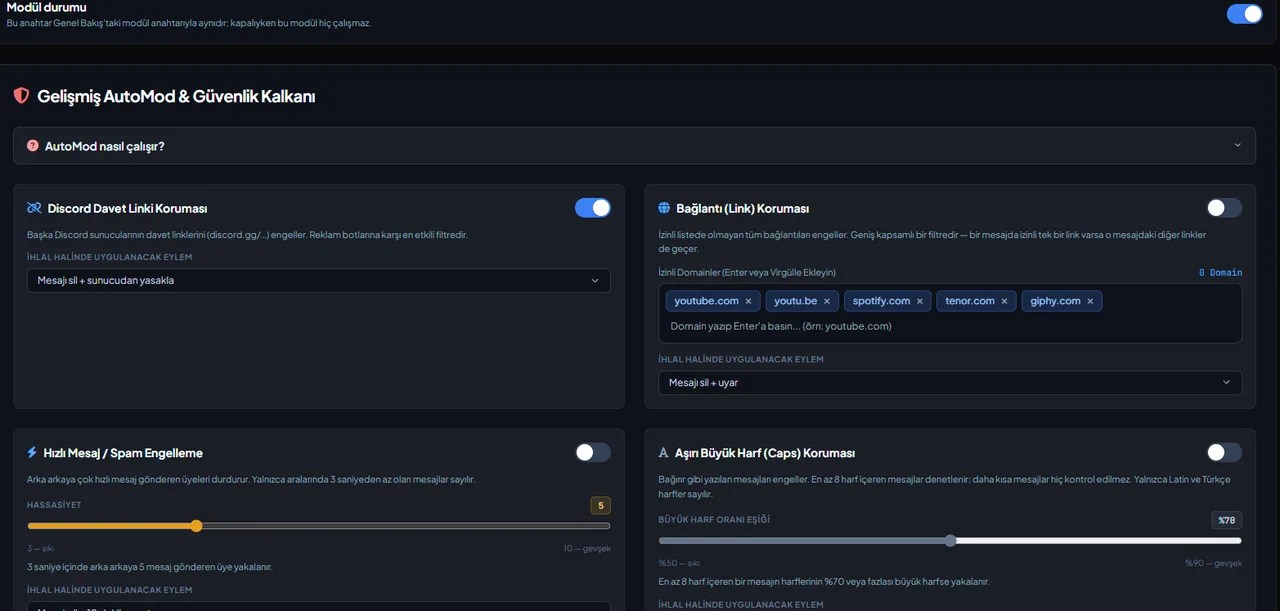
| Auto-moderation | AutoMod: 10 filters, separate action for each filter (lightest is deleting the message and warning) | AutoMod |
| Warning and punishment tiers | Warning counter; default is a 1-hour mute on 3 warnings, kick from the server on 5 warnings — thresholds and actions are adjustable | AutoMod → Progressive Punishment System |
| Log | Moderation log channel; case record and decision log for every infraction | Log |
| Manual moderation commands | Warn, mute, kick, ban, and moderation history | Commands → Moderation |
| Staff roles | Permission for roles without Discord permissions to use bot commands (when disabled, permissions revert strictly to Discord) | Server Settings |
| Welcome and auto-role | Welcome message and automatic role assignment on join | Welcome · Auto-Role |
| Support channel | Ticket system: staff role, category, and log channel | Ticket |
What happens exactly during an infraction?
When an AutoMod filter is triggered, it performs the following steps in order:
- The message is deleted.
- A warning that disappears after five seconds is sent to the channel.
- A moderation case is opened.
- The user's warning counter increases by one.
- An entry is logged in the moderation log channel.
- The action you selected for the filter is applied.
This chain is fixed; what changes are the actions and warning thresholds you assign to the filter. The lightest possible action for a triggered filter is deleting the message and warning the user; it cannot be left without an action. If you want a human to issue the punishment, leave the punishment tier action as "None / Warning Only": warnings are counted and logged, but no additional punishment is applied automatically.
Where Dyno is strong
Dyno has long been a moderation-focused bot, and if it works well with your established server setup, that has inherent value. Changing a bot solely for price means retraining your moderator team's habits; make sure to factor in this cost.
What is different in VeyroBot?
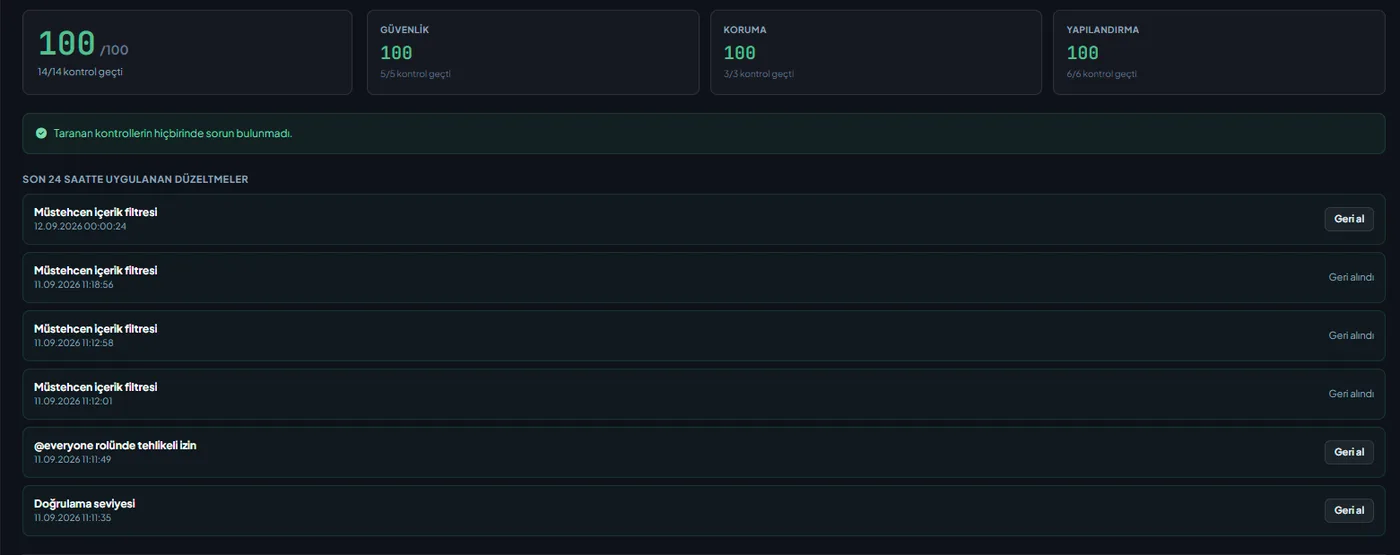
Moderation, music, leveling, ticketing, stream notifications, and the AI assistant all reside within the same bot and the same panel; there is no need to stack separate bots. The Server Health Score at the top of the panel detects silent misconfigurations such as "AutoMod is enabled but no filters have actions assigned" or "the log channel has been deleted," fixes most of them with a single click, and allows you to undo them. The panel operates in seven languages. A premium license is assigned to a server and can be transferred from the panel to another of your servers; plan details are available on the premium page.
Migration steps
- Add VeyroBot; do not remove Dyno. Keep both bots side by side for a week, and temporarily turn off Dyno's auto-moderation so the same message doesn't get punished twice.
- Check the bot role hierarchy. The bot role must be positioned above the roles it will moderate; the Health Score displays this as the first item.
- Set up the log channel, then the AutoMod filters. Set up logs first, then filters: leaving the action as "warning only" during the first few days and monitoring the logs will help reveal false positives early.
- Adjust punishment tiers to fit your community. Default thresholds (3 → 1-hour mute, 5 → kick) may be too harsh for small communities or too lenient for large gaming servers.
- Grant permissions to the moderator team and remove Dyno. Define staff roles in Server Settings, make sure the team has tested the commands, and then remove Dyno.
Who it is for, and who it is not for
Suitable for:
- Servers running separate bots for leveling, ticketing, notifications, or music alongside moderation, and looking to consolidate them into a single panel.
- Those who want a control mechanism to measure setup accuracy.
- Moderator teams operating in different languages.
Not suitable for:
- Servers that use moderation exclusively and have had their Dyno setup running smoothly for years.
- Communities that want every decision to be made strictly by a human, leaving no room for automation — AutoMod can be used in log-only mode, but its primary value lies in automation.
Frequently Asked Questions
Will warning history from Dyno transfer to VeyroBot?
No. Moderation history starts fresh; you can export old cases from Dyno and keep them in your own archive.
How many filters does AutoMod come with, and can I assign a different action to each?
There are ten filters (invites, links, spam, caps, mass mention, banned words, regex pattern, repetitive message, emoji, and line spam) and a separate action can be assigned to each; even with the lightest action of "delete + warn," the rest of the chain (case, warning counter, logs) remains active.
Can moderators use bot commands if they do not have Discord permissions?
Yes, you can grant this permission to selected roles via Server Settings; when you turn the setting off, permission checks revert strictly to Discord permissions.
What is Dyno's refund or server transfer policy?
We did not see any statements regarding these two topics on Dyno's page; therefore, we neither claim they "exist" nor "do not exist." Check Dyno's official page for up-to-date information.
How can I see missing parts of the setup?
The Health Score in Overview reads your actual settings: it highlights issues such as enabled modules without rules, deleted log channels, or incorrect role hierarchy, fixes most of them with a single click, and the fixes can be undone.
Last updated: September 29, 2026. Dyno plan details were obtained from Dyno's own premium page on that date and are subject to change.
For these topics in VeyroBot
Discord AutoMod and Automatic Moderation
Profanity, spam, advertising and mass-mention filters; tiered punishments and one shared case history. Protect your server automatically with VeyroBot.
Discord Support Ticket System
Support tickets opened with a button, a staff role, private channels under a category and ticket logs. Set it up with VeyroBot in a few minutes.