2026 Guide for Those Looking for a MEE6 Alternative: Which Module Does What?
If you are thinking of switching from MEE6, first clarify this: what tasks are you migrating? This guide maps MEE6’s plugin list to VeyroBot modules, outlines the migration steps, and clearly states who it is not suitable for.
This article was translated automatically from the Turkish original. Read the Turkish original
In this article
Quick verdict
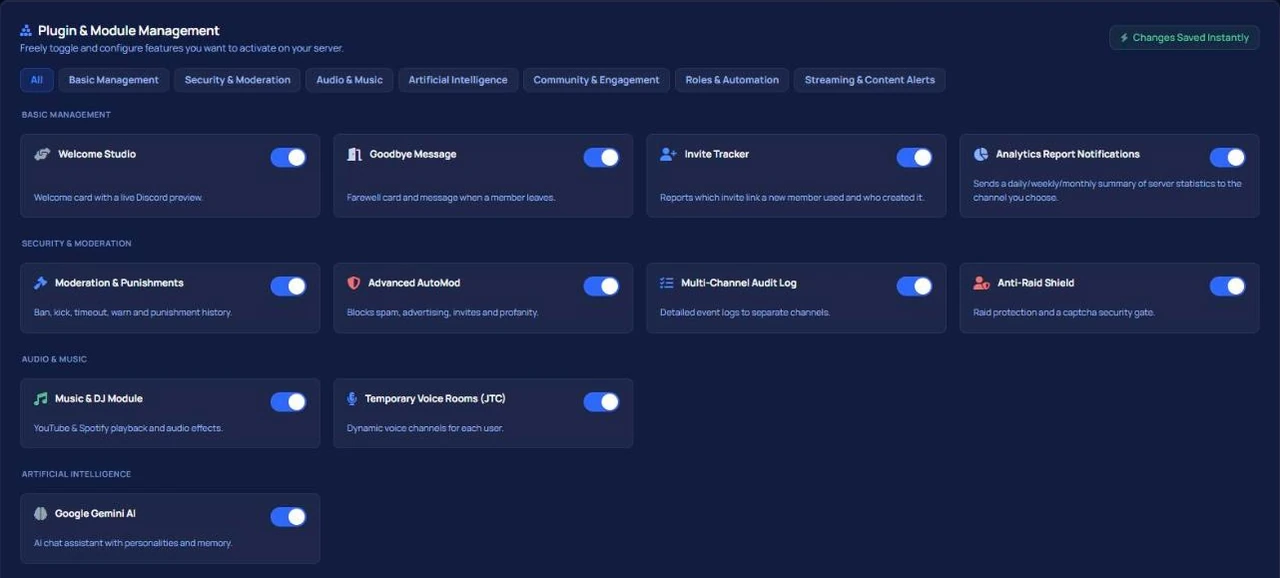
For a server looking for a MEE6 alternative, the real question isn't "which bot is better," but rather "which features was I using in MEE6 and where should I move them." VeyroBot offers a corresponding module for each of the six plugin categories listed on MEE6’s own page (moderation, utilities, social alerts, games & fun, bot personalizer, artificial intelligence) under a single dashboard. The only exception is level data: XP accumulated in MEE6 cannot be transferred, and the leveling system starts fresh.
Why are people switching from MEE6?
This article isn't written to bash MEE6; MEE6 is a long-standing bot with a rich set of plugins. The desire to switch usually comes down to two concrete reasons, both of which are written on MEE6’s own premium page (as of September 12, 2026):
- A subscription is for a single server. In MEE6’s own words: “A subscription is valid for a single Discord server. If you wish to get premium for multiple servers, you need a subscription for each server.” If you manage two servers, you need two subscriptions.
- List price. The monthly list price on the page appears as $11.99, and the annual list price as $143.88; the same page also features a limited-time discount campaign. We couldn't verify whether this campaign is shown to everyone, so we base our comparisons on the list price.
All figures, quotes, and their VeyroBot counterparts are listed in a single table on the MEE6 vs VeyroBot comparison page; instead of repeating prices, this article focuses on migrating the work.
This topic in VeyroBot:Discord AutoMod and Automatic Moderation →
Feature mapping table: MEE6 category → VeyroBot module
The left column shows the category names from MEE6’s premium page; the right column shows the corresponding tab in the VeyroBot dashboard.
| MEE6 category | VeyroBot counterpart | Where in the dashboard |
|---|---|---|
| Moderation & Server Management | AutoMod (10 filters, separate actions per filter), moderation commands, warning counter and tiered punishments, moderation log channel, welcome and auto-role | AutoMod · Moderation · Log · Welcome · Auto Role |
| Utilities | Scheduled messages, reminders, birthday celebrations, invite tracker, server analytics and report notifications, join-to-create voice channels | Scheduled Message · Reminder · Birthday · Invite Tracker · Analytics · JTC |
| Social Alerts | Kick, Twitch, and YouTube stream notifications; separate announcement text and tag role per streamer | Kick · Twitch · YouTube notification tabs |
| Games & Fun | Level/XP system and role rewards, /rank card, giveaways, music (button-controlled panel, DJ role) | Levels · Giveaways · Music |
| Bot Personalizer | Server-specific avatar, banner, and display name for the bot | Bot Profile |
| MEE6 AI | AI assistant: server-specific personality, response length limit, restriction to a single channel if desired, custom system prompt | AI Studio |
This table intentionally omits which MEE6 features are paid: this information varies depending on MEE6's plans, and we only state what we can verify from their own pages. For plan differences on VeyroBot, check the premium page.
What makes VeyroBot different?
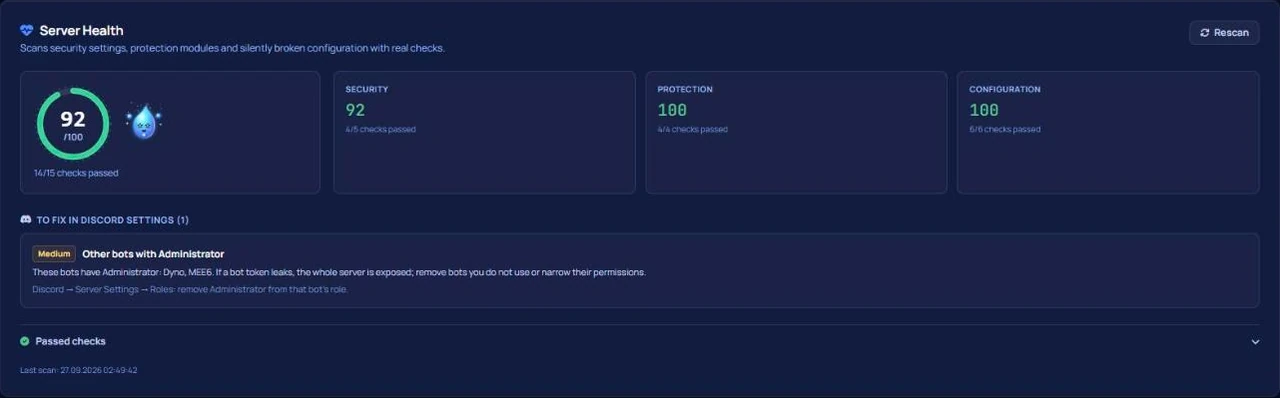
The module list might look similar; the difference lies in the layer that measures whether the setup is correct. The Server Health Score at the top of the dashboard finds silent errors: a module is enabled but no rule is defined, the log channel has been deleted, or the bot role is positioned below other roles. It fixes most of these with a single click and allows you to undo the fix. The score is calculated from your actual settings, not a static checklist. The dashboard and site operate in seven languages; if your team includes a moderator who doesn't speak Turkish, they will see the same dashboard in their own language.
Migration steps
- Add VeyroBot, don't remove MEE6 yet. Run both bots side by side for a week; temporarily disable the MEE6 plugin handling the same task to avoid duplicate replies.
- Check the Health Score in the Overview tab. Issues like bot role hierarchy and missing log channels will show up here from minute one; apply the one-click fixes.
- Set up AutoMod and the log channel. When a violation occurs in sequence: the message is deleted, a short warning appears in the channel, a moderation case is opened, the warning counter increments, a record is logged to the log channel, and your chosen action is applied. Adjust warning thresholds (default: 1-hour mute on 3 warnings, kick on 5 warnings) to fit your community.
- Plan the leveling system from scratch. XP cannot be migrated. Redefine role rewards and announce to members in advance that levels are resetting; on large servers, this step is the most delicate part of the transition.
- Migrate notifications and utilities. Enter your streamer list into the Kick/Twitch/YouTube tabs, and recurring announcements into the Scheduled Message tab. Once everything is running smoothly, remove MEE6.
Which servers should stay on MEE6?
Suitable for:
- Servers using multiple plugins in MEE6 and wanting to consolidate them into a single dashboard.
- Those managing multiple servers who want to transfer their premium license between their own servers when needed.
- Communities whose moderation teams operate in different languages.
Not suitable for:
- Servers that only use the leveling system in MEE6 and have years of accumulated XP data — there is no way to transfer that data.
- Those looking for a bot for a single narrow task (reaction roles only, music only) — a lean bot dedicated solely to that task might be simpler.
Frequently Asked Questions
Can I transfer MEE6 level and XP data to VeyroBot?
No. There is no import feature; the leveling system starts from scratch. You can reconfigure role rewards, but members' past XP will not carry over.
Will running both bots at the same time cause issues?
If both bots perform the same task, you will get duplicate replies and punishments. During the transition period, disable the plugin you are migrating in MEE6 and enable it in VeyroBot; remove MEE6 after a week.
Is the VeyroBot premium license tied to a single server?
The license is assigned to one server and can be transferred from the dashboard to another server you own. Check the premium page for details and pricing.
Does it make sense to switch while MEE6 has a limited-time discount?
Campaign pricing is temporary, but the scope rule (single server) is permanent. When making your decision, calculate the list price and how many servers you manage together; the table on the comparison page is dated and sourced.
How do I know if the setup is correct?
The Health Score in the Overview reads your actual settings; if there is a missing log channel, an enabled module without rules, or an incorrect role hierarchy, it shows them along with the reason and fixes most with a single click.
Last updated: September 12, 2026. Pricing and scope information regarding MEE6 was taken from MEE6’s own premium page on that date and may have changed.
For these topics in VeyroBot
Discord AutoMod and Automatic Moderation
Profanity, spam, advertising and mass-mention filters; tiered punishments and one shared case history. Protect your server automatically with VeyroBot.
Discord Leveling System and Rank Cards
XP from messages and voice channels, customizable rank cards, level reward roles and a public leaderboard page. Keep your community active with VeyroBot.
Discord AI Bot
Google Gemini-powered chat, a server-specific persona and system prompt, and multi-turn memory. Add AI to your Discord server with VeyroBot.