How to Set Up Discord Reaction Roles? Complete Guide Including Timed Roles
Dropdown menu or button panel? Which one is right for your role set, how to set a duration on a menu, and how the role is removed when the time expires? Command and panel setup, the hierarchy trap, and three common mistakes.
This article was translated automatically from the Turkish original. Read the Turkish original
In this article
In short
Reaction roles allow members to choose their own roles using a menu or button on a message. In VeyroBot, there are two formats: dropdown menus and button panels. Both can be set up using the /reactionrole command or from the Reaction Roles section of the dashboard.
You can also assign a duration to a menu: when the time expires, the bot automatically removes the role. You no longer need to manually track event roles, contest participations, or temporary access.
Two conditions for the role to be given
If these two conditions are not met, the menu will be created and the message will appear, but no roles will be given. Most user complaints stem from this.
- The Autorole module must be enabled. The role-granting behavior of menus and buttons depends on this module; if it is disabled, menus will not respond to clicks.
- The bot's role must be higher than the roles it will distribute. Discord does not allow a bot to assign a role that is positioned above its own highest role. Roles that are not higher are not silently skipped; they appear by name in the "failed to assign" list in the response returned to the member. The bot also needs the Manage Roles permission.
If you are unsure how role order works, check out the Discord role and permission system guide first; the hierarchy rule explained there applies here identically.
This topic in VeyroBot:Discord Reaction Roles (Role Menu) →
Dropdown menu or button panel?
Both behave differently, and this difference determines the right choice for your role set.
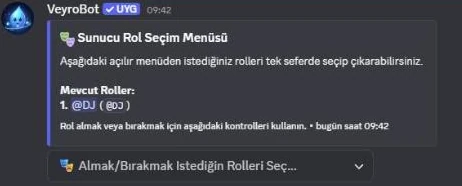
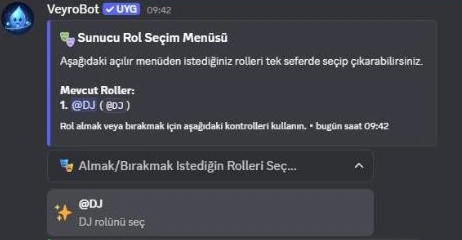
| Dropdown menu | Members can select multiple options. The menu acts like a full list: roles that are left unchecked are removed. This is best for co-managed sets such as colors, games, or interest roles. |
| Button panel | Each button toggles only its own role on or off; it does not affect other roles. This is best for individually claimed roles such as rules acceptance or notification roles. |
| Shared limit | A menu can contain a maximum of 25 roles. This is a Discord limitation: a dropdown menu takes 25 options, and a button panel takes 5 rows × 5 buttons. |
Setup via command
You must have the Manage Roles permission to use the command.
/reactionrole type:<dropdown | buttons> title:<menu title> role1:@Role [rol2 … role5] [description] [duration]
- type — chooses whether it will be a menu or buttons.
- title — the title displayed above the message; mandatory.
- role1 … role5 — the command accepts up to five roles at once. Longer lists can be set up via the dashboard.
- description — the description line falling right below the title.
- duration — how long the assigned role will stay. If left blank, the role is permanent.
Setup via dashboard
The dashboard removes the command's limitations and allows you to visually customize the menu:
- Selection of up to 25 roles in a single menu.
- Titles can be up to 256 characters and descriptions up to 1000 characters.
- Allows you to choose the embed color of the menu message and the channel it will be sent to.
- Duration is assigned from the same options list as the command.
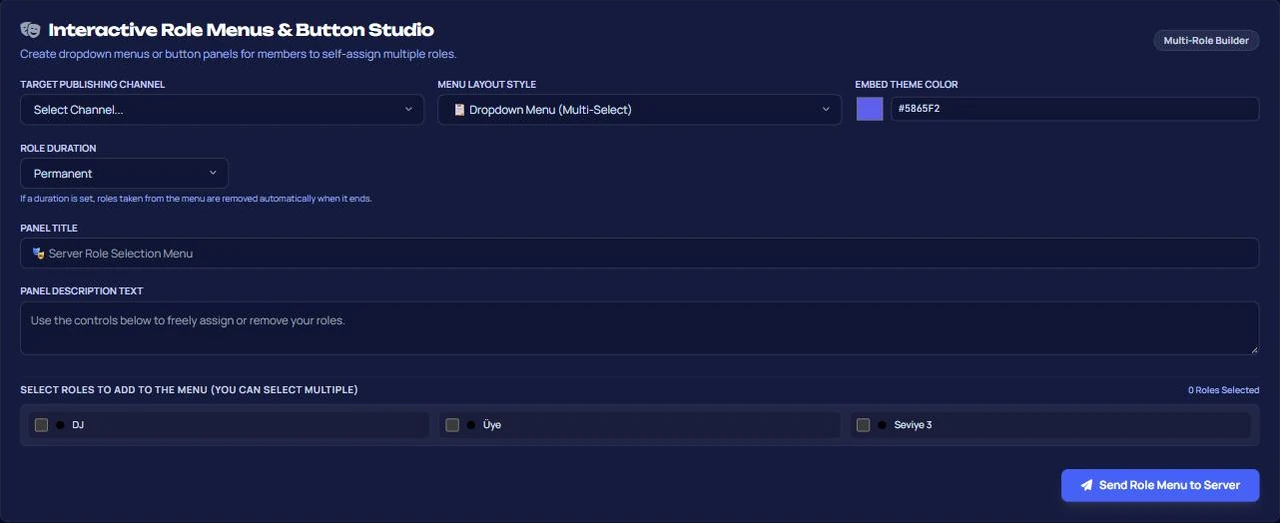
The menu message is sent to your selected channel by the bot. If you delete the message, that menu will stop working; you will need to set up a new menu.
Timed roles: automatic role revocation
Duration options are fixed: permanent, 10 minutes, 1 hour, 6 hours, 1 day, 3 days, 7 days, 30 days. The duration is defined at the menu level — every role taken from that menu is assigned with the same duration.
The mechanism is not just a "set a reminder and forget it"; records are kept in the database:
- The expiration time is saved the moment a member receives the role. The duration is not lost even if the bot restarts.
- Records whose duration has expired are scanned at one-minute intervals, and the roles are revoked.
- If a member drops the role themselves, the timer is deleted; if they take the role again, the duration starts from scratch.
- Even if the menu is deleted later, roles given from that menu are revoked when their respective durations expire.
- If the role has been deleted, the member has left the server, or the member no longer has the role, the record is cleared.
- If the bot cannot revoke the role (due to a permission or hierarchy issue), it retries on every cycle; if it fails for 24 hours, it drops the record. This is why the hierarchy rule in the prerequisites is even more crucial for timed roles.
You can check which plans include timed menus on the plan comparison table.
Mistakes with the channel, multiple selection and staff roles
- Setting up the menu in the wrong channel. If you send the menu message to a channel visible only to staff, members won't be able to get roles. The menu must be in a channel that everyone can read.
- Assuming a dropdown menu is single-choice only. When a member selects a second role, the first one stays; however, when they uncheck an option from the menu, that role is removed. If roles must be mutually exclusive, your role design—not the menu—should ensure this.
- Putting staff roles in the menu. Every role you add to the menu is a role that anyone who can see that channel can obtain. Roles carrying moderator, voice channel management, or message deletion permissions should never be put in a menu.
Should members pick the role, or should staff give it?
Suitable for: communities where members choose their own notification, game, color, or interest roles; servers distributing temporary roles during events and contests; setups granting access after rules acceptance.
Not suitable for: situations where a human needs to decide who gets a role (staff recruitment, verified member status) and servers where roles depend on an application/approval process. In those cases, a staff member—not a menu—grants the role.
Frequently asked questions
If a member takes a role from the menu and immediately drops it, does the timer run?
No. The timer is deleted the moment they drop the role. If they take the role again, the duration starts from zero.
Can I make only one of the roles in a menu timed?
No. The duration is menu-wide. Create separate menus for different durations.
Can I edit the menu message?
The title, description, and roles of the menu are determined during setup. To make changes, you need to set up a new menu and delete the old one.
What happens to roles that expire while the bot is offline?
Since records wait in the database, they are revoked on the first cycle when the bot comes back online; the duration is not lost.
I want members to choose from more than 25 roles. Split the roles by topic and create multiple menus; the limit is per menu.
Last updated: September 15, 2026. The limits and behaviors in this article have been verified against the reaction role and timed role engine in the current version of VeyroBot.