How to Set Up an Automatic Voice Channel (JTC) on Discord
A private room is instantly created for any member who joins the generator channel, and deleted once empty. Setup steps, control panel buttons, and three common mistakes.
This article was translated automatically from the Turkish original. Read the Turkish original

In this article
In short
Temporary voice rooms (Join to Create) instantly open a private room for any member who joins a "generator" voice channel; the bot automatically deletes the room once it becomes empty. Setup is done via the panel with three simple selections: the generator channel, the category where rooms will be created, and the default user limit.
The room owner manages their room using the control panel sent by the bot — no extra Discord permissions are granted; the bot executes actions on their behalf.
How it works
The moment a member joins the generator channel, the bot creates a new voice channel, moves the member there, and makes them the owner of that room. The room name is generated from a template based on the bot's server language (such as "🔊 Member's Room"); the owner can change this if they wish using the Rename button on the panel. When the last person leaves the room, it is automatically deleted, preventing empty channels from cluttering the server.
This topic in VeyroBot:Discord Temporary Voice Channels (Join to Create) →
Setup steps
- Open the panel. Panel → your server → Temporary Voice Rooms.
- Select the generator channel. This is the voice channel members will join to create a room. Give it a clear name, like "➕ Create Room".
- Select a category. New rooms will be created under this category; if you don't select one, your channel list layout might get messy.
- Set the default user limit. 0 means unlimited; the owner can change this later for their own room.
- Keep the control panel enabled. The buttons sent to the owner when a room is created can be disabled here; if you disable them, the owner won't be able to manage their room.
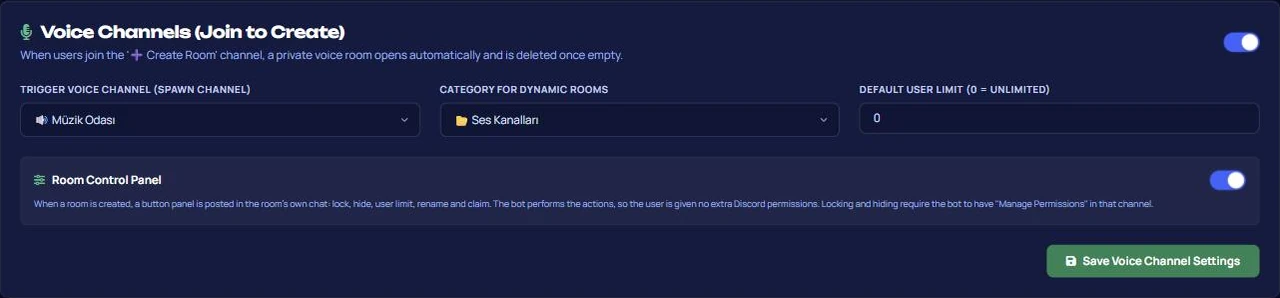
Room control panel
| Button | What it does |
|---|---|
| Lock / Unlock | Prevents new users from joining the room; those already inside are unaffected. |
| Hide / Show | Makes the room visible in the channel list only to those inside. |
| User Limit | Sets a limit between 0 and 99; 0 is unlimited. |
| Rename | Changes the room name (up to 100 characters). |
| Claim | If the owner has left the room, claims ownership after a short wait. |

Only the room owner can use the panel, and they must be in the room to do so. Ownership cannot be claimed if the owner is still in the room.
If rooms do not open or end up scattered
1. Leaving the generator channel without a category. New rooms will appear at the very top of the channel list, making the server look cluttered.
2. Disabling the control panel and expecting no complaints from owners. When the panel is disabled, members cannot lock their rooms or set limits, meaning every request will go to the moderators.
3. Forgetting the bot's channel creation permission. If the bot cannot create channels in your selected category, members will join the generator channel and nothing will happen.
Does a small server need temporary rooms?
Suitable for: Communities with fluctuating voice channel needs, gaming servers, and crowded servers where members constantly ask staff to create channels for their groups.
Not suitable for: Small servers where a single permanent, public chat room is enough. Temporary rooms do not replace permanent channels; they are deleted once empty.
Frequently asked questions
Can I set a server-wide room name template?
No. The room name is generated from a template based on the bot's server language; there is no custom server-wide naming template setting. Once the room is created, the owner can change its name.
When is a room deleted?
When the last real member leaves. Bots staying in the room do not count as keeping it active.
What happens if the owner leaves the room?
The room remains active. Anyone left inside can claim ownership after a short wait using the Claim button; if the original creator returns, they can reclaim ownership.
How many rooms can be created?
There is no specific limit; the only limit is Discord's channel limit. Since rooms are deleted as they become empty, they won't pile up in practice.
Is a locked room a hidden room?
No. Locking prevents new users from joining, but the room remains visible in the list. If you don't want it to be visible, use the Hide button as well.
Last updated: September 15, 2026. Setting names are the current names in the VeyroBot panel. For role and permission setup, refer to the role and permission system reference, and to troubleshoot why the bot cannot perform an action, see the permission errors guide.